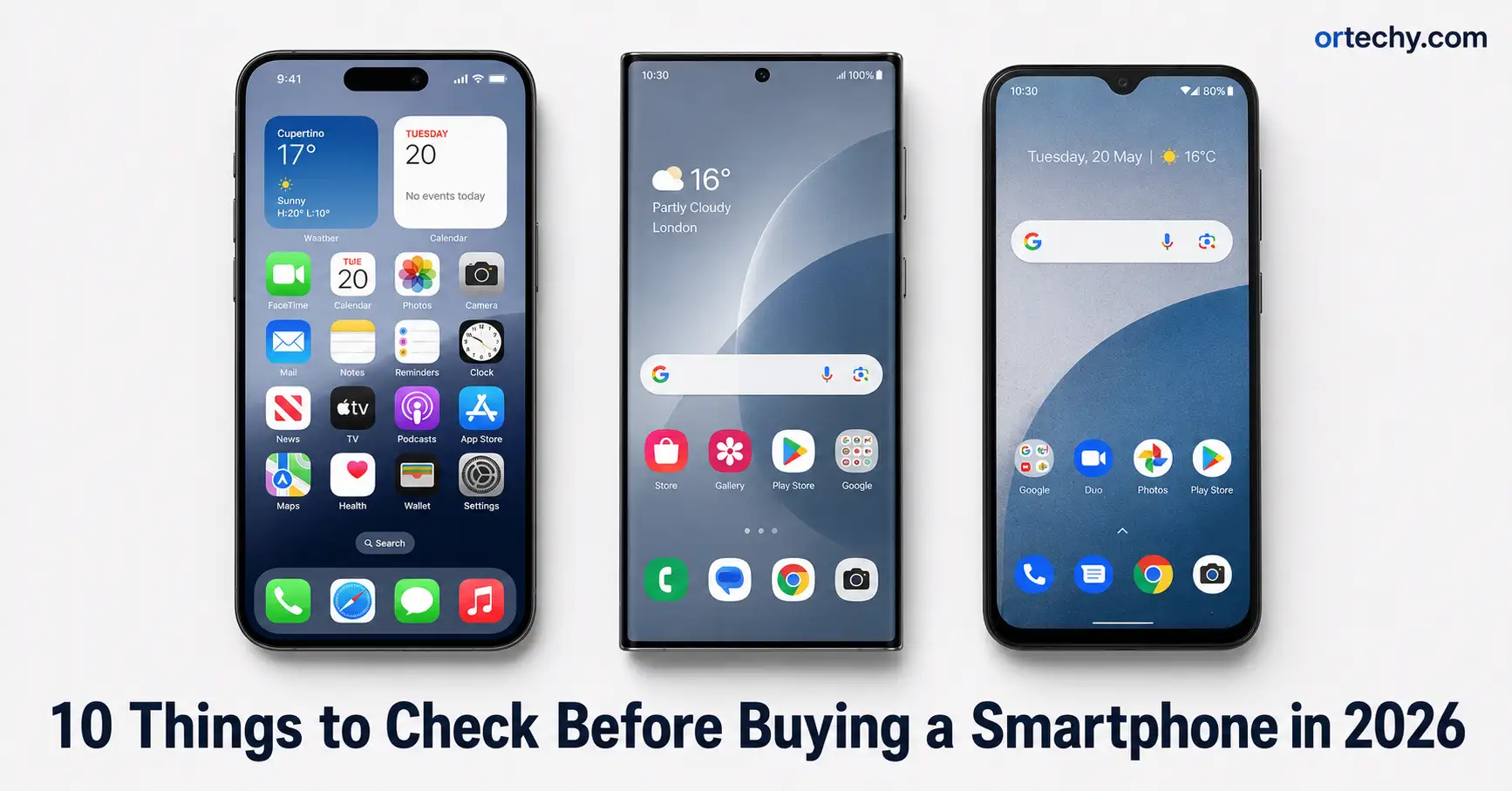
10 Things to Check Before Buying a New Smartphone in 2026
Buying a new smartphone in 2026 is harder than it looks. The market is flooded with options across every price range, and manufacturers are now competing on AI features, battery technology, software longevity, and camera sensors all at once. One wrong decision can leave you locked into a device that underperforms, lacks updates, or simply does not work on your carrier.
The good news is that a simple pre-purchase checklist can save you from most of these mistakes. Whether you are eyeing a flagship or a mid-range device, knowing what to evaluate before you spend your money makes a real difference. This guide walks you through the ten most important things to check before buying a new smartphone this year.
These checks apply whether you are buying new, refurbished, or switching ecosystems entirely. Work through each one before you commit, and you will make a much smarter buying decision.
1. Check Software Update Support Before Buying a New Smartphone
Software support is now one of the most important factors in choosing a smartphone. A phone that stops receiving updates becomes a security risk, loses access to new features, and drops in resale value faster than any hardware flaw.
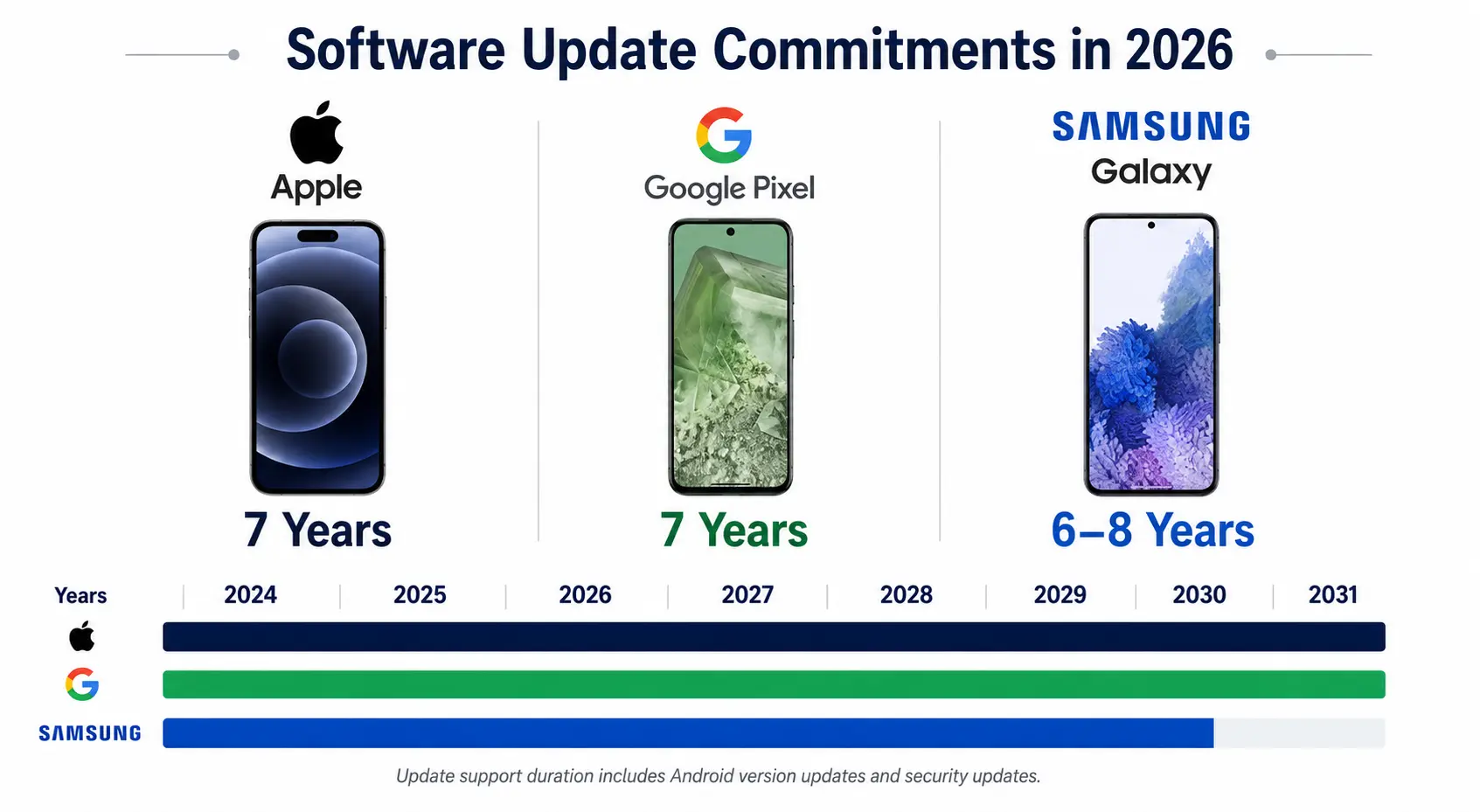
In 2026, the best phones offer seven years of operating system and security updates. Google Pixel devices starting from the Pixel 8 series and Samsung Galaxy S24 and later models both promise seven years of guaranteed updates, as confirmed by Android Authority’s full update policy breakdown. Apple does not publish an official support window, but iPhones consistently receive six to eight years of iOS updates in practice.
Before you buy, look up the exact model on the manufacturer’s website and confirm the update commitment in writing. Budget phones often offer only two or three years of security patches. That matters if you plan to keep your phone for more than two years.
What to Look For in Update Policies
- Seven years of OS updates is the current gold standard for Android flagships
- Security patches matter just as much as major OS upgrades
- Mid-range phones should offer at least four to five years of support in 2026
- Check the policy for your exact model number, not just the brand
2. Verify Carrier Compatibility and 5G Band Support
Carrier compatibility is the check most buyers skip, and it is the one that causes the most regret. A phone that does not support your carrier’s specific 5G bands will deliver slower speeds and weaker coverage, even if it is technically “5G capable.”
Not all 5G phones support all 5G bands. In the United States, T-Mobile uses band n71 for wide coverage and n41 for mid-band speeds. Verizon relies heavily on C-Band (n77). AT&T runs on several overlapping bands. Budget and mid-range phones often exclude key bands to cut costs, and you will only discover this after purchase.
To verify compatibility, find the full model number of the phone you want, then check the manufacturer’s specifications page or your carrier’s compatibility checker. Do not rely on retailer filters alone, as these are often outdated. Also confirm whether the phone uses a physical SIM, an eSIM, or both. More phones in 2026 are moving to eSIM-only designs, and not every carrier activates eSIMs equally smoothly.
How to Check Band Compatibility Quickly
- Use your carrier’s official compatibility page with the exact model number
- Search the FCC ID database at fccid.io if you need the full band list
- For eSIM-only phones, confirm your carrier supports eSIM activation in your region
- Travelers should check for global band support to avoid dead zones abroad
3. Evaluate Battery Capacity and Charging Speed
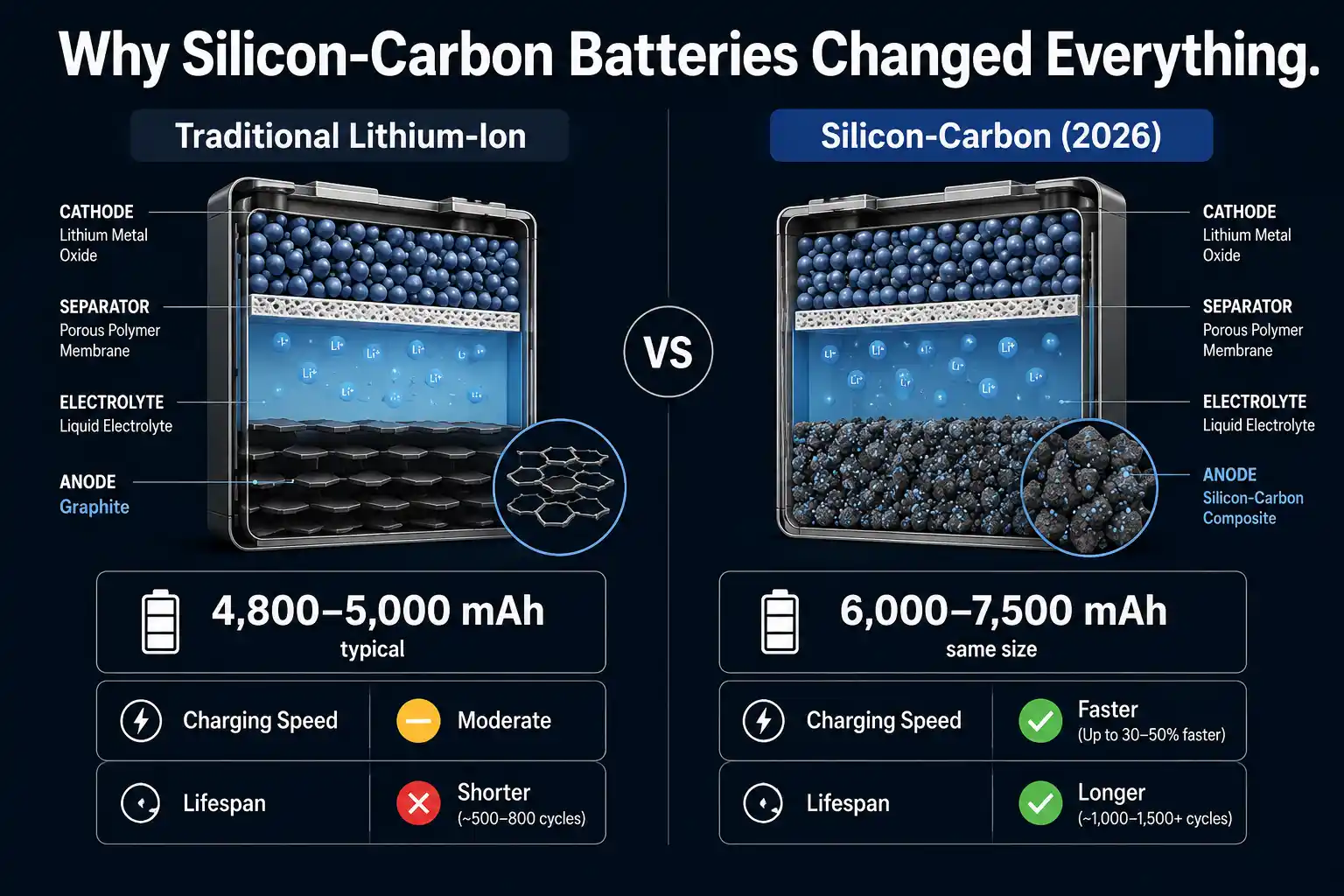
Battery technology changed significantly in 2025 and 2026. Silicon-carbon batteries, which use a silicon-enhanced anode instead of traditional graphite, now appear in many flagship and mid-range Android phones. These batteries hold more energy in the same physical space, charge faster, and maintain better health over time.
Average global smartphone battery capacity reached 5,291 mAh in January 2026, an increase of around 400 mAh year on year, according to research from Counterpoint Research’s battery capacity report. Flagship phones like the OnePlus 15 now ship with a 7,300 mAh silicon-carbon cell that delivers two full days of real-world use.
When evaluating battery life, look beyond the mAh number alone. Check independent review sites like GSMArena or Tom’s Guide for real-world screen-on-time test results. Also check the wired and wireless charging speeds. In 2026, anything below 45W wired charging on a mid-range phone is worth questioning.
Key Battery Numbers to Check
- Look for at least 5,000 mAh for all-day battery life with heavy use
- Silicon-carbon battery phones offer better capacity in slimmer designs
- Fast charging of 65W or above means a 0-to-100 charge in under 45 minutes
- Wireless charging support adds flexibility, especially at home or in the office
4. Look Closely at the Camera System
Camera marketing in 2026 is still misleading for most buyers. Megapixels alone tell you almost nothing useful about real-world image quality. What actually determines photo quality is sensor size, aperture, optical zoom capability, and how well the phone’s image processing software handles light.
Stop counting megapixels and start checking sensor size and optical zoom. A 50 megapixel sensor with a large physical size will produce better photos than a 200 megapixel sensor with a tiny lens. In 2026, a versatile flagship camera system should offer at least three times to five times true optical zoom, meaning optical zoom that uses actual lens movement rather than software cropping.
Also check video capabilities. Look for 4K recording at 60 frames per second and, ideally, 10-bit Log recording support if you plan to edit footage after shooting. For night photography, check whether the phone uses a dedicated night mode algorithm with multi-frame processing rather than simple brightness boosting.
Camera Specs That Actually Matter
- Sensor size: larger sensors capture more light and produce better photos
- Optical zoom: periscope zoom lenses deliver true optical magnification
- Aperture: a lower f-number means better low-light performance
- Video: 4K at 60 fps and 10-bit color are worth checking before you buy
- Optical image stabilisation (OIS) reduces blur in handheld and low-light shots
5. Confirm the Processor and RAM for Your Use Case
The processor, also called the chipset or system on chip (SoC), determines how fast your phone runs apps, handles multitasking, and processes AI tasks on the device itself. In 2026, on-device AI processing has become a practical feature rather than a marketing term, and it requires a capable chip.
For a smooth experience that lasts several years, look for at least 8 GB of RAM and a current-generation processor. The leading chipsets in 2026 include the Apple A18 Pro in the iPhone 17 series, the Qualcomm Snapdragon 8 Elite in Android flagships, and Google’s Tensor G4 in the Pixel 9 series. Mid-range buyers should look for the Snapdragon 7s Gen 3 or MediaTek Dimensity 8300 at a minimum.
Storage matters too. Check that the phone offers at least 128 GB of internal storage and confirm whether it includes a microSD card slot. Most modern flagships no longer include one, which means the storage you buy is the storage you keep.
Performance Checklist
- 8 GB of RAM is the minimum for smooth multitasking in 2026
- 12 GB or more of RAM is ideal for heavy users and gamers
- Check benchmarks on sites like AnTuTu or Geekbench for chip comparisons
- Confirm internal storage size and whether expansion via microSD is supported
6. Check the Display Quality and Refresh Rate
The display is the part of the phone you interact with every single second you use it. A good screen makes everything look better and feel more responsive. A poor screen will frustrate you every day, regardless of how fast the chip is underneath it.
In 2026, a quality smartphone display should offer at least a 120Hz refresh rate, an AMOLED or OLED panel, and a peak brightness above 1,500 nits. Higher refresh rates, measured in hertz (Hz), make scrolling and animations feel noticeably smoother. AMOLED screens produce true blacks because each pixel generates its own light. High peak brightness ensures readability in direct sunlight.
Also check for eye protection features. Some 2026 displays offer high PWM dimming rates, which reduces the flickering that causes eye strain during extended use. Budget phones often use lower-quality LCD panels, which are acceptable but noticeably inferior for media consumption and gaming.
Display Specs to Prioritise
- AMOLED or OLED panel for deep blacks and vibrant colours
- 120Hz or higher refresh rate for fluid scrolling and gaming
- Peak brightness of 1,500 nits or above for outdoor readability
- High PWM dimming rate for reduced eye strain during long sessions
7. Research the Build Quality and IP Rating
Build quality affects how long your phone survives real-world use. Drop resistance, water resistance, and the quality of the glass and frame all determine whether a three-year-old phone still looks and works like new.
Look for an IP68 rating as a minimum on any flagship or upper mid-range smartphone in 2026. IP68 means the phone can survive submersion in water up to 1.5 metres deep for 30 minutes. Some budget phones carry an IP54 rating, which covers only splash and dust resistance. For a phone you will carry every day, IP68 is worth paying for.
Check the glass on both the front and back panels. Corning Gorilla Glass Victus 2 and Ceramic Shield both offer strong scratch and drop resistance. The frame material also matters. Aluminium frames absorb impact better than plastic, while titanium frames, found on some flagship models, offer the best strength-to-weight ratio available in 2026.
Build Quality Checklist
- IP68 water resistance for flagship or upper mid-range phones
- Gorilla Glass Victus or Ceramic Shield on the front panel
- Aluminium or titanium frame for better drop protection
- Glass backs look premium but crack more easily than polycarbonate in drops
8. Evaluate the Ecosystem and Software Experience
The ecosystem around your smartphone matters as much as the hardware inside it. This means the operating system, the pre-installed apps, how well the phone integrates with your other devices, and how clean or cluttered the interface is out of the box.
iOS and Android offer fundamentally different ecosystems, and switching between them has real costs. If you already use Apple products like a Mac, iPad, or Apple Watch, an iPhone fits seamlessly into that system. If you use Google services daily and prefer flexibility in apps and settings, Android gives you more control.
On the Android side, check how much the manufacturer has customised the software. Some Android skins, like Samsung’s One UI or Xiaomi’s HyperOS, add significant features but also include bloatware, meaning apps pre-installed that you cannot remove. Stock Android, found on Pixel phones, tends to be cleaner and faster. Whatever you choose, make sure the software works the way you actually want to work, not just the way it looks in marketing videos.
Ecosystem Questions to Answer Before You Buy
- Which ecosystem do your current devices belong to: Apple, Google, or neither?
- How much pre-installed bloatware comes with the phone?
- Does the manufacturer’s software receive timely updates or lag behind?
- Are the AI features built into the phone genuinely useful for your daily tasks?
9. Calculate the Total Cost of Ownership
The price you see on the product page is rarely the full cost of owning a smartphone. Accessories, insurance, repair costs, and financing charges can add significantly to what you actually spend over two or three years.
A phone bought on a carrier installment plan often costs more over two years than buying the same model unlocked outright. Carrier installment plans also lock you in, prevent switching, and may include hidden fees. Buying unlocked gives you the freedom to change carriers, sell the phone early, or use a local SIM when travelling internationally.
Also factor in repairability. Some phones now use more repairable designs with easier screen and battery replacements, which reduces long-term costs. Check whether the manufacturer offers an official repair programme and whether third-party repair shops can service the model you are considering.
Total Cost Factors to Consider
- Unlocked versus carrier-financed: compare the true two-year total cost
- Screen protector and case will add $20 to $60 but significantly extend the phone’s life
- AppleCare, Samsung Care, or third-party insurance adds monthly cost but reduces repair risk
- Repairability affects long-term value, especially for battery replacements after two years
10. Read Independent Reviews and Check Real-World Test Results
Manufacturer specifications are carefully written to emphasise strengths and omit weaknesses. Reading independent, hands-on reviews from trusted publications before you buy gives you a far more accurate picture of how a phone actually performs in daily life.
Spend at least 30 minutes reading independent reviews before purchasing any smartphone costing more than $300. Trusted sources include publications like The Verge, CNET, Tom’s Guide, and GSMArena, all of which test phones in real-world conditions and publish benchmark results alongside written evaluations. Pay special attention to battery life test scores, camera comparisons in different lighting conditions, and any software bugs noted at launch.
Also check user reviews on retail platforms after the phone has been available for at least three months. Early launch reviews sometimes miss issues that only appear with extended use, such as battery degradation, software stability problems, or connectivity bugs that appear after a firmware update.
Where to Find Trustworthy Smartphone Reviews
- The Verge and CNET for comprehensive flagship reviews with real testing
- GSMArena for detailed technical specs and battery endurance test scores
- Tom’s Guide for camera comparisons and battery life results
- Retail user reviews after three to six months of real-world ownership
Frequently Asked Questions
How many years of software updates should a new smartphone have in 2026?
In 2026, the industry benchmark for flagship phones is seven years of operating system and security updates. Google Pixel phones from the Pixel 8 onwards and Samsung Galaxy S24 series and later both promise seven years. Apple does not publish an official number but typically delivers six to eight years of iOS support in practice. For mid-range phones, look for a minimum of four to five years of guaranteed updates.
Is an IP68 rating necessary on a new smartphone?
IP68 is worth having on any phone you plan to keep for two or more years. It means the phone can survive submersion in water up to 1.5 metres for 30 minutes, which covers rain, pool splashes, and accidental drops in water. Budget phones often carry only IP54, which covers splash resistance but not full submersion. For everyday use, IP68 gives you meaningful peace of mind.
What is the difference between optical zoom and digital zoom on a smartphone camera?
Optical zoom uses a physical telephoto lens to magnify the image without degrading quality. Digital zoom is software-based cropping of the main sensor, which reduces image sharpness as you zoom in further. In 2026, a good camera phone should offer at least three times to five times true optical zoom using a periscope lens system. Any zoom beyond the optical maximum will use digital processing, which reduces detail.
Should I buy an unlocked phone or through my carrier?
Buying unlocked generally gives you more flexibility and often works out cheaper over two years when you compare the true total cost of a carrier installment plan including any fees. Unlocked phones also let you switch carriers freely, use a local SIM when travelling, and sell the phone without restrictions. The main advantage of a carrier plan is lower upfront cost, which matters if paying full price is not practical.
What is a silicon-carbon battery and should it affect my buying decision?
A silicon-carbon battery uses a silicon-enhanced anode instead of traditional graphite, which allows the battery to store significantly more energy in the same physical space. This means larger capacity without making the phone thicker, faster charging speeds, and better battery health over time. In 2026, silicon-carbon batteries appear in many Android flagships and upper mid-range phones. If two-day battery life or fast charging matters to you, it is worth checking whether your chosen phone uses this technology.
How do I know if a phone is compatible with my carrier before buying?
The most reliable method is to find the exact model number of the phone and cross-reference it with your carrier’s official compatibility checker. Do not rely on generic retailer filters, as these are often incomplete. For 5G compatibility specifically, check that the phone supports the exact frequency bands your carrier uses in your area. Your carrier’s support page will list the required bands, and the phone manufacturer’s specifications page will list which bands the model supports.
Make a Smarter Smartphone Purchase in 2026
Buying a new smartphone in 2026 does not have to be confusing. When you work through these ten checks before spending your money, you dramatically reduce the risk of regret. The devices that offer the best long-term value are not always the ones with the highest spec sheet. They are the ones that match your actual usage, work reliably on your carrier, and continue to receive updates for years after purchase.
Software longevity, battery technology, carrier compatibility, and camera quality are the four factors that will affect your daily experience more than any other spec. Focus on those first, and use the remaining checks to narrow your shortlist to the right device for your budget and lifestyle.
Before making your final decision, spend time with independent reviews and real-world battery and camera test results. The best information is always based on hands-on testing, not manufacturer claims. For a broader view of the current smartphone landscape, The Verge’s smartphone coverage is consistently one of the most reliable resources available.
The right phone for you in 2026 is the one that disappears into your daily routine. It just works, lasts all day, receives updates for years, and does not require compromises that frustrate you every time you use it. Use this checklist to find that phone, and you will get far more value from your next purchase than most buyers ever do.

Prince Anichi
Founder and Lead Technology Editor at Ortechy. Covering digital economy shifts, tech ecosystems across Africa, cybersecurity intelligence, and emerging software platforms.