Meta released Meta Muse Image on July 7, 2026, and within seventy-two hours privacy groups, talent agencies, and Instagram users were already pushing back. The reason is simple. Meta opted every eligible public account into the tool by default, which means someone else can turn your Instagram photos into AI art without asking you first.
This guide covers what Meta Muse Image actually does, how it works under the hood, and why it has become one of the most talked about AI launches of the year. You will also learn exactly how to turn the feature off, how it compares to rivals like GPT Image 2 and Nano Banana 2, and what businesses can expect from it.
Because this tool touches almost two billion Instagram accounts, understanding it matters even if you never plan to use it yourself. Let us start with the basics.
What Is Meta Muse Image?
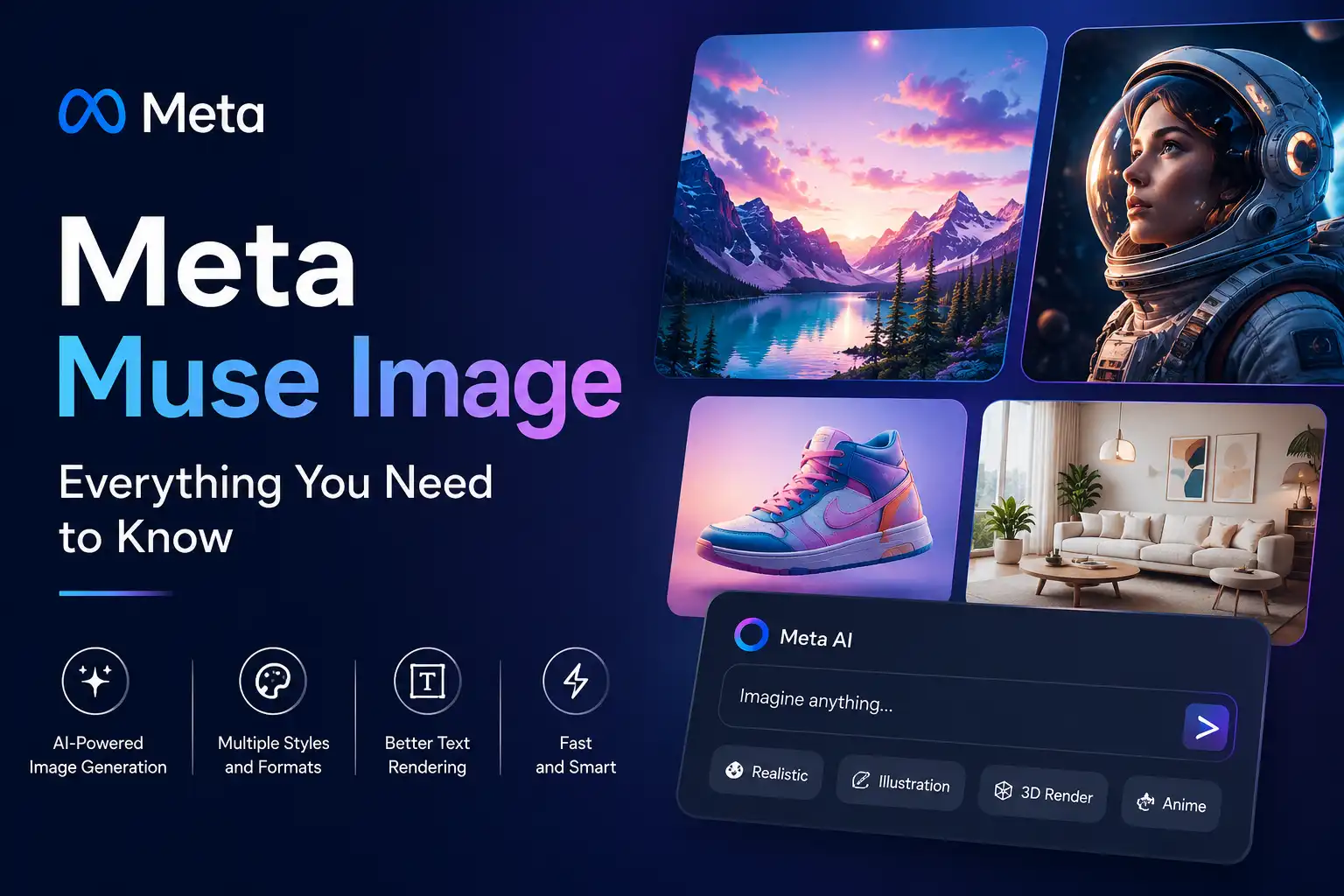
Meta Muse Image is the first image generation model built by Meta Superintelligence Labs, the AI research division Mark Zuckerberg formed to close the gap with OpenAI and Google. It launched inside the Meta AI app, on the meta.ai website, in WhatsApp direct messages, and in Instagram Stories, according to Meta’s official newsroom announcement.
Before this release, Meta leaned on outside vendors. The company had previously used third-party AI models like Midjourney and Black Forest Labs to power image features inside its own apps, as reported by CNBC’s coverage of the launch. Muse Image changes that. It is Meta’s own model, and the company plans to use it to cut its reliance on licensed technology going forward.
Who Built It and Why It Matters
Alexandr Wang leads Meta Superintelligence Labs. He previously oversaw the April debut of Muse Spark, the large language model that replaced Meta’s Llama family. Muse Image is the lab’s second major public release, and internally it carried the codename Mango before launch.
In my view, the naming pattern (Muse Spark for text, Muse Image for pictures, Muse Video coming next) signals that Meta wants one unified creative brand across every format. That is a smart move for marketing, but it also means any trust problems with one Muse product can quickly bleed into the others.
How Meta Muse Image Works Behind the Scenes
Unlike older image generators that map a text prompt directly to pixels, Muse Image behaves more like an agent than a static tool. Meta’s technical blog explains that the model calls on search and coding tools to improve accuracy, then refines its own drafts before showing you the result.
This self-refining loop can take three different forms. Sometimes the model makes a small local edit when one detail looks wrong. Other times it throws out the draft and starts over. In more complex cases, it reaches for a different tool entirely, such as a live web search, to ground the image in real facts.
Web Search Grounding
Because Muse Image can search the web mid-generation, it produces more accurate results for prompts tied to current events or real landmarks. Meta reports that enabling search noticeably improved factual accuracy on knowledge-heavy prompts in internal testing.
This is a meaningful technical step. Most consumer image generators still guess at real-world details from training data alone, which is why they often botch logos, signage, or well-known buildings. Grounding the output in a live search reduces that guesswork considerably.
Key Features of Meta Muse Image
Meta packed a wide range of creative tools into this single release. Here is what stands out most.
- Conversational editing: you describe changes in plain language and Muse Image applies them without starting from scratch.
- Sketch and markup edits: tap the markup icon to circle or annotate exactly what you want changed on an existing image.
- Multi-photo blending: combine a selfie with a vacation photo, or place a pet inside a famous painting.
- Legible text rendering: the model can generate infographics or how-to guides with text that stays clean and readable.
- Room redesign: snap a photo of a room and Muse Image can redesign it using real products pulled from the web or Facebook Marketplace.
- More than thirty new Instagram Stories effects, with additional AI-powered filters rolling out over time.
Then there is the feature causing the most controversy: the ability to @-mention a public Instagram account and pull that person’s real photos into a new AI-generated image. Meta frames this as a way to build a birthday card for a friend or a custom event invitation. Critics see something very different, which the next section covers in full.
Meta Muse Image vs GPT Image 2 and Nano Banana 2
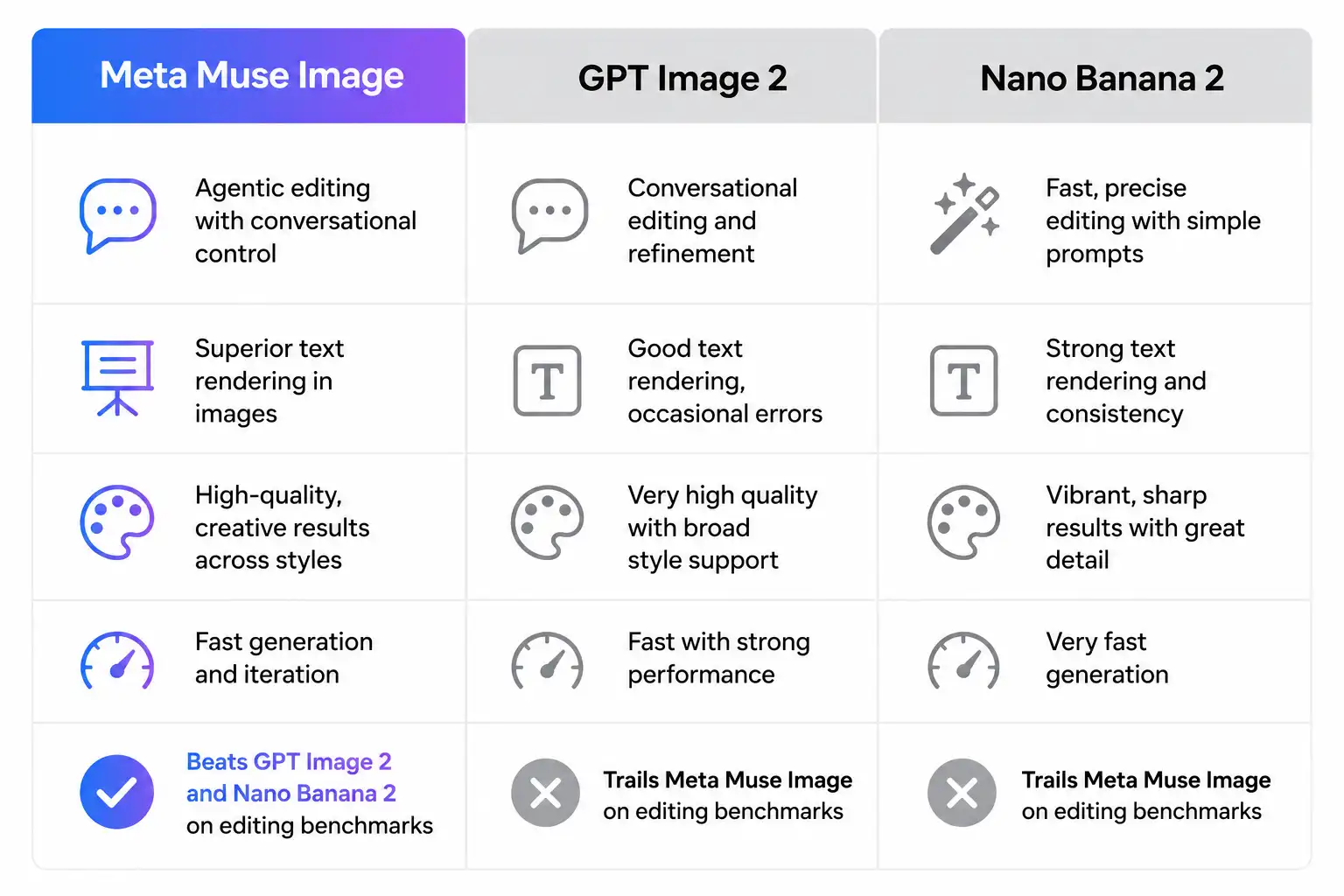
So how does Muse Image actually perform against the competition? Meta shared internal benchmark results alongside the launch, and the picture is mixed. According to CNBC’s report on Meta’s own testing, Muse Image trails OpenAI’s GPT Image 2 on overall benchmarks but beats Google’s Nano Banana 2 model on single and multi-image editing tasks.
- Meta Muse Image (Meta Superintelligence Labs, launched July 2026): known for deep Instagram and WhatsApp integration plus agentic self-refinement.
- GPT Image 2 (OpenAI): leads Muse Image on Meta’s own internal benchmarks.
- Nano Banana 2 (Google): trails Muse Image specifically on editing tasks, according to Meta’s tests.
Take Meta’s self-reported numbers with a grain of salt, because no company benchmarks its own product against a rival without choosing favorable tasks. Still, the fact that Meta admits it trails GPT Image 2 at all is notable. Most launch announcements only highlight the categories where a company wins.
The Instagram Photo Controversy Explained
This is the part of the Meta Muse Image story that has dominated headlines all week. By default, Muse Image can pull photos from any eligible public Instagram account and use them inside a new AI-generated image, simply because someone else typed an @-mention. The account owner is not asked for permission and, according to Meta’s own policy language, will not be notified when it happens.
Talent agency CAA publicly condemned the design. The agency argued that no one’s name, image, or creative work should be used by any outside party, AI included, without clear and documented consent, as reported by Variety’s coverage of CAA’s statement.
Digital rights groups echoed that concern. Foxglove, a tech justice nonprofit, called the setup an obvious recipe for disaster, pointing to a year of documented harms from non-consensual AI-altered images. Privacy International separately warned that this launch is the latest sign AI companies treat personal photos as raw material to exploit.
Who Is Automatically Excluded
Meta does build in some guardrails. The company states that private accounts and any account belonging to a user under eighteen are automatically excluded from being @-mentioned. Teen users also cannot tag or reference other accounts through the feature at all.
Even so, that leaves every adult with a public Instagram account exposed by default. This means the burden of protecting yourself falls entirely on the user, not on Meta.
How to Opt Out of Meta Muse Image
If you would rather your public photos stay out of Muse Image entirely, you can turn the setting off in a few taps. This process only stops future use. It will not delete images someone already generated with your photos, and it will not notify you retroactively.
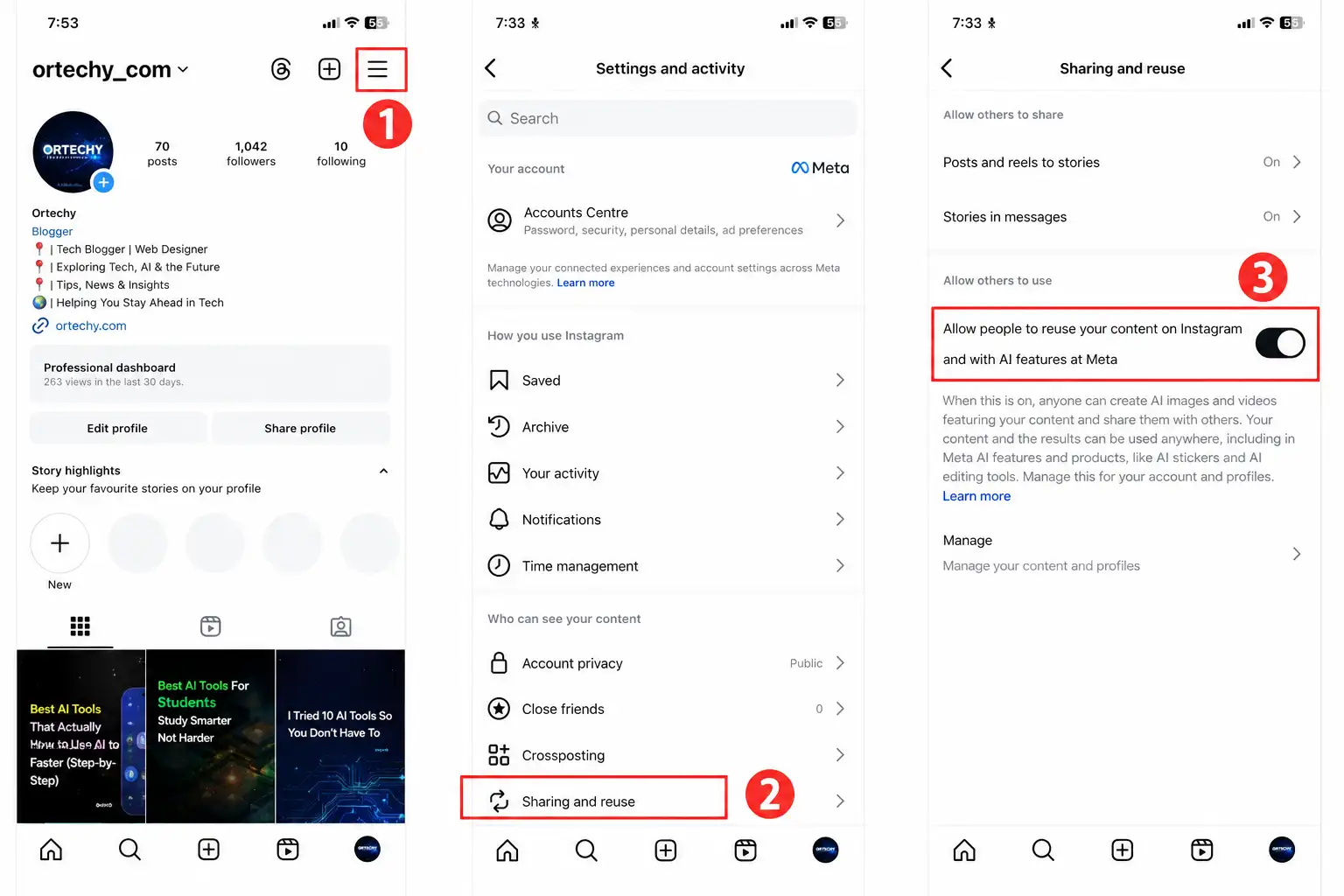
- Open Instagram and go to your profile.
- Tap the three-line menu in the upper right corner and choose Settings and activity.
- Scroll down to Sharing and reuse.
- Find the toggle labeled Allow people to reuse your content on Instagram and with AI features at Meta.
- Turn the toggle off for both posts and reels. Some app versions may show these as separate switches.
According to Forbes’ privacy reporting on the opt-out process, this setting only appears for adult public accounts, since teen and private accounts are excluded automatically.
Real screenshot needed here: capture the actual Instagram Settings and activity screen showing the Sharing and reuse toggle, since Meta’s interface wording may shift slightly between app versions.
If you want the strongest available protection, switching your account to private remains the only option that blocks Muse Image completely, because the tool cannot reference private accounts at all under any circumstance.
Meta Muse Image for Advertisers and Businesses
Consumer backlash aside, Meta built Muse Image with advertisers firmly in mind. The model now powers image generation inside Advantage Plus, Meta’s automated ad creative platform for brands.
Meta says the tool brings native reasoning to the creative process, letting advertisers adjust elements, swap styles, and generate on-brand variations with fewer manual iterations. In the coming weeks, agencies and advertisers can expect to see image variants powered by Muse Image show up directly inside their campaign tools.
What This Means for Small Businesses
For a small business without an in-house design team, this could meaningfully cut the cost of producing ad creative. A shop owner can theoretically generate a dozen on-brand product images in the time it once took to book a single photo shoot.
However, the same consent questions that apply to individual users apply here too. Brands should confirm any Muse Image output does not rely on a real person’s likeness without documented permission, especially given how the tool already sources public Instagram photos by default.
Safety, Privacy and the Content Seal Watermark
To help people tell real photos from generated ones, Muse Image embeds an invisible watermark called Content Seal into every image it produces. Meta’s technical blog states the watermark survives cropping, compression, resizing, and even screenshotting, and the company is previewing a separate detection tool so anyone can check whether an image carries the hidden signal.
That said, provenance is not the same thing as consent. Content Seal can confirm that Meta’s AI made an image. It cannot stop someone from using your face in the first place, and it does nothing to remove images that already exist once you opt out.
Meta’s Privacy Track Record
Skepticism toward this launch does not exist in a vacuum. In 2019, the Federal Trade Commission fined Facebook five billion dollars after finding the company had misled users about how much control they had over their own data, tied to the Cambridge Analytica scandal, according to TechCrunch’s report on the opt-out controversy.
Meta also shut down its facial recognition system in 2021 amid lawsuits over biometric data collection. Security researchers at Malwarebytes’ analysis of the Muse Image rollout warn that lowering the barrier to generating convincing synthetic images could make impersonation and identity fraud easier at scale.
Therefore, treat Muse Image the way you would treat any new data-hungry feature from a company with this history. Review your settings first, and decide what you are comfortable with before the feature reaches your region.
What Meta Muse Image Means Going Forward
Meta Muse Image is genuinely impressive from a pure technology standpoint. The agentic self-refinement, live web grounding, and deep integration across WhatsApp, Instagram, and Facebook put it firmly in the same conversation as GPT Image 2 and Nano Banana 2.
The launch also exposes a familiar pattern. Meta shipped a powerful, easy to use tool first and left consent as an afterthought buried three menus deep in Instagram settings. That decision, more than the technology itself, is what triggered backlash from CAA, Foxglove, Privacy International, and ordinary users within days of release.
If you use Instagram, the smart move is to check your Sharing and reuse settings today rather than wait for Meta to make the choice for you. The feature is still rolling out region by region, so if you do not see the toggle yet, check back soon, because it is coming.
Muse Image will not be the last AI tool to launch with an opt-out default instead of an opt-in one. Understanding exactly how Meta Muse Image works, and exactly how to control it, puts you ahead of the next controversy rather than reacting to it after the fact. For the latest official updates, keep an eye on Meta AI’s technical blog on Muse Image and Muse Video.
Frequently Asked Questions
Is Meta Muse Image free to use?
Yes. Everyday creation through the Meta AI app, WhatsApp, and Instagram is free. Power users who exceed the free generation limit need a Meta One subscription to keep creating.
Can Meta Muse Image use my Instagram photos without asking me?
Yes, if your account is public and you have not opted out. Anyone can @-mention your account and use your public photos, and Meta will not notify you when this happens.
How do I stop Meta Muse Image from using my photos?
Go to Instagram Settings and activity, then Sharing and reuse, then turn off the toggle for allowing people to reuse your content with AI features at Meta. Switching your account to private blocks the feature entirely.
Does opting out remove images that already exist?
No. Opting out only prevents future use of your photos. Any AI images already generated using your content before you changed the setting will remain in circulation.
What is Content Seal?
Content Seal is Meta’s invisible watermarking system. It marks every Muse Image creation with a hidden provenance signal that survives cropping, compressing, resizing, and screenshotting.
Is Meta Muse Image better than GPT Image 2?
Not according to Meta’s own internal testing. The company’s benchmarks show Muse Image trailing OpenAI’s GPT Image 2 overall, though it reportedly beats Google’s Nano Banana 2 on editing tasks.

Prince Anichi
Founder and Lead Technology Editor at Ortechy. Covering digital economy shifts, tech ecosystems across Africa, cybersecurity intelligence, and emerging software platforms.