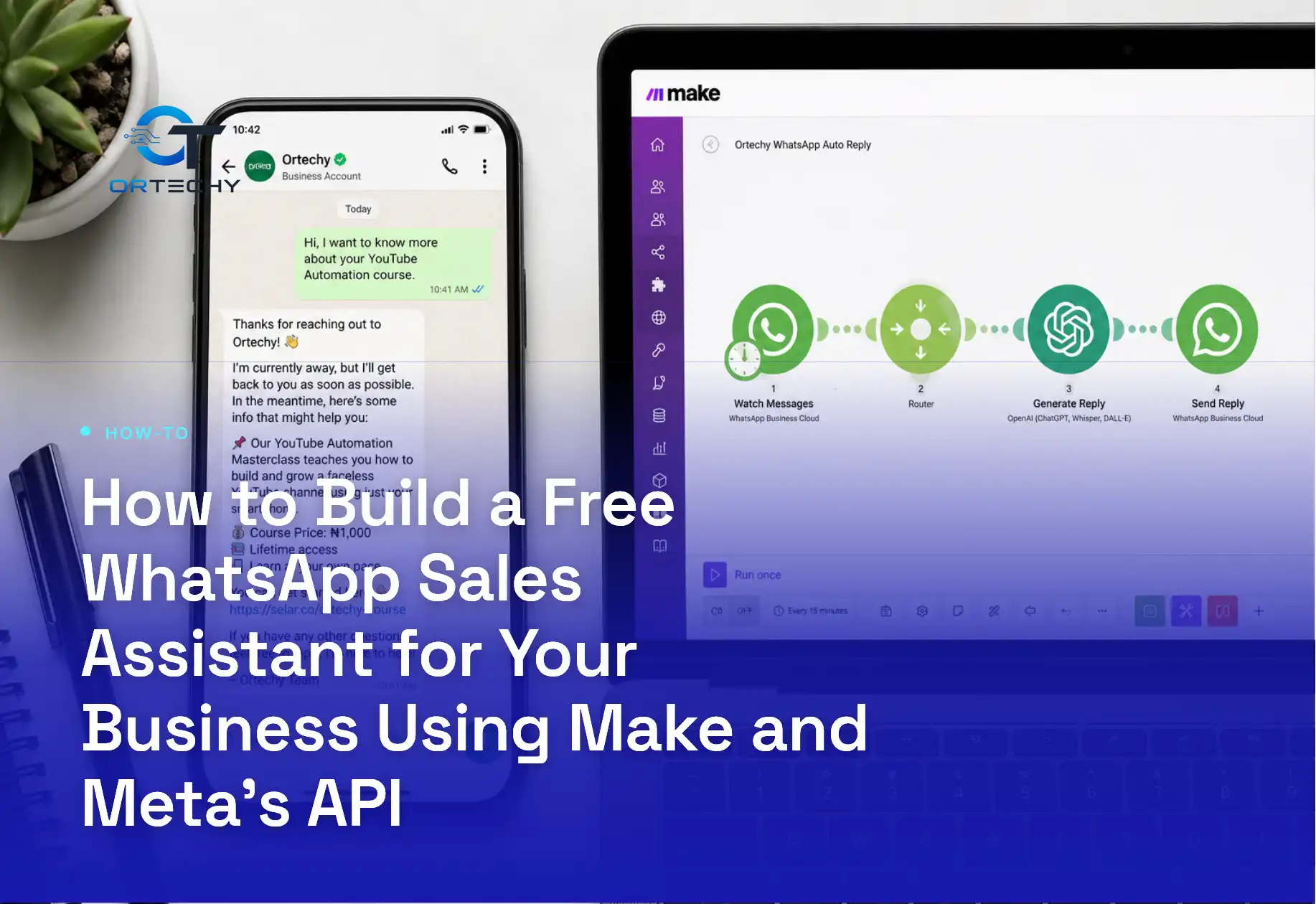
A WhatsApp automated sales assistant can answer customer questions, share your catalogue, and log leads while you sleep, and you can build one without writing a line of backend code. Meta’s own developer documentation confirms that service replies inside an open customer window carry no per-message charge, and Make’s entry-level plan hands you 1,000 monthly credits at zero cost. That combination is what makes this build genuinely low-cost for a small Nigerian business testing automation for the first time.
This guide walks through the exact setup, from creating your Meta Business Portfolio to wiring a working Make scenario that reads incoming WhatsApp messages, detects what the customer wants, and replies automatically. Then it covers where the “free” claim breaks down once you scale, because Meta moved WhatsApp billing to a per-message model in mid-2025, and pretending that change does not exist would be dishonest.
Now, let us get into the build. Every step below assumes you are starting from zero: no developer account, no verified WhatsApp Business number, no Make scenario.
What You Actually Need Before You Start
Because this build touches two separate platforms, you need accounts on both before you open the scenario editor. Here is the full list.
- A Meta Business Portfolio (formerly Business Manager) with your business details verified
- A WhatsApp Business Account (WABA) connected to a phone number that has never been registered on the regular WhatsApp app
- A free Make account, which gives you 1,000 operations, now called credits, every month
- A short list of the questions your customers actually ask, since your automation is only as good as this list
This means you do not need a developer team or a paid BSP (Business Solution Provider) subscription to get started. Make connects directly to Meta’s WhatsApp Business Cloud API, so you are talking to Meta’s own infrastructure through Make’s visual builder rather than through a third-party reseller.
Step 1: Create Your Meta Business Portfolio and WhatsApp Business Account
First, head to business.facebook.com and create a Business Portfolio if you do not already have one. Meta will ask for your business name, website, and a contact email. Because this step triggers identity checks, use details that match your official documents exactly.
Once your portfolio exists, add a WhatsApp Business Account from the same dashboard and attach a phone number. According to Make’s own integration documentation, Meta will review your business and display name, and this review can take up to one business day. During review, you can still send five business-initiated test messages every 24 hours, which is enough to confirm your setup works before launch.
Step 2: Generate Your Permanent Access Token
Why a Permanent Token Matters
Meta issues temporary tokens by default, and these expire within hours. Therefore, your automation will break silently if you use one. Instead, generate a permanent (System User) access token from your Meta Business Portfolio’s System Users section, and store it somewhere safe.
Connecting the Token to Make
Make’s WhatsApp Business Cloud module offers two connection types, and one of them, the WhatsApp Business Cloud (legacy) connection, requires exactly this permanent token plus your WhatsApp Business Account ID. Add a WhatsApp Business Cloud module inside a new Make scenario, click create a connection, and paste in both values when prompted.
Step 3: Build the Core Scenario Structure in Make
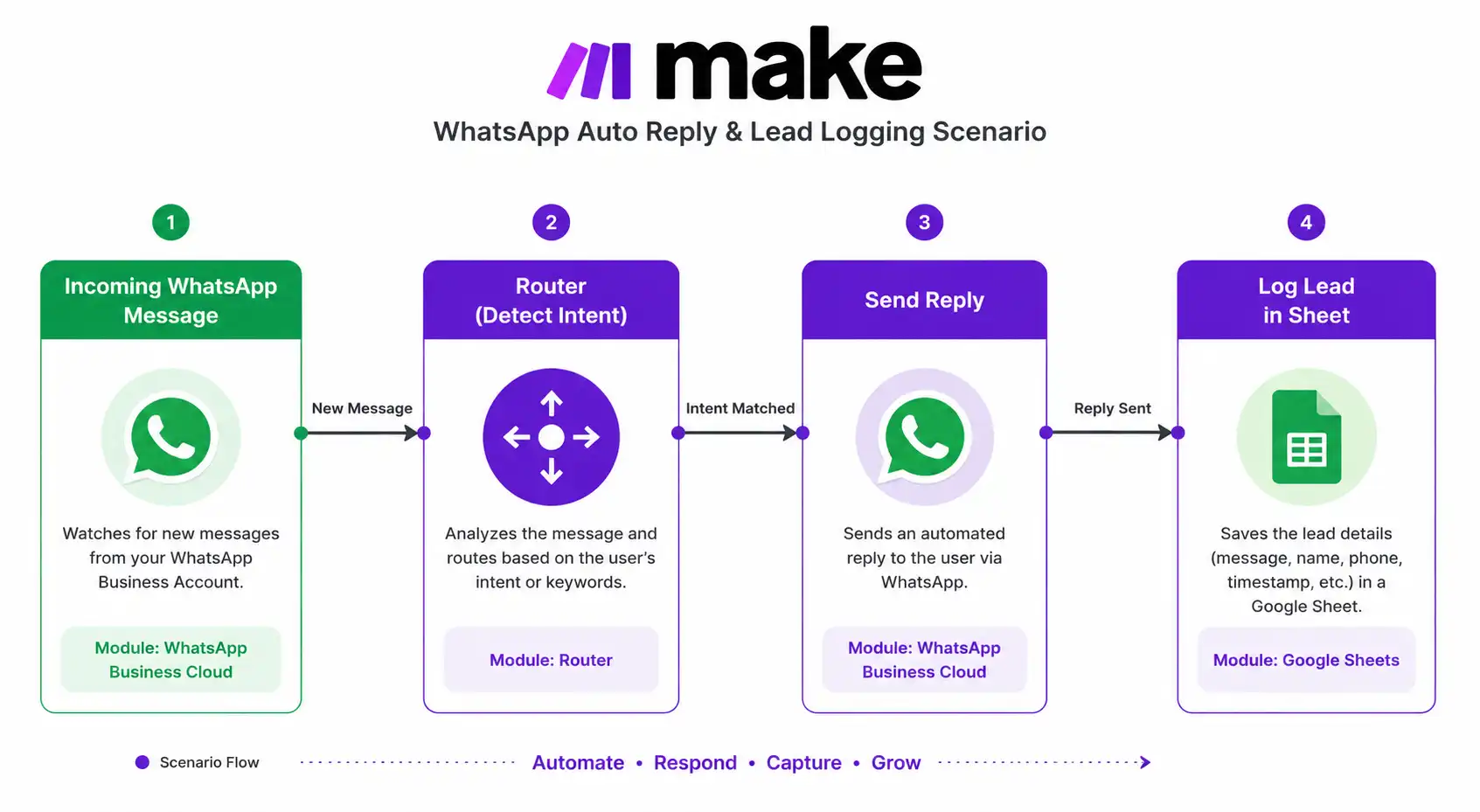
Now comes the actual automation. A sales assistant scenario in Make typically follows four logical stages, and each stage maps to a specific module type.
Trigger: Watch Incoming Messages
Add a Watch Events (Webhooks) trigger module for WhatsApp Business Cloud. This module fires every time a customer sends your business number a message, whether that is a greeting, a product question, or a price enquiry.
Router: Detect Customer Intent
Next, add a Router module immediately after the trigger. This splits the scenario into separate paths based on keywords or button replies. For example, one path handles the word “price,” another handles “catalogue,” and a third handles anything that does not match, which falls into a default human-handoff path.
Action: Send the Right Reply
Each router path ends in a Send a Message action module. Because Meta only allows free-form text replies inside an open 24-hour customer service window, your first response to any new conversation should ideally use an approved template message, and every reply after that can be a plain text or interactive list message.
Logging: Capture the Lead
Finally, add a Google Sheets or Airtable module at the end of each path to log the customer’s number, their question, and a timestamp. This turns a simple auto-responder into an actual sales pipeline you can follow up on manually.
Step 4: Design Message Templates Meta Will Actually Approve
Meta reviews every template before it goes live, and rejected templates are the single biggest reason first-time builders get stuck. A few rules help you pass review on the first attempt.
- Avoid promotional language in utility templates, since Meta reclassifies mismatched templates and bills them at the wrong, usually higher, category rate
- Keep variables like {{1}} for the customer’s name limited to genuine personalisation, not filler text
- Never submit a template that only contains a link with no explanatory text
- Write in the language your customers actually use, since Nigerian Pidgin or mixed English performs better for local audiences than stiff formal English
[Screenshot recommended here: Meta Business Suite template submission screen showing the category dropdown and approval status, to help readers recognise the actual interface.]
How Much a WhatsApp Automated Sales Assistant Really Costs
This is the section most guides skip, and it is the one that matters most for your budget. Meta retired its old conversation-based pricing entirely on July 1, 2025, and replaced it with per-message billing, according to Meta’s official WhatsApp Business Platform pricing documentation. Under the current model, you pay per delivered template message, and the rate depends on the recipient’s country and whether the template is marketing, utility, or authentication.
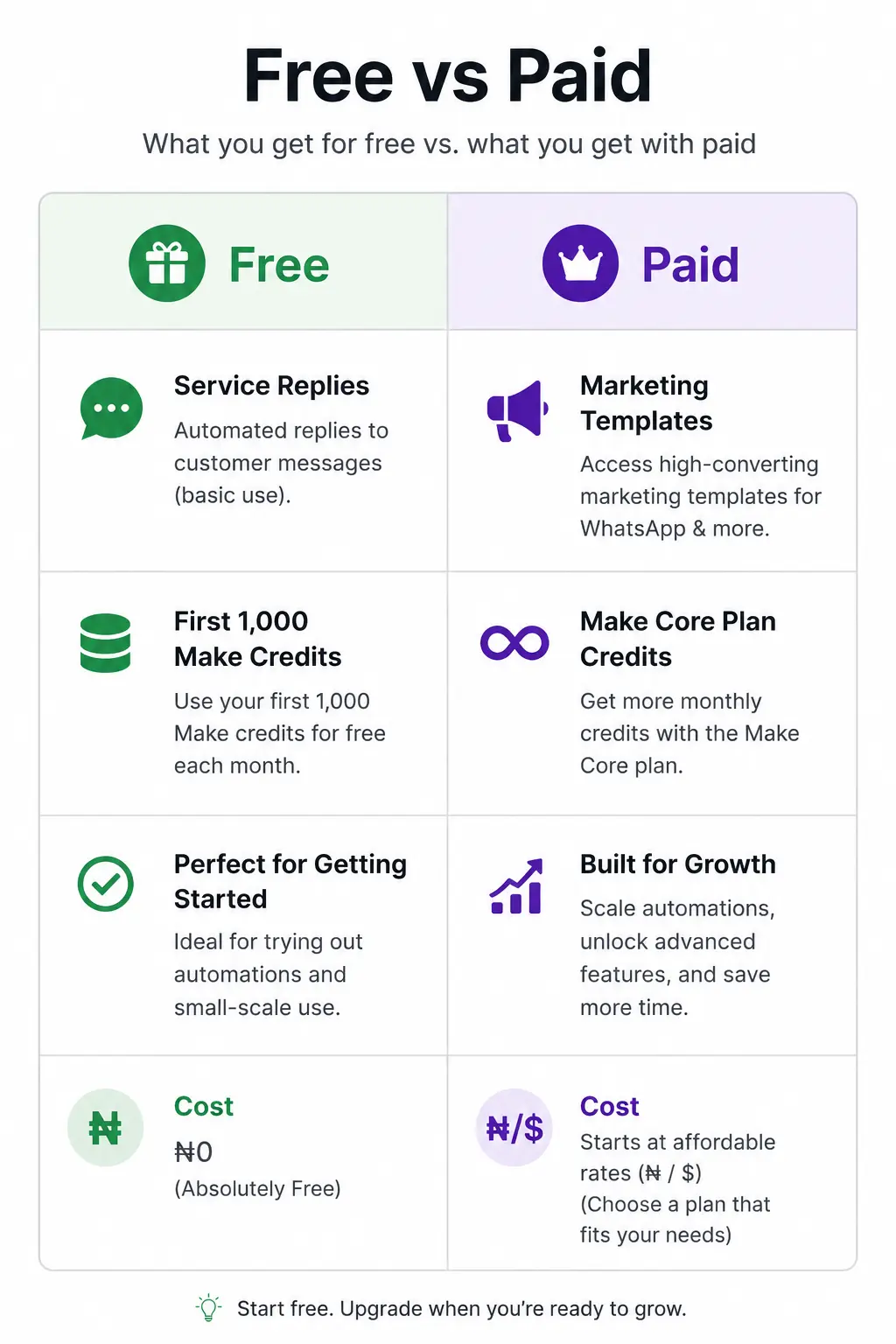
The genuinely free part still exists. Service messages, meaning any reply you send after a customer messages you first, inside that open 24-hour window, remain free. Meta confirmed this remains unchanged since its own deprecated conversation-based pricing reference document, which notes free-tier service conversations became unlimited from November 1, 2024. So if your sales assistant only replies to customers who message you first, your Meta bill can realistically stay near zero.
On the Make side, the free plan gives you 1,000 credits every month, capped at two active scenarios and a 15-minute minimum polling interval, based on Make’s own WhatsApp Business Cloud integration page. Every module that runs, including the trigger, spends one credit. A simple three-module scenario, trigger, router, and one reply, costs roughly three credits per conversation. That means 1,000 free credits cover approximately 300 customer conversations a month before you need to upgrade.
Where the Costs Creep In
Costs appear the moment you start sending marketing templates, such as promotions or cart reminders, to customers who have not messaged you first. Independent pricing trackers report 2026 marketing rates ranging from roughly four cents per message in Nigeria and India up to well above ten cents in the United States and United Kingdom, though you should always confirm current numbers against Meta’s live rate card, since Meta updates rates up to quarterly. Utility and authentication templates cost considerably less than marketing templates and unlock volume-based discounts as your usage grows.
Common Mistakes That Get WhatsApp Numbers Restricted
Because Meta actively monitors message quality, a few habits can quietly damage your account’s messaging tier.
- Sending template messages to numbers that never opted in, which increases block rates
- Reusing one generic template for every customer instead of tailoring it to their actual question
- Ignoring your account’s quality rating dashboard inside Meta Business Suite
- Ignoring Make’s execution history, so failed sends pile up silently for days
Because Meta evaluates your account’s messaging tier based partly on quality ratings, a few complaints early on can slow your ability to scale later. This means it pays to start small, test with real customers, and expand your template library gradually rather than launching every idea at once.
Scaling Beyond the Free Tier
Once your sales assistant proves useful, you will likely outgrow both free tiers within a month or two. At that point, Make’s Core plan adds 10,000 credits, unlimited active scenarios, and a one-minute scheduling interval, which is a meaningful jump from the free plan’s 15-minute polling delay. On the Meta side, there is no paid upgrade to unlock, since you already pay Meta directly per message. Instead, your job shifts to keeping more of your traffic inside free service windows and reserving paid marketing templates for campaigns that clearly justify the cost.
Is This WhatsApp Sales Assistant Really Free?
Honestly, calling this setup 100 percent free only holds true at small volume, and any guide that tells you otherwise is not being straight with you. What is true is that you can build, test, and run a working WhatsApp automated sales assistant for genuinely nothing if most of your conversations start with the customer messaging you first, since Make’s free credits and Meta’s free service window cover that use case comfortably.
The moment you add outbound marketing templates, cart reminders, or cold outreach, you step into Meta’s per-message billing, and that cost scales with your ambition, not your budget. For a Nigerian business testing whether WhatsApp automation is worth the investment, that is actually the right order to learn things in: prove the assistant works for free, then decide whether paid outbound messaging earns its keep.
Ortechy’s take is simple. Start with the free tier, log every conversation your assistant handles, and only reach for paid templates once you have real data showing customers respond. For the full, current rate card before you commit budget, always check Meta’s official WhatsApp Business Platform pricing page directly, since rates shift by country and by quarter.
Frequently Asked Questions
Do I need a developer to build this WhatsApp automated sales assistant?
No. Make’s visual builder handles the logic through drag-and-drop modules, and Meta’s WhatsApp Business Cloud API connects to Make without custom code. Basic comfort navigating settings menus is enough.
Can I use my personal WhatsApp number for this?
No. The number you connect to a WhatsApp Business Account cannot currently be registered on the standard WhatsApp consumer app, so most businesses use a fresh SIM or a dedicated business line.
How many customer conversations can the free tier actually handle?
Roughly 300 conversations a month on Make’s free plan, assuming a simple three-module scenario, plus unlimited free service replies from Meta as long as the customer messages first.
What happens if my message template gets rejected?
Meta gives a rejection reason inside Meta Business Suite. Most rejections trace back to promotional language inside a utility template or missing context around a variable, and you can edit and resubmit immediately.
Does this work for a business based in Nigeria?
Yes. Nigeria appears on Meta’s standard country rate card for all message categories, and Make’s platform is available globally with no regional restriction on the free plan.
Is Make better than paying a WhatsApp BSP directly?
For early-stage testing, yes, because Make connects straight to Meta’s Cloud API without a BSP’s added markup. Once you need advanced features like AI-driven replies or a shared team inbox, a dedicated BSP may become worth the extra cost.

Prince Anichi
Founder and Lead Technology Editor at Ortechy. Covering digital economy shifts, tech ecosystems across Africa, cybersecurity intelligence, and emerging software platforms.