Nearly three billion people use WhatsApp every month, which makes it one of the most valuable targets for cybercriminals anywhere. If you want to know how to know if your WhatsApp is hacked, the honest answer is that most victims find out the hard way, usually from a worried friend asking why you just asked them for money.
This guide covers every warning sign that matters in 2026, from unfamiliar linked devices to verification codes you never requested. It also explains how attackers actually get in, because in most cases it has nothing to do with breaking encryption and everything to do with tricking you into handing over access yourself.
Now let’s get into the signs, starting with the one people notice first and the one they notice last.
Why WhatsApp Accounts Are Such a Popular Target
Because WhatsApp is trusted by friends, family, and coworkers, a hijacked account is worth far more to a scammer than a random social media login. This means once someone controls your account, they can ask your closest contacts for money and be believed instantly.
Also, WhatsApp uses end to end encryption (E2EE) by default, so messages in transit are scrambled and unreadable to outsiders. However, encryption only protects data in transit. It does nothing to stop an attacker who has already tricked you into handing over a login code or who has taken over the phone number tied to your account.
Therefore, the real weak point is rarely WhatsApp’s technology. As ESET’s security researchers explain, in 2026 a compromise usually does not look like being locked out at all. It looks like an attacker quietly linking a browser to your account and reading everything while you notice nothing.
You Are Suddenly Logged Out Without Warning
This is usually the loudest and most obvious sign your WhatsApp is hacked. If the app kicks you out and shows a message about your account being registered on a new device, someone has likely just taken it over.
Because WhatsApp only allows one active number registration at a time on the primary device, a hacker who successfully re-registers your number automatically bumps you off. If this happens and you did not request a new device registration, treat it as an active attack, not a glitch.
- Open WhatsApp immediately and try to log back in with your own number
- Enter the six-digit SMS or call verification code the moment it arrives
- If a two-step verification PIN was already set and it now rejects your PIN, someone may have changed it, which is a serious red flag
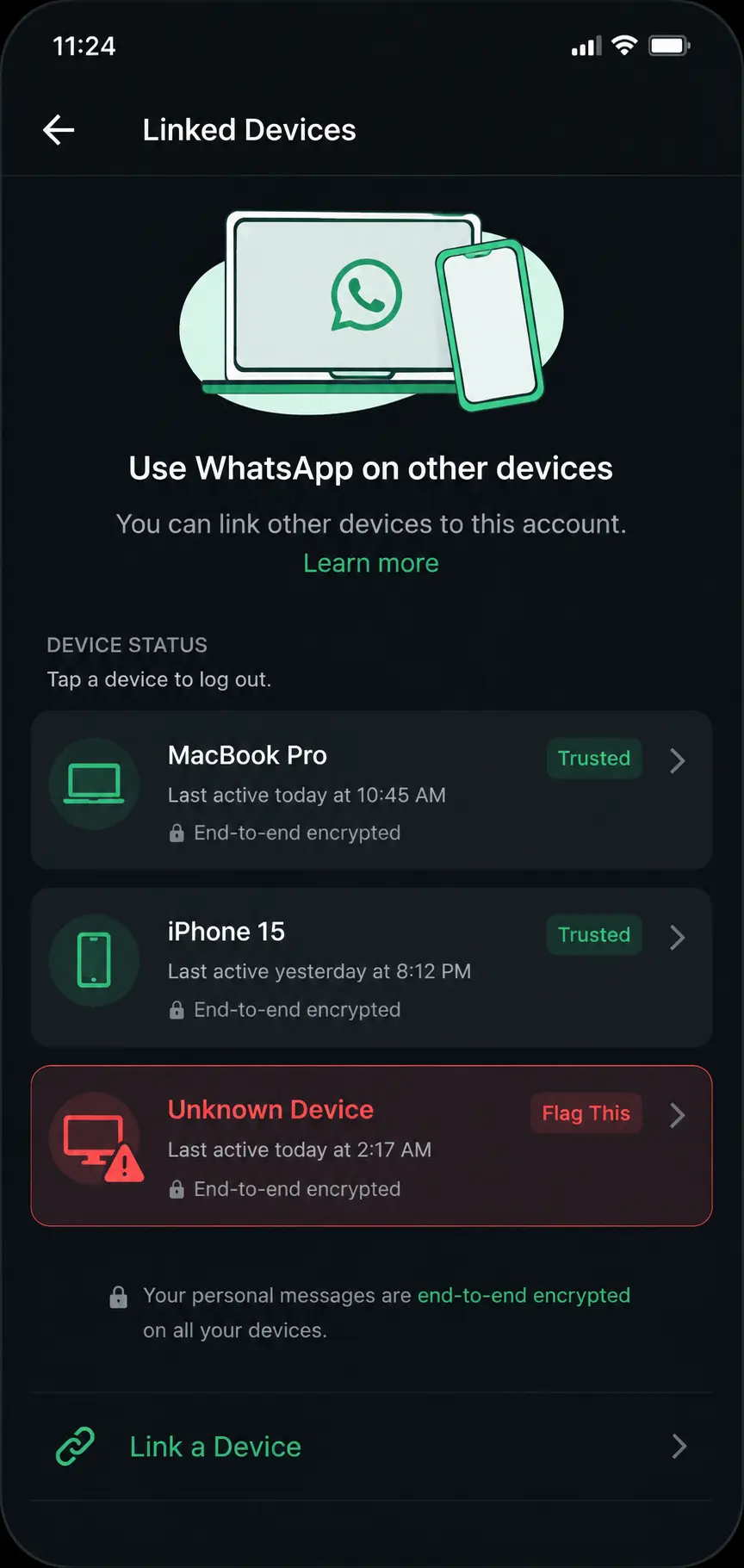
Unfamiliar Devices Show Up in Linked Devices
How to Check Linked Devices
Attackers often do not bother taking over your number at all. Instead, they link WhatsApp Web or WhatsApp Desktop to your account from their own laptop, which lets them read chats quietly in the background.
To check this, open WhatsApp, tap the three dots in the top right corner, and select Linked Devices. Then review every entry on the list carefully.
- Look for device names, browsers, or locations you do not recognize
- Tap any suspicious device and select Log Out
- Repeat this check every few weeks, even if nothing seems wrong
According to ExpressVPN’s account recovery research, spotting a device you do not own in this list is one of the strongest indicators that someone else has active access to your chats right now.
You Receive Verification Codes You Never Requested
This sign is sneaky because it arrives quietly as a normal-looking SMS. If a six-digit WhatsApp code lands in your messages and you were not the one trying to log in, someone else is actively attempting to steal your account at that exact moment.
Because this code is the single key that unlocks your entire account, attackers rely almost entirely on social engineering to get it. Never share this code with anyone, even if they claim to be WhatsApp support, a friend in trouble, or a delivery agent confirming an order. WhatsApp never asks users for this code through chat or phone calls.
Bitdefender’s fraud research team found that most account takeovers begin with a scammer tricking the victim into sharing this exact verification code, often through a fake customer support message or a manipulated call-forwarding request.
Messages Appear That You Never Sent
Finding replies to conversations you do not remember having is one of the clearest confirmations of a breach. This is different from a simple typo or a forgotten late-night message. It means someone else is actively typing from inside your account.
Watch for these specific patterns:
- Unread messages that are already marked as read before you opened them
- Sent messages sitting in chats that you do not remember writing
- Deleted messages appearing in threads, including ones supposedly deleted by you
- New groups or chats you never joined showing up in your chat list
Kaspersky’s security team recommends paying special attention to the first signs of unexpected outgoing messages and acting immediately, since hijacked accounts are frequently used within minutes to scam the victim’s own contact list.
Your Profile Picture, Bio, or Name Has Changed
Logging in to find a stranger’s photo or a rewritten bio staring back at you is one of the more unsettling signs. This usually means an attacker is preparing to impersonate you for a scam, and changing your identity details makes their fake messages feel more convincing to your contacts.
This means the moment you spot an unauthorized change to your name, photo, status, or phone number, you should assume the account is compromised and move straight into recovery mode rather than waiting to see what happens next.
Contacts Report Strange Messages From You
Sometimes the very first clue that your account has been hacked is not something you notice yourself. It is a text or a phone call from a friend asking why you just asked them to send money, click a link, or vote in a strange giveaway.
Because attackers know panic works in their favor, the messages they send often involve urgent, emotional requests such as a fake medical emergency, a stranded relative story, or a too-good-to-be-true prize. In practice, this tactic is so common that fraud researchers now treat it as the signature move of hijacked messaging accounts.
If even one contact tells you they received a suspicious message from your number, do not dismiss it. Check your linked devices and login status right away.
Unknown Numbers Appear in Your Contact List
Occasionally, victims notice new phone numbers sitting in their WhatsApp contacts that they never added themselves. This can happen when an attacker’s device syncs its own contact list to your account after linking a session, effectively feeding the hacker a fresh list of targets to scam under your name.
Finally, poor phone performance rounds out the list of subtler warning signs. A sudden battery drain, unusual overheating, or a phone that feels sluggish for no clear reason can indicate a hidden app or malicious process running in the background, particularly if it started around the same time as other WhatsApp irregularities.
How Attackers Actually Break In
Social Engineering and Fake Verification Requests
Most WhatsApp compromises do not involve breaking encryption or exploiting complicated software bugs. They involve convincing a real person to hand over a login code, click a malicious link, or dial a call-forwarding code that quietly redirects their verification calls to the attacker.
SIM Swap Attacks
Because your WhatsApp account is tied to your phone number, a SIM swap where a criminal convinces your mobile carrier to issue a duplicate SIM card can hand over full control without needing your password at all. This means anyone handling sensitive accounts should periodically confirm with their carrier that no duplicate SIM has been issued in their name.
Device and Malware Compromise
Additionally, if the phone or computer itself is infected with spyware, no amount of WhatsApp security settings will fully protect you, because the attacker is reading messages directly off the compromised device rather than the network. In February 2026, Apple patched a long-standing iOS flaw that Google’s Threat Analysis Group confirmed had been exploited for roughly a decade inside commercial spyware chains, a reminder that keeping your operating system updated is not optional.
What to Do the Moment You Suspect a Hack
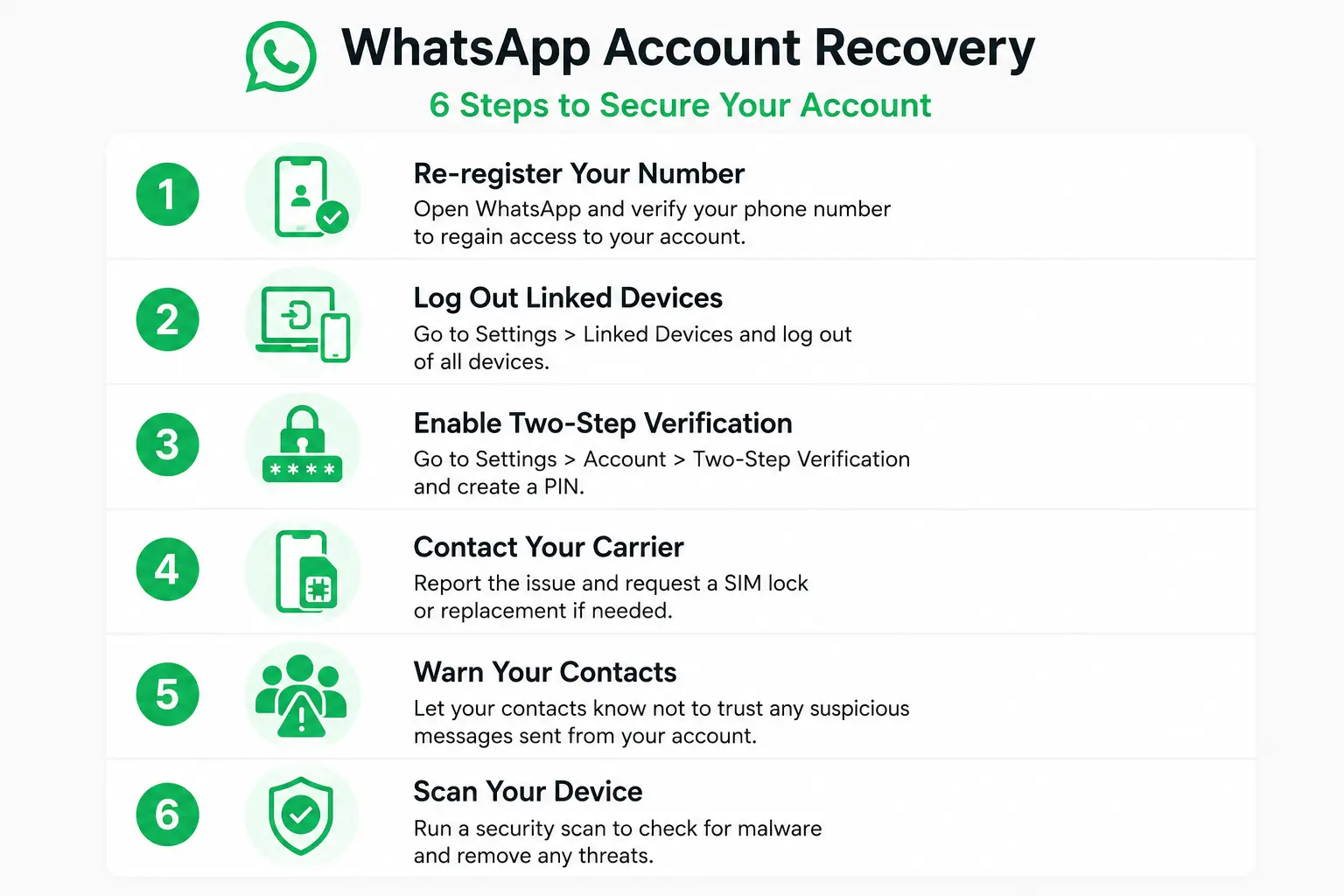
Speed matters more than anything else once you suspect your WhatsApp is hacked. Follow these steps in order.
- Re-register immediately. Open WhatsApp, enter your number, and request a fresh SMS or call verification code. Entering it instantly disconnects the attacker’s session.
- Log out every linked device. Go to Settings, then Linked Devices, and remove anything you do not personally recognize.
- Enable two-step verification. Navigate to Settings, then Account, then Two-Step Verification, and set a PIN plus a recovery email so you can never be locked out permanently.
- Contact your mobile carrier. Confirm no unauthorized SIM swap or call forwarding has been set up on your line.
- Warn your contacts. Let close friends and family know your account was compromised so they ignore any strange requests sent before you regained control.
- Scan your device. Run a reputable mobile security scanner to rule out spyware or malicious background apps.
If you can no longer receive the verification code at all, WhatsApp’s official Help Center outlines the steps for recovering a compromised account, including what happens if two-step verification was changed without your consent.
Stay a Step Ahead of Account Hijackers
Knowing how to know if your WhatsApp is hacked comes down to trusting the small details. An unexpected logout, a code you never asked for, or a friend flagging a weird message are rarely coincidences, and treating them as noise is exactly how attackers stay in your account undetected for longer than they should.
The good news is that recovery is usually fast when you act immediately. Re-registering your number, clearing linked devices, and switching on two-step verification takes only a few minutes, yet it locks an attacker out for good in the vast majority of cases.
Prevention costs even less effort than recovery. A strong two-step verification PIN, a habit of checking linked devices occasionally, and a firm rule to never share a verification code with anyone will stop the overwhelming majority of WhatsApp takeover attempts before they start.
Ultimately, WhatsApp’s encryption is genuinely strong, as confirmed by Forbes’ security reporting on the platform’s default protections, but no encryption can protect an account once a person, not the software, becomes the weak link. Stay alert, verify before you trust, and your account will stay yours.
Frequently Asked Questions
Can someone hack my WhatsApp with just my phone number?
A phone number alone is not enough on its own. However, an attacker paired with a SIM swap or a tricked verification code can absolutely use your number to take full control of your account.
Does two-step verification really stop hackers?
Yes, in the vast majority of cases. A two-step verification PIN blocks re-registration attempts even if an attacker already has your SMS code, because they would also need the PIN you set separately.
Why did I get a WhatsApp code I never requested?
This almost always means someone is actively trying to register your number on a different device. Ignore any request to share that code, and if it keeps happening, enable two-step verification right away.
Can WhatsApp be hacked through a link or attachment?
Yes. Malicious links can lead to phishing pages designed to steal your verification code, and infected attachments can install spyware that reads messages directly from your device.
What happens if I lose access completely and cannot log back in?
If the attacker changed your two-step verification PIN, WhatsApp requires a seven day waiting period before it can be reset, after which you can regain full control of the account.
Is WhatsApp Web a common way accounts get hacked?
Yes, it is one of the most common methods. Attackers link WhatsApp Web to a victim’s account through a scanned QR code or stolen session, then read chats silently without ever needing the account password.

Prince Anichi
Founder and Lead Technology Editor at Ortechy. Covering digital economy shifts, tech ecosystems across Africa, cybersecurity intelligence, and emerging software platforms.