
How to Reduce Prompt Fatigue When Using AI Tools
Most people discover prompt fatigue the hard way. You sit down with ChatGPT, Claude, or Gemini, ready to be productive. Thirty minutes later, you have rewritten the same instruction five times, the outputs still miss the mark, and your mental energy is gone. Prompt fatigue is the cognitive exhaustion that builds when you spend more mental effort managing an AI tool than the tool saves you. It is one of the most underreported friction points in AI adoption, and it is costing workers far more time than they realise.
Research from 2026 found that workers lose an average of 51 minutes each week to tool fatigue alone, switching between applications as many as 100 times per day. Layered on top of that, Shibumi’s AI fatigue data shows that 47 percent of workers feel unprepared for widespread AI adoption. The problem is not the technology itself. The problem is how people interact with it, without any system, without any structure, and without breaks.
This guide covers the practical steps you can take right now to reduce prompt fatigue when using AI tools. You will learn how to write better prompts faster, build a personal prompt library, set cognitive boundaries, and use AI in a way that actually saves energy rather than draining it. Every strategy here is grounded in real cognitive science and current workplace research.
What Prompt Fatigue Actually Is and Why It Happens
Prompt fatigue is not the same as general screen fatigue or burnout, though it often gets lumped in with both. It is a specific type of decision fatigue that builds when you repeatedly try to translate a complex thought into a form an AI model can act on accurately. Each failed attempt requires you to diagnose what went wrong, reformulate the instruction, and re-evaluate a new output. That cycle is mentally expensive.
The Cognitive Science Behind the Exhaustion
John Sweller’s cognitive load theory, first published in 1988, showed that working memory can hold only four to seven pieces of information at once. When you write a prompt, you are simultaneously holding the task goal, the AI’s tendencies, the desired output format, the context it needs, and the constraints it should follow. That is a heavy working memory load before you have done any actual work.
The challenge compounds with each interaction. When AI outputs fall short, users shift from doing their actual job to managing the AI, a fundamentally different cognitive mode. The mental cost of that shift adds up across dozens of daily interactions. This is also why experienced developers in a 2025 METR research trial took 19 percent longer to complete tasks when using AI tools compared to working without them — a counterintuitive but credible finding from Addy Osmani’s analysis of AI-assisted software engineering.
The Signs You Are Already Experiencing It
Prompt fatigue does not always announce itself clearly. The symptoms build gradually and often get misread as a problem with the AI rather than a problem with the workflow.
- You feel reluctant to open an AI tool even when you know it would help
- You spend more time editing AI outputs than writing from scratch
- You experience heightened irritability after extended AI sessions
- Simple decisions feel overwhelming after long prompting sessions
- You find yourself copying and rewriting the same context over and over
- Original ideas feel harder to generate without the AI as a starting point
If three or more of those patterns sound familiar, your workflow has a structural problem. The good news is that it is fixable, and it does not require you to use AI less. It requires you to use it more deliberately.
Build a Prompt Library to Reduce Prompt Fatigue Over Time
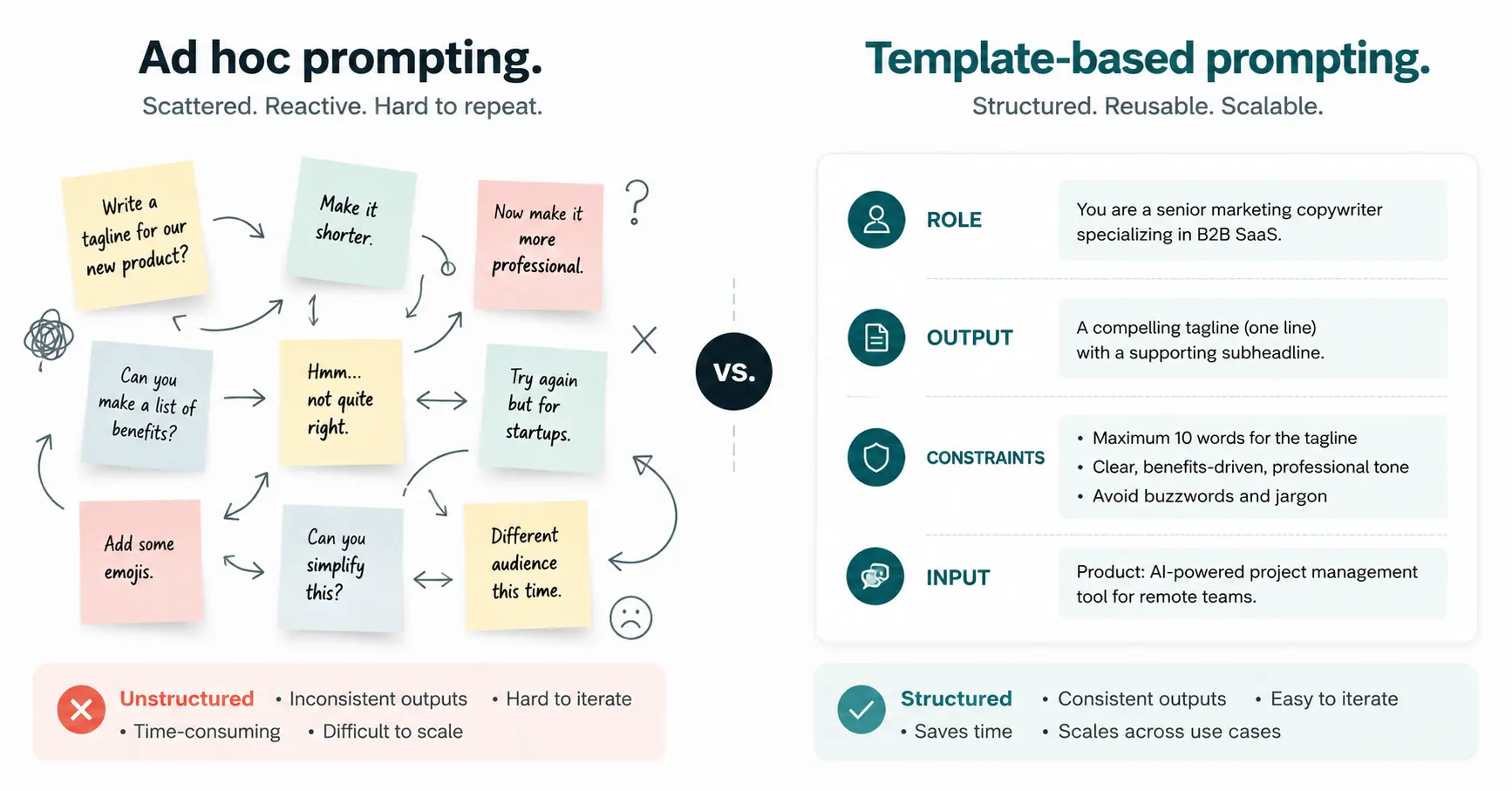
The single most effective way to reduce prompt fatigue is to stop writing prompts from scratch. A personal prompt library is a saved collection of your best-performing instructions, formatted as reusable templates with placeholder variables. Instead of reconstructing the full context each time, you fill in what changes and leave the structure intact.
This is not a novel idea. In 2025, prompt libraries became standard practice in professional AI content workflows, according to research published across enterprise AI adoption studies. The World Economic Forum’s 2024 Future of Jobs Report identified prompt engineering and AI interaction as top emerging skills for the decade ahead, and structured prompt management sits at the centre of that skill set.
How to Build Your First Prompt Template
Start with the tasks you perform with AI most often. For most knowledge workers, these include drafting emails, summarising documents, generating outlines, and researching topics. Take your best-performing prompt for each task and convert it into a template.
A good template has four components. First, a role assignment. Second, the desired output. Third, specific constraints. Fourth, a placeholder for the variable input. Here is a practical example:
“You are a [ROLE]. Write a [OUTPUT TYPE] for [AUDIENCE]. Keep it under [LENGTH]. The topic is: [TOPIC]. Tone should be [TONE].”
That structure takes 20 seconds to fill in. It replaces five minutes of thinking from scratch. According to Atlassian’s guide on preventing AI fatigue, adding context and constraints to a prompt is the most reliable way to reduce the time spent sifting through irrelevant outputs. The more precise the instruction, the less editing the output needs.
Where to Store Your Prompt Library
Storage matters more than most people expect. If your prompts live in a notes app you rarely open, you will not use them. The best storage solution is wherever you already work. Notion pages, Google Docs, a pinned Slack message, or a dedicated browser bookmark folder all work well. The format is less important than the friction of access. If retrieving a template takes more than ten seconds, it will not become a habit.
Tools like Vellum and PromptLayer offer more structured prompt management for teams, with version history and performance tracking built in. For individual users, a simple tagged document with a search function is usually enough to start.
Structure Your Prompts Better From the Start
Bad prompts create multiple rounds of iteration. Every extra round multiplies the cognitive cost. The most direct way to cut prompt fatigue is to write instructions that produce usable outputs the first time, more often.
The Role, Output, Constraint Framework
The role-output-constraint framework is the most widely tested structure for consistent AI results. Assigning a role focuses the model’s framing. Stating the exact output format removes ambiguity. Adding constraints prevents the model from generating content you will have to cut. Research across multiple language models shows that role-assigned, format-specific prompts consistently outperform open-ended instructions on quality benchmarks.
Compare these two prompts for the same task:
Weak: “Summarise this article.”
Strong: “You are a business analyst. Summarise this article in five bullet points for a non-technical executive audience. Focus only on commercial implications. Each bullet should be under 20 words.”
The strong version removes almost every source of ambiguity. The model does not have to guess your audience, your purpose, your format, or your priorities. The output it produces will need far less editing.


Use Chain-of-Thought Prompting for Complex Tasks
For tasks requiring multi-step reasoning, chain-of-thought prompting reduces errors significantly. This means asking the model to show its reasoning before giving a final answer. A simple addition to any prompt works: “Think through this step by step before giving your final response.”
This technique is particularly useful for analysis, planning, and research tasks where the first output of a simple prompt often misses critical steps. Structured prompt processes of this type have been shown to reduce AI output errors by as much as 76 percent, according to enterprise prompt engineering deployment data published across multiple platforms in 2025.
Set Cognitive Boundaries Around Your AI Sessions
Prompt fatigue is not only a prompting problem. It is also a time management and attention problem. Unlimited, unstructured AI use across the full workday is one of the fastest routes to cognitive depletion. The same way you would not read dense legal documents for eight consecutive hours, you should not run intensive AI prompting sessions without intentional breaks.
The Case for Batching Your AI Work
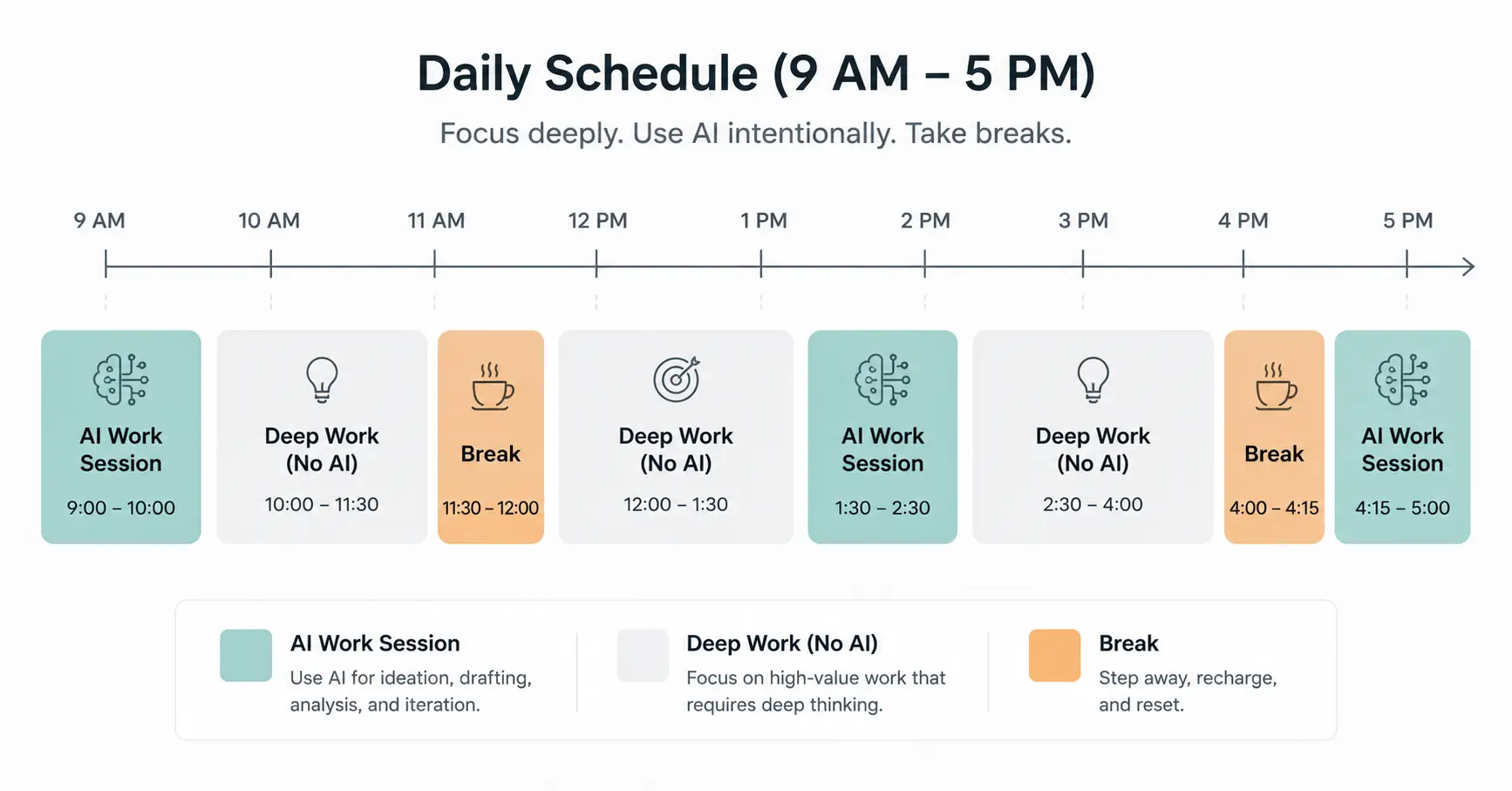
Batching means grouping all your AI-dependent tasks into one or two dedicated time blocks per day, rather than switching in and out of AI tools continuously. This approach reduces the context-switching cost, which is one of the biggest hidden drains in modern knowledge work.
Context switching between different cognitive modes, like creative thinking, critical evaluation, and instruction writing, depletes mental resources faster than sustained work in a single mode. When you batch AI sessions, you stay in instruction mode for a defined window, then shift fully to other work. The transitions are cleaner, and recovery is faster.
Schedule Analog Blocks Daily
Research published in the International Journal of Environmental Research and Public Health found that structured offline time and microbreaks directly reduce cognitive overload and improve sustained attention within days. For AI users, this means scheduling 60 to 90 minute no-AI blocks for deep work, planning, or writing from scratch.
These analog periods serve a secondary function beyond rest. They rebuild your ability to generate original ideas independently. Cognitive bandwidth research from Doolly describes uninterrupted deep work as the most effective antidote to prompt fatigue over time. The goal is not to avoid AI. The goal is to maintain the independent cognitive capacity that makes you a good AI user in the first place.
Limit the Number of AI Tools You Use at Once
Tool sprawl is a quiet but serious driver of AI fatigue. Many workers now manage multiple AI tools simultaneously: one for writing, one for research, one for image generation, one for coding, one for scheduling. Each tool has its own interface, its own quirks, its own prompting conventions, and its own output style to evaluate.
The cognitive overhead of managing three AI tools is not three times the overhead of managing one. It is significantly higher, because each switch requires a mental mode reset, not just a tab change. Atlassian’s workplace research recommends limiting active tools to two or three per project to prevent automation fatigue from compounding across the day.
Audit Your Current AI Stack
Take ten minutes this week to list every AI tool you use. Include the tools you use occasionally, not just daily. For each one, ask: does this tool provide a capability I cannot get from another tool I already use? If the answer is no, that tool is adding cognitive overhead without adding proportional value.
Most knowledge workers find two or three AI tools cover 90 percent of their needs. The remaining tools exist because they were easy to sign up for, not because they are essential. Cutting them does not reduce your AI capability. It reduces the management load that causes fatigue.
Use Context Windows and Custom Instructions Strategically
Every major AI tool now offers some version of persistent context. ChatGPT has custom instructions. Claude has project memories. Gemini has personalisation settings. These features exist specifically to eliminate the repetitive context-setting that drives prompt fatigue. Most users either do not know they exist or set them up once and forget to update them.
What to Store in Custom Instructions
Think of custom instructions as the standing brief you would give a new assistant on their first day. They do not need you to re-explain your role, your audience, or your preferred output format every time. Your AI tool should not need that either.
Useful things to store in custom instructions include your professional role and industry, your typical audience for written content, format preferences such as bullet points versus prose, tone guidance such as formal or conversational, and any recurring constraints such as word limits or style rules.
Setting these up once removes a significant chunk of the repetitive context you would otherwise include in every prompt. That reduction in prompt length is not trivial. Shorter prompts with persistent context outperform long contextless prompts on consistency, and they cost you far less mental effort to write each time.
Recognise When AI Is Not the Right Tool
Part of reducing prompt fatigue is accepting that not every task benefits from AI assistance. This sounds obvious, but it runs counter to the cultural pressure many workplaces now place on AI adoption. When 95 percent of Fortune 500 companies report using AI in some capacity, there is implicit pressure to find AI applications for everything, even tasks where the friction of prompting exceeds the benefit of the output.
A useful test is the rewrite ratio. If you consistently spend more time editing an AI output than it would have taken to write the first draft yourself, that task does not need AI. The goal of AI assistance is a net time saving and a net cognitive saving. When neither is present, the tool is adding friction, not removing it.
Tasks That Usually Warrant AI
- First drafts of structured documents where format matters more than voice
- Research summarisation across multiple sources
- Generating multiple variations of the same content for testing
- Tasks involving repetitive formatting or transformation of data
- Brainstorming initial options when you are starting from a blank page
Tasks That Often Do Not
- Short messages where the prompting context is longer than the message itself
- Highly personal or emotionally nuanced writing where your voice is the point
- Decisions that require judgment built from direct experience
- Tasks where you would spend more time fact-checking than creating
Take a Systematic Approach to Prompt Iteration
When a prompt does not work, most people edit it immediately and try again. This instinct is understandable but inefficient. Random iteration without a diagnostic process means you may fix one problem and introduce another, or change the wrong variable entirely.
A better approach is to treat prompt iteration the way a researcher treats an experiment. Change one variable at a time. If the output is wrong in tone, adjust the tone instruction specifically. If the output is too long, add a length constraint specifically. If the model is missing context, add one piece of context at a time and test the change.
This systematic approach reduces the number of iterations needed to reach a usable output, which directly reduces the cognitive cost of the prompting process. It also builds your intuition faster. After a few weeks of systematic iteration, you will develop a reliable mental model of what different AI tools respond to, and your first-attempt quality will improve significantly.
Keep a Prompt Failure Log
This is a habit that sounds tedious until you try it. Keep a simple running note of prompts that failed and what specifically went wrong. After two weeks, patterns will emerge. You will find that most of your failures share two or three common causes, and you can address those at the template level rather than troubleshooting case by case.
This habit also reduces the emotional friction of prompt failures. When you treat a bad output as data rather than a personal frustration, the cognitive and emotional cost of the failed interaction drops considerably.
Frequently Asked Questions
What is prompt fatigue in AI tools?
Prompt fatigue is the cognitive exhaustion that comes from repeatedly writing, testing, and revising instructions for AI tools without getting reliable outputs. It happens when the mental effort of managing AI interactions exceeds the time and energy the tool was supposed to save. It is a specific form of decision fatigue rooted in the repetitive nature of prompt writing.
How long does it take to build a useful prompt library?
A basic prompt library covering your five most common AI tasks can be built in about two hours. Start by pulling your best-performing prompts from recent sessions and converting them into templates with placeholder variables. The library grows naturally over time as you add new templates after completing new task types.
Does prompt fatigue mean I am using AI too much?
Not necessarily. Prompt fatigue is usually a signal of unstructured AI use rather than excessive AI use. You can use AI heavily and experience very little fatigue if your workflow is well organised, your templates are in place, and your sessions are time-bounded. The problem is the pattern, not the volume.
Can using multiple AI tools make prompt fatigue worse?
Yes, significantly. Each additional tool introduces its own interface, prompting conventions, and output patterns to manage. Research consistently shows that cognitive overhead increases disproportionately with each additional tool in a daily workflow. Limiting active AI tools to two or three per project is a widely recommended threshold for sustainable use.
What is the best way to recover from prompt fatigue once it has set in?
The most effective recovery strategy is scheduled analog time: dedicated blocks of 60 to 90 minutes without any AI tool use, doing focused work by hand or engaging in strategic thinking. Structured offline periods restore cognitive bandwidth within days, according to workplace research. Reducing your active tool count and setting an evening cutoff for AI use also accelerates recovery meaningfully.
Are some AI tools less fatiguing to use than others?
Yes. Tools with persistent memory and custom instruction features reduce the repetitive context-setting that drives much of the fatigue. Chat-based tools where you can build on a running conversation without restarting context are also generally less draining than tools requiring fresh, full-context prompts for every interaction. The interface matters as much as the underlying model for daily usability.

Prince Anichi
Founder and Lead Technology Editor at Ortechy. Covering digital economy shifts, tech ecosystems across Africa, cybersecurity intelligence, and emerging software platforms.