In this article35 sections
- 01.Why WordPress Security Is a Bigger Problem in 2026
- ↳The Scale of the Threat
- ↳Where the Vulnerabilities Actually Come From
- 02.Step One: Keep Everything Updated
- ↳Why Updates Are Your First Line of Defence
- ↳Managing Plugins to Reduce Your Attack Surface
- 03.Step Two: Harden Your Login and Access Controls
- ↳Use Strong Passwords and a Password Manager
- ↳Enable Two-Factor Authentication
- ↳Limit Login Attempts and Change the Login URL
- 04.Step Three: Install a Web Application Firewall
- ↳What a WAF Does and Why You Need One
- ↳Choosing the Right Security Plugin
- 05.Step Four: Set Up Regular Backups
- ↳Why Backups Are Non-Negotiable
- ↳How to Back Up Your Site Properly
- 06.Step Five: Secure Your WordPress Configuration
- ↳Move to HTTPS and Keep Your SSL Certificate Active
- ↳Disable File Editing and Protect wp-config.php
- ↳Change the Default Database Prefix
- 07.Step Six: Monitor Your Site for Threats
- ↳Set Up File Integrity Monitoring
- ↳Keep an Activity Log
- 08.Step Seven: Choose Secure Hosting
- ↳Why Your Host Is Part of Your Security Stack
- 09.Step Eight: Harden Against AI-Powered Threats
- ↳The New Attack Surface in 2026
- 10.Frequently Asked Questions
- ↳How often should I update my WordPress plugins?
- ↳Do I need a security plugin if my host already has a firewall?
- ↳What is the most common way WordPress sites get hacked?
- ↳How do I know if my WordPress site has already been hacked?
- ↳Is managed WordPress hosting worth the extra cost for security?
- ↳Can I secure a WordPress website myself without hiring a developer?
- 11.Conclusion
How to Secure a WordPress Website in 2026: The Complete Guide
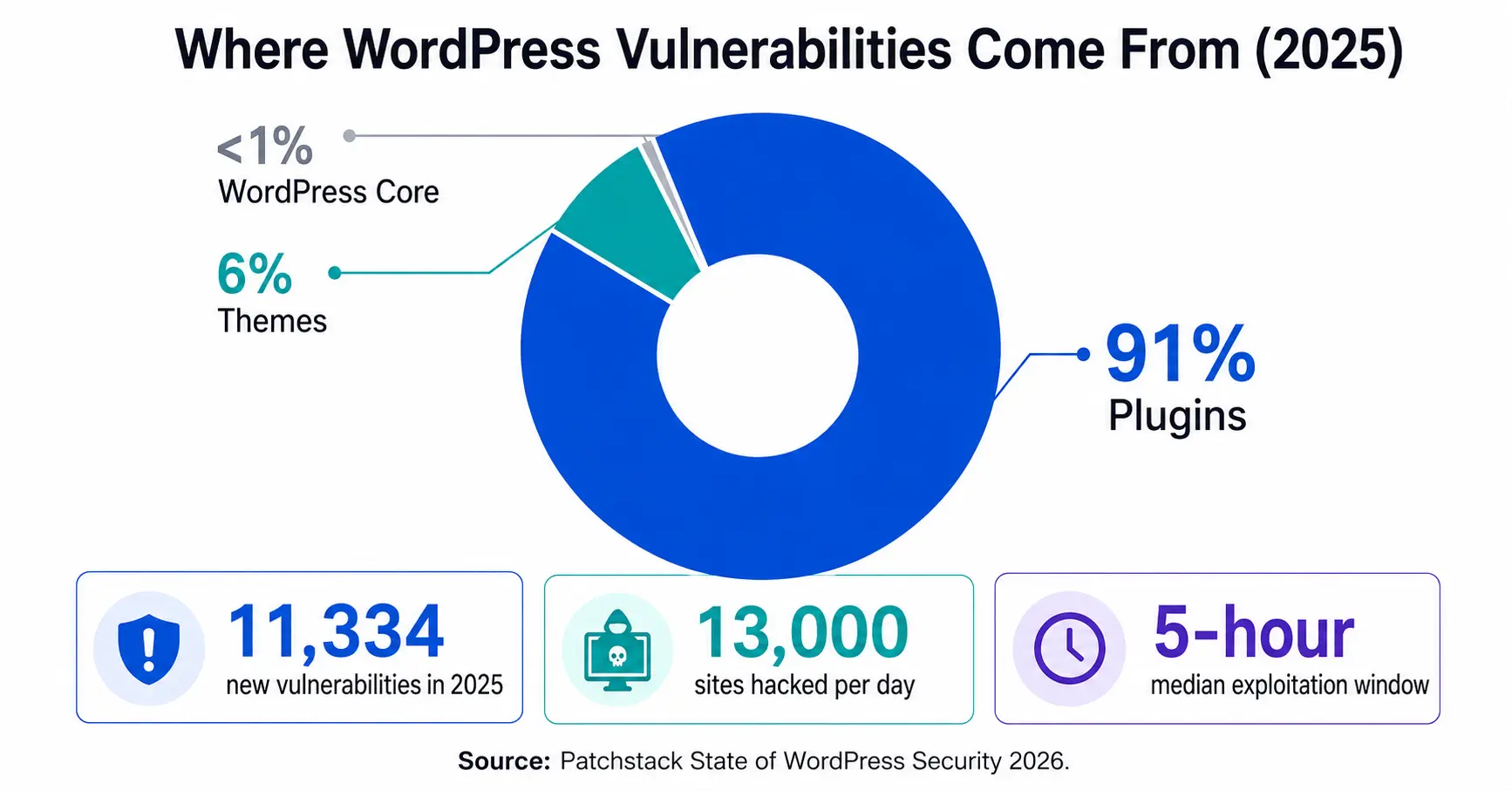
If you run a WordPress website, the threat environment in 2026 is more serious than it has ever been. Security researchers recorded 11,334 new WordPress vulnerabilities in 2025 alone, a 42 percent increase over the previous year, according to Patchstack’s State of WordPress Security 2026 whitepaper. Attackers now weaponise newly disclosed flaws within a median window of just five hours. That means the time between a vulnerability being made public and your site being scanned for it is shorter than your lunch break.
The good news is that WordPress core itself is remarkably solid. Only six vulnerabilities were discovered in the WordPress core codebase in all of 2025. The real risk lives in your plugins, your themes, your login page, and your hosting configuration. Each of those is something you can directly control.
This guide covers every practical step you need to secure a WordPress website in 2026: from updates and access controls to firewalls, backups, and monitoring. Work through it section by section and your site will be significantly harder to compromise than the average WordPress installation.
Why WordPress Security Is a Bigger Problem in 2026
The Scale of the Threat
WordPress powers 43.5 percent of the entire internet, which makes it the largest single target for automated hacking tools. Attackers do not pick individual victims and try to break in manually. They run bots that scan millions of sites simultaneously, testing for known vulnerabilities the moment a disclosure goes public.
Approximately 13,000 WordPress sites are compromised every day, roughly 4.7 million per year, as reported by Colorlib’s verified WordPress hacking statistics for 2026. Most of those owners had no idea their site was vulnerable until something went visibly wrong.
Where the Vulnerabilities Actually Come From
Understanding the source of risk helps you focus your effort. The breakdown from Patchstack’s 2026 research is clear:
- 91 percent of vulnerabilities come from plugins
- 6 percent come from themes
- Less than one percent come from WordPress core
Additionally, 43 percent of all 2025 vulnerabilities required zero authentication to exploit. An attacker did not need to steal a password or trick an admin. They just needed a vulnerable plugin to be installed and active. Cross-site scripting (XSS) accounted for 47.7 percent of all vulnerability types, making it the dominant attack category by a wide margin.
Step One: Keep Everything Updated
Why Updates Are Your First Line of Defence
Updates are the single most effective action you can take to secure a WordPress website. When a vulnerability is disclosed, the developer typically releases a patch. The problem is that 46 percent of WordPress vulnerabilities in 2025 had no patch available at the time of disclosure. That means even diligent site owners running updates the moment they appear can still be exposed.
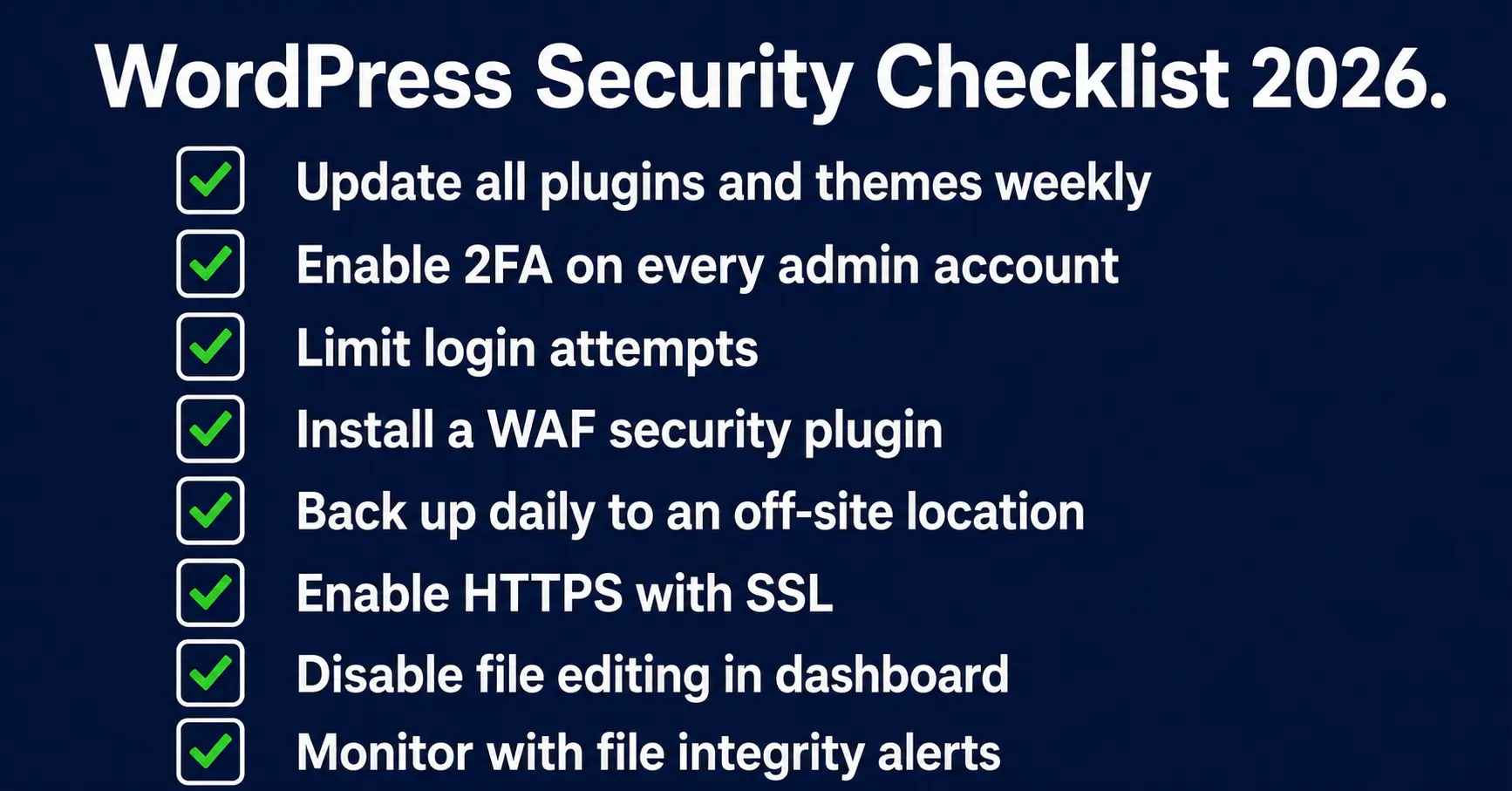
However, the sites most at risk are those running outdated software for weeks or months after patches are released. Enable automatic updates for WordPress core minor releases, and check your plugin and theme update queue at least once a week.
Managing Plugins to Reduce Your Attack Surface
Now, go through every plugin installed on your site. Ask two questions about each one: is it actively maintained by its developer, and does your site genuinely need it? If the answer to either question is no, delete it. Deactivated plugins still present a risk because their files remain on your server.
Reduce your plugin count as far as you can. Every plugin you remove is one fewer potential entry point for an attacker. Also, avoid plugins that have not received an update in over 12 months. Unmaintained plugins account for a disproportionate share of serious exploits.
Step Two: Harden Your Login and Access Controls
Use Strong Passwords and a Password Manager
Brute force attacks, where automated tools try thousands of password combinations per second, remain one of the most common WordPress attack methods. The defence is straightforward. Use a password that is long, random, and unique to your WordPress admin account. A password manager like Bitwarden or 1Password makes this easy to maintain without writing anything down.
Never reuse a password from another account on your WordPress login. If that other account is breached in an unrelated data leak, attackers run the recovered credentials against WordPress sites immediately. This technique is called credential stuffing, and it works because most people reuse passwords.
Enable Two-Factor Authentication
Two-factor authentication (2FA) requires a second verification step beyond your password, typically a time-based code from an app like Google Authenticator or Authy. Even if an attacker obtains your password, they cannot log in without the second factor.
Enable 2FA for every admin-level account on your site. Several free plugins handle this, including WP 2FA and the security suite from Wordfence. This one step eliminates the majority of credential-based attacks entirely.
Limit Login Attempts and Change the Login URL
By default, WordPress allows unlimited login attempts. This makes brute force attacks trivial to run. Install a plugin that limits failed login attempts, such as Limit Login Attempts Reloaded, and configure it to lock out IP addresses after three to five failed attempts.
Also consider changing your login URL from the default /wp-admin path. This does not stop a determined attacker but it significantly reduces the volume of automated scanning your login page receives every day. Plugins like WPS Hide Login handle this change in minutes.
Step Three: Install a Web Application Firewall
What a WAF Does and Why You Need One
A web application firewall (WAF) sits between your website and incoming traffic, blocking malicious requests before they reach your WordPress files. It filters out SQL injection attempts (where attackers try to manipulate your database through form inputs), XSS attacks, and requests that match known exploit patterns.
Standard hosting defences block only about 26 percent of WordPress-specific exploits, according to Patchstack’s 2026 findings. A dedicated WAF raises that coverage substantially. Traditional firewalls block only 12 percent of WordPress-specific attacks, as noted by Colorlib’s 2026 WordPress security data, which means a purpose-built WordPress security layer is essential rather than optional.
Choosing the Right Security Plugin
Several well-established WordPress security plugins include WAF functionality. The most widely used options in 2026 are:
- Wordfence Security — includes an endpoint firewall, malware scanner, and real-time threat intelligence feed. Free tier available with premium upgrades.
- Sucuri Security — offers a cloud-based WAF, malware scanning, and post-hack cleanup. Strong choice for business-critical sites.
- Solid Security (formerly iThemes Security) — covers login hardening, file change detection, and 2FA in a single plugin.
- Patchstack — focuses specifically on vulnerability patching and virtual patches for plugins before official fixes are released.
Therefore, choose one comprehensive security plugin rather than installing several that overlap in function. Conflicting security plugins can create gaps or cause performance issues.
Step Four: Set Up Regular Backups
Why Backups Are Non-Negotiable
A backup is your recovery option when everything else fails. If your site is compromised, infected with malware, or broken by a bad update, a clean backup lets you restore to a known-good state without starting from scratch. Without one, you face the prospect of rebuilding your entire site from memory.
The average cost of recovering from a WordPress hack is estimated at $14,500 when you factor in malware removal, developer time, downtime, lost revenue, and SEO damage, according to analysis compiled by Hide My WP Ghost’s 2025 to 2026 WordPress security statistics. Against the cost of a reliable backup solution, that number makes the decision straightforward.
How to Back Up Your Site Properly
Follow these principles when setting up your backup system:
- Back up both your database and your files. A database backup without your uploads folder is incomplete.
- Store backups off-site, away from your hosting server. If the server is compromised, on-server backups may also be infected.
- Run daily backups for active sites and weekly backups for lower-traffic ones.
- Test your backups periodically by restoring to a staging environment. An untested backup is an assumption, not a safety net.
Reliable backup plugins include UpdraftPlus, BlogVault, and WPvivid. Many quality managed WordPress hosts also include automated daily backups as part of their plans.
Step Five: Secure Your WordPress Configuration
Move to HTTPS and Keep Your SSL Certificate Active
HTTPS encrypts the data travelling between your visitors’ browsers and your server. In 2026, every WordPress site should run on HTTPS as a baseline. Most hosting providers include free SSL/TLS certificates through Let’s Encrypt. If yours does not, it is worth switching hosts.
Also, set up a redirect so that all HTTP traffic automatically goes to the HTTPS version of your site. This prevents visitors from accidentally loading the unencrypted version, which could expose login credentials or form submissions.
Disable File Editing and Protect wp-config.php
WordPress includes a built-in code editor in the admin dashboard that lets you edit plugin and theme files directly. This is a significant risk if an attacker gains admin access. Disable it by adding the following line to your wp-config.php file:
define(‘DISALLOW_FILE_EDIT’, true);
Also, protect your wp-config.php file, which contains your database credentials and security keys. Move it one directory level above your WordPress root, or add rules to your .htaccess file to block direct access to it. Your hosting provider’s support team can walk you through this if you are not comfortable editing server configuration files.
Change the Default Database Prefix
By default, WordPress uses the prefix “wp_” for all database tables. Automated attack tools know this and use it in SQL injection attempts. Changing the prefix to something random, like “xq47_”, breaks a large proportion of automated database attacks. Most WordPress security plugins include a tool to make this change safely without manually editing your database.
Step Six: Monitor Your Site for Threats
Set Up File Integrity Monitoring
File integrity monitoring (FIM) tracks changes to your WordPress core files and alerts you when something is modified unexpectedly. If an attacker injects malicious code into a legitimate plugin file, FIM catches it. This matters because attackers in 2026 increasingly inject code directly into existing WordPress files rather than dropping standalone malicious files, making traditional malware scans less effective on their own.
69.6 percent of hacked WordPress sites contain unauthorised backdoors, meaning attackers leave a hidden entry point to return even after the visible malware is cleaned up. File integrity monitoring, combined with an activity log, is the most reliable way to detect this kind of intrusion early.
Keep an Activity Log
An activity log records every significant action on your site: login attempts, plugin installations, settings changes, and file modifications. When something goes wrong, the log tells you exactly what happened and when. Without it, you are trying to diagnose an incident with no evidence.
The WP Activity Log plugin is a dedicated, well-maintained tool for this purpose. Set it to retain logs for at least 90 days, which covers the typical detection window for slow-moving compromises that might not trigger immediate alerts.
Step Seven: Choose Secure Hosting
Why Your Host Is Part of Your Security Stack
Your hosting environment is the foundation everything else sits on. A poorly configured shared hosting server can expose your site to vulnerabilities from neighbouring accounts, a technique called cross-site contamination. Managed WordPress hosting providers isolate accounts at the server level and apply server-side security rules that shared hosting typically does not.
When evaluating a host, look for these features as a minimum standard:
- PHP 8.2 or later (older PHP versions no longer receive security updates)
- Automatic daily backups stored off-site
- A server-level WAF
- Malware scanning and removal support
- SSL certificate included
- Isolated account environments
Reputable managed WordPress hosts include Kinsta, WP Engine, and Cloudways. For smaller budgets, SiteGround and Hostinger both offer solid security features at lower price points, according to Search Engine Journal’s coverage of the Patchstack 2026 security report.
Step Eight: Harden Against AI-Powered Threats
The New Attack Surface in 2026
One development that makes 2026 distinct from earlier years is the emergence of AI-generated code as an attack surface. Research published in 2025 found that approximately 45 percent of code produced by current AI coding tools contains security flaws. Sites built with AI-generated custom plugins or themes introduce vulnerabilities that standard scanning tools designed for the WordPress plugin repository may not detect.
If your site uses any AI-generated code, have it reviewed by a developer with security experience before deploying it in a production environment. This applies to custom plugins, theme modifications, and any JavaScript added to your site through code injection tools. The Patchstack vulnerability intelligence platform now specifically covers this category of risk, as detailed in Patchstack’s mid-year 2025 vulnerability report.
Frequently Asked Questions
How often should I update my WordPress plugins?
Check for plugin updates at least once per week. For high-traffic or business-critical sites, enable automatic updates where the plugin developer supports them. Given that attackers exploit new vulnerabilities within five hours of disclosure, waiting more than a week to apply patches creates a meaningful window of exposure.
Do I need a security plugin if my host already has a firewall?
Yes. Server-level firewalls and hosting security tools block only about 26 percent of WordPress-specific exploits on average. A dedicated WordPress security plugin adds an application-level layer that catches threats the hosting firewall does not see. Both layers together provide substantially better protection than either alone.
What is the most common way WordPress sites get hacked?
Vulnerable plugins account for 91 percent of WordPress security incidents. The second most common entry point is weak or reused admin passwords targeted through brute force or credential stuffing attacks. Keeping plugins updated and using strong unique passwords with two-factor authentication eliminates the vast majority of risk.
How do I know if my WordPress site has already been hacked?
Warning signs include unexpected redirects, new admin users you did not create, Google search results showing spam links, and your hosting provider sending malware alerts. Run a malware scan using Wordfence or Sucuri immediately if you notice any of these. Remember that 69.6 percent of hacked sites contain backdoors, so a full audit is necessary even after visible malware is removed.
Is managed WordPress hosting worth the extra cost for security?
For any site that generates income or holds user data, yes. Managed hosts provide server-level isolation, automatic patching, daily backups, and expert support during incidents. The cost difference is small compared to the $14,500 average recovery cost after a serious compromise.
Can I secure a WordPress website myself without hiring a developer?
Yes, for the majority of the steps covered in this guide. Enabling 2FA, installing a security plugin, setting up backups, and keeping software updated are all actions any site owner can complete without technical expertise. For advanced hardening like wp-config.php changes or database prefix modifications, a security plugin typically handles these safely through its own interface.
Conclusion
The scale of the threat facing WordPress sites in 2026 is real. Over 11,000 new vulnerabilities in a single year, 13,000 sites compromised every day, and an exploitation window measured in hours rather than days. However, the response does not need to be complicated. The sites that get hacked are overwhelmingly those running outdated software, using weak passwords, and relying on hosting security alone.
To secure a WordPress website effectively, you need layers: updated software, strong access controls, a dedicated firewall, regular backups, and active monitoring. None of these steps individually guarantees protection. Together, they make your site a significantly harder target than the millions of unprotected WordPress installations that automated attack tools sweep through every day.
Start today with the two highest-impact actions: update every plugin and theme, and enable two-factor authentication on your admin account. Those two steps alone close off the attack vectors responsible for the majority of successful WordPress compromises. Every additional step you take from this guide raises your site’s security baseline further and narrows the window attackers have to work with.
For ongoing vulnerability intelligence specific to WordPress, the Patchstack vulnerability database is the most comprehensive free resource available and updates in real time as new flaws are disclosed. Bookmark it, check it regularly, and treat WordPress security as a process rather than a one-time task.

Prince Anichi
Founder and Lead Technology Editor at Ortechy. Covering digital economy shifts, tech ecosystems across Africa, cybersecurity intelligence, and emerging software platforms.