How to Use ChatGPT for CVs, Emails, and Proposals
Nearly half of recent job seekers have already used ChatGPT for CVs, emails, and proposals, and most of them say it worked. This shift did not happen quietly. It happened fast, and it changed how professionals across Africa and beyond approach everyday writing tasks.
This guide covers exactly how to use ChatGPT for CVs, emails, and proposals without sounding like everyone else who typed the same lazy prompt. You will get real prompts, honest data on what works, and a clear list of the mistakes that give AI writing away.
Now let us look at why so many professionals have already made the switch, and what the data actually shows about the results.
Why Professionals Are Turning to ChatGPT for CVs, Emails, and Proposals
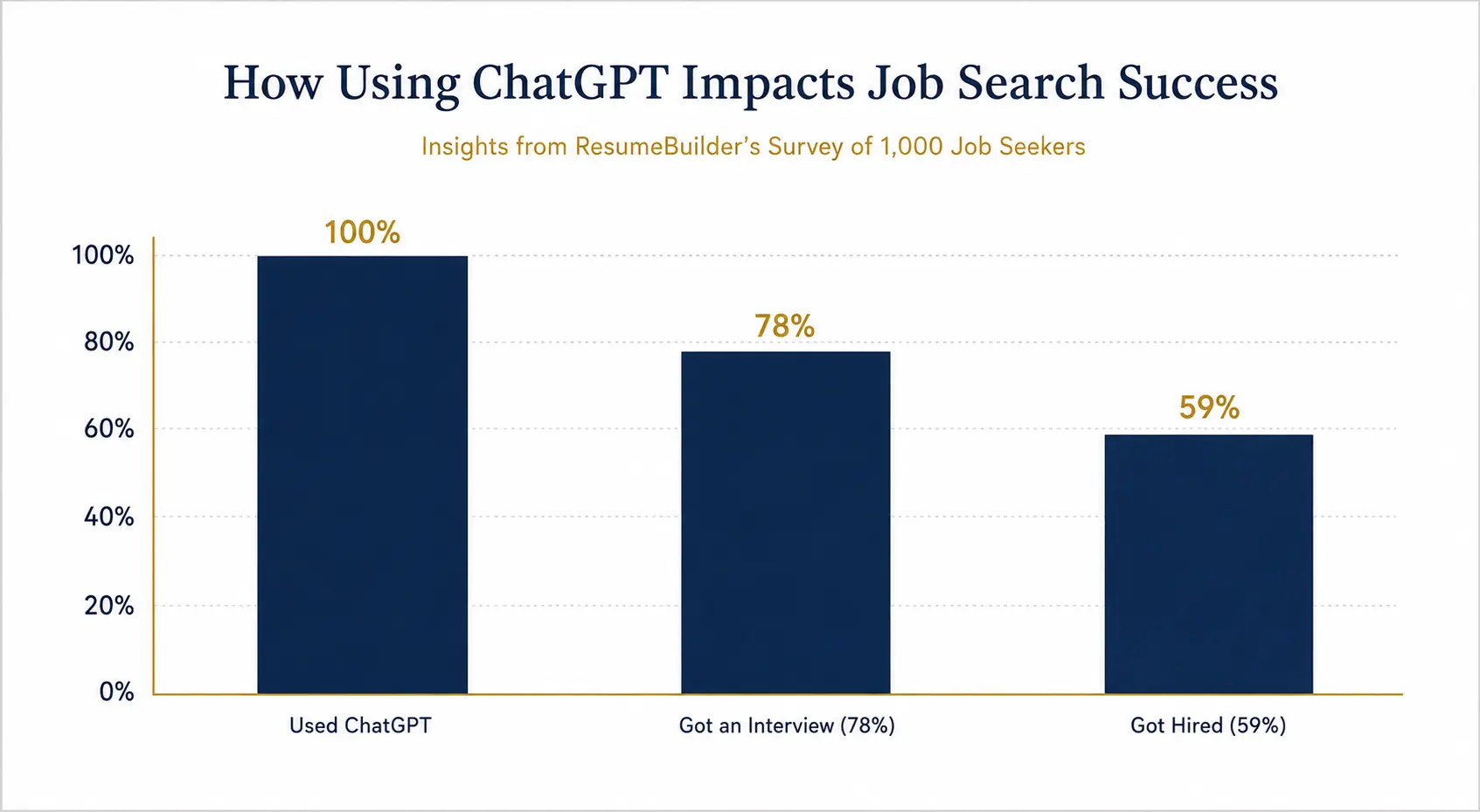
Time pressure is the biggest driver. A ResumeBuilder.com survey of over 1,000 job seekers found that nearly half had used ChatGPT to help write a resume, a cover letter, or both. Most were applying to many roles at once and simply did not have hours to spare per application.
The results surprised even the researchers. Seventy-eight percent of ChatGPT users landed an interview, and 59 percent were eventually hired using materials the chatbot helped write. Nearly seven in 10 said they saw a higher response rate from employers after switching to AI-assisted drafts.
However, this is not a story about typing one prompt and winning instantly. A pre-registered study published in the journal Science by researchers Noy and Zhang found that ChatGPT cut writing time by roughly 40 percent on real workplace tasks and lifted graded quality by about 18 percent. That is the pattern worth remembering: ChatGPT works best as an editor and accelerator, not a ghostwriter starting from nothing.
The Trade Off Recruiters Are Watching For
There is a catch. Research compiled on hiring data shows that 49 percent of hiring managers say they automatically dismiss résumés they suspect were AI-generated, and 62 percent reject AI-written material that feels generic or unpersonalised.
Here is the twist though. The same research shows hiring managers are far less accurate at spotting AI writing than they believe. When tested blind, detection accuracy dropped to around 33 percent, even though most managers claimed they could catch it every time. This means the real risk is not that you used ChatGPT. The real risk is submitting something generic.
How to Use ChatGPT to Write a Better CV
A strong CV prompt gives ChatGPT real material to work with. Vague prompts produce vague output, and vague output is exactly what gets flagged.
Give It Your Actual Achievements First
Before you open ChatGPT, list your specific wins. Include numbers, results, and names of tools or platforms you used. Then ask ChatGPT to turn that raw list into polished CV bullet points rather than asking it to invent your career from a job title.
A useful prompt looks like this:
- “Rewrite these achievements as CV bullet points for a [job title] role. Lead each bullet with a strong action verb, include a measurable result, and keep each line under 20 words.”
- “Compare this CV against this job description and list the keywords I am missing.”
- “Rewrite my summary paragraph so it sounds confident but not exaggerated, in plain language a hiring manager would actually say out loud.”
Let ChatGPT Handle Keywords, Not Your Voice
Applicant tracking systems scan for keyword matches to the job description, correct formatting, and complete sections. They do not check whether a human or an AI typed the words. So the smartest use of ChatGPT here is keyword matching and structure, while your actual sentences stay in your own voice.
This means the 20 to 40 percent rule works well in practice. Let AI handle formatting, keyword alignment, and first drafts. Then rewrite the substance yourself with real numbers and details only you would know.
Common CV Mistakes ChatGPT Makes, and How to Fix Them
Because ChatGPT predicts likely word patterns, it tends to repeat certain phrases across thousands of users. Watch for these patterns before you submit anything.
- Generic power phrases. Terms like “results-driven professional” or “proven track record” appear so often that recruiters now treat them as filler. Replace them with your actual result.
- Invented specifics. If you did not give ChatGPT a number, it may still produce one. Always verify every statistic, percentage, and dollar figure before it goes on your CV.
- Overly balanced sentence lengths. Human writing naturally varies. AI drafts often fall into a steady rhythm that reads as slightly robotic. Break that pattern by shortening some lines and letting others run longer.
- Missing personal context. ChatGPT does not know your actual manager, project name, or client. Add these details yourself after the first draft.
How to Use ChatGPT to Write Professional Emails That Get Replies
Email is where ChatGPT often earns its keep the fastest, because most business emails follow a predictable shape: context, ask, and next step.
Prompts for Everyday Business Emails
Give ChatGPT the purpose, the recipient, and the tone you want. Skipping these details is the main reason people get flat, generic-sounding drafts.
- “Write a follow-up email to a client after a proposal call. Reference [specific detail discussed], thank them for their time, and ask one direct question about next steps. Keep it under 120 words.”
- “Draft a polite email declining a partnership request. Keep the door open for future opportunities and avoid sounding dismissive.”
- “Write a price negotiation email to a supplier. We currently pay [amount] and want to move to [amount] because our order volume increased. Keep the tone respectful and firm.”
Because 83 to 87 percent of hiring managers and business contacts still read written communication carefully before responding, according to research on cover letters and written applications in the AI era, the quality of your email still directly shapes whether you get a reply at all.
Refining Tone Without Starting Over
Rather than rewriting a draft from scratch, ask ChatGPT to adjust what already exists. This saves time and keeps your original structure intact.
Try phrases such as “make this warmer without losing professionalism,” “cut this to under 100 words,” or “remove any phrase that sounds like a template.” These small nudges usually produce a far better second draft than starting over.
How to Use ChatGPT to Write Business Proposals That Win Clients
Proposals carry more risk than emails because they often include pricing, scope, and legal commitments. This is exactly where unedited AI drafts cause the most damage.
Build the Proposal Section by Section
Asking ChatGPT to write an entire proposal in one prompt usually produces a generic result. Instead, work through it piece by piece: executive summary, problem statement, proposed solution, timeline, and investment breakdown.
A stronger approach looks like this:
- “Write an executive summary for a proposal to [client name] offering [service]. Open with the outcome they will get, not a description of our company.”
- “Turn these discovery call notes into a problem statement that shows we understood the client’s specific pain points: [paste notes].”
- “Write a pricing section that justifies a [amount] investment by comparing it to the cost of doing this task in-house.”
Fact Check Every Number and Case Study
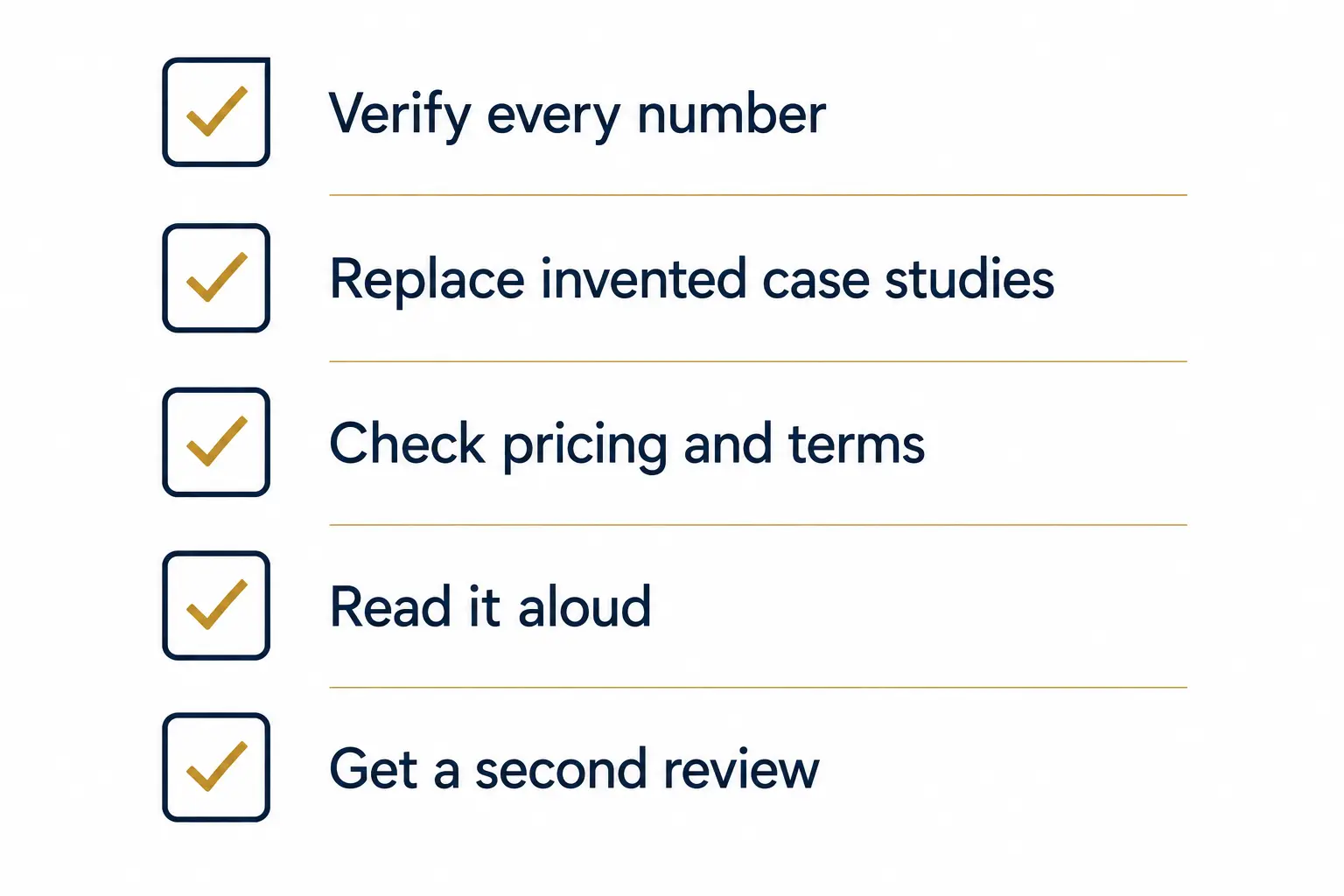
This is the single most important rule for business proposals. Guidance on writing business proposals with ChatGPT points out that the tool can fabricate plausible sounding statistics and even invent case studies if you ask for a relevant example and do not supply a real one.
Before sending anything, verify every statistic, replace any invented case study with a real client result, and have a second person review the scope of work, payment terms, and any binding language. AI can draft structure. It cannot vouch for accuracy or carry legal responsibility for what it wrote.
Watch for the Tells
Overused em dashes, unnaturally balanced paragraph lengths, and phrases like “in today’s fast-paced world” are common giveaways that a proposal was not edited after ChatGPT generated it. Read the draft aloud. If it does not sound like something you would actually say to a client on a call, rewrite that section in your own words.
A Simple Workflow for CVs, Emails, and Proposals
Once you understand the risks and the prompts, the actual workflow becomes simple. Follow this sequence for any document type.
- Gather your raw material first: achievements, notes, discovery call details, or the specific ask.
- Give ChatGPT a detailed prompt with role, tone, audience, and word count.
- Generate a first draft and treat it as a rough skeleton, not a finished document.
- Replace generic phrases, invented numbers, and template language with your real details.
- Read the final version aloud to confirm it sounds like you.
- For proposals with pricing or legal terms, have a second person check the specifics before sending.
In practice, this workflow takes only a few minutes longer than copying and pasting an unedited draft, and it is the difference between a document that gets a reply and one that gets ignored.
What Do I Think About Using ChatGPT for CVs, Emails, and Proposals
The data tells a consistent story. ChatGPT genuinely helps with speed and structure, and job seekers who use it well report stronger interview and response rates. At the same time, hiring managers and clients increasingly reject writing that feels generic, even though they are worse at spotting AI than they think.
The professionals who win with ChatGPT for CVs, emails, and proposals are not the ones who avoid it, and they are not the ones who paste its output straight into a document either. They are the ones who treat it as a fast first draft and then do the real work of adding their own voice, their own numbers, and their own judgment.
That balance is the entire skill. Use ChatGPT to remove the blank page problem, then use your own experience to remove everything that sounds like a template.
For further reading on how job seekers are using AI in hiring, see the original reporting from Computerworld’s coverage of ChatGPT in job applications.
Frequently Asked Questions
Can recruiters tell if I used ChatGPT for my CV?
Most claim they can, but blind testing puts real detection accuracy closer to 33 percent. The bigger issue is generic phrasing, not AI use itself, so personalise every draft heavily.
Is it safe to use ChatGPT for a formal business proposal?
Yes, for structure and drafting. No, for final numbers, case studies, or legal terms without independent verification, since ChatGPT can produce confident but inaccurate details.
How much of my CV should come directly from ChatGPT?
A useful guideline is 20 to 40 percent AI assistance, mainly for formatting and keyword alignment, with your own achievements and voice making up the rest.
What is the biggest mistake people make with ChatGPT emails?
Sending the first draft without edits. Generic openers and uniform sentence lengths are easy to spot, so always adjust tone and add one specific detail only you would know.
Should I mention ChatGPT skills on my CV?
If AI tools are relevant to the role, such as in marketing, content, or analytics, yes. It is becoming a common and expected skill listing in those fields.
Can ChatGPT write an entire proposal in one prompt?
It can, but the result is usually generic. Building the proposal section by section, with your own notes and details fed in at each step, produces a far stronger document.

Prince Anichi
Founder and Lead Technology Editor at Ortechy. Covering digital economy shifts, tech ecosystems across Africa, cybersecurity intelligence, and emerging software platforms.