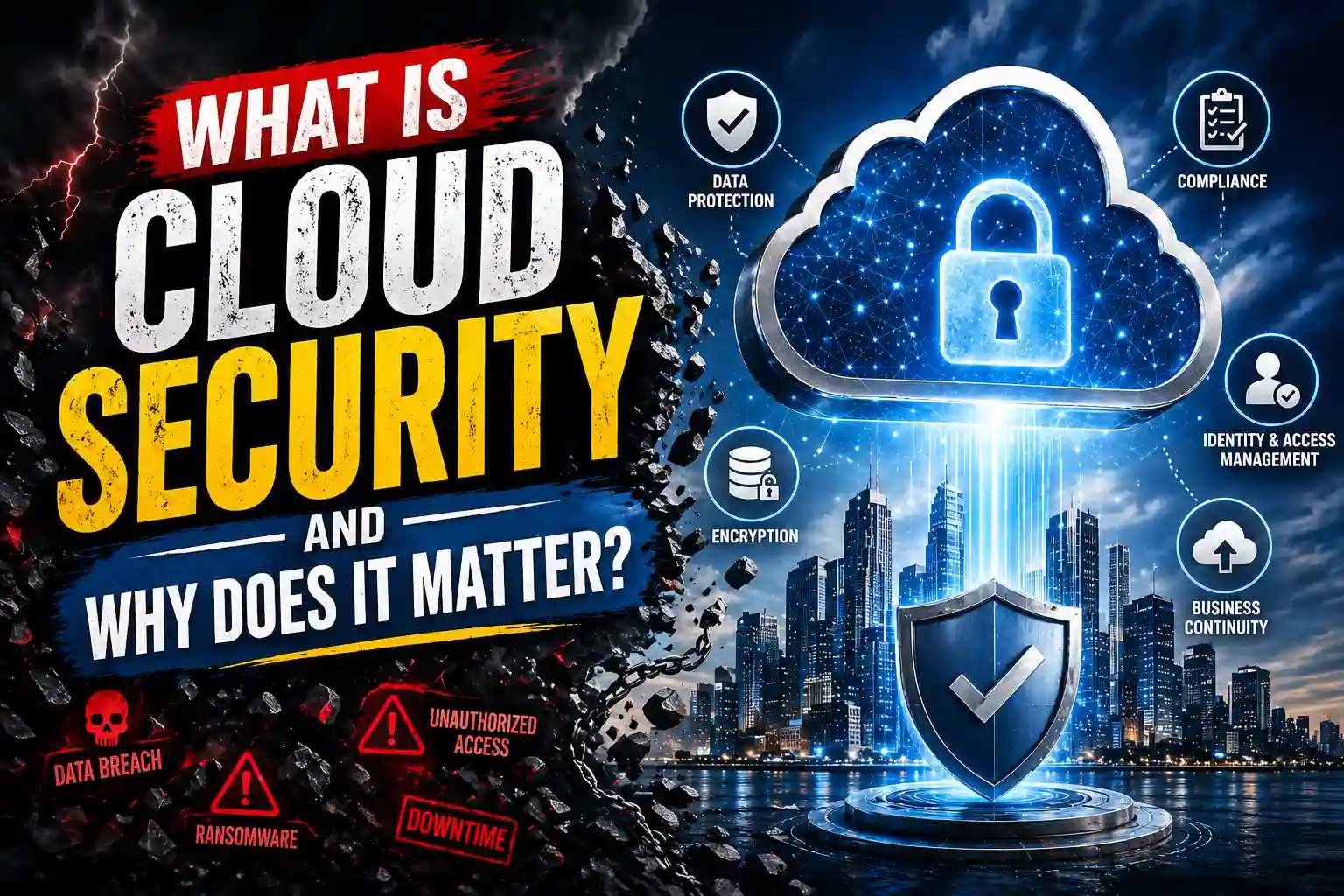
What Is Cloud Security? The Complete Beginner’s Guide for 2026
INTRODUCTION
What is cloud security and why does every business owner, IT professional, and everyday person need to understand it right now? Cloud computing has moved from being a cutting-edge technology to the invisible backbone of modern life. Your emails, banking apps, streaming services, work documents, medical records, and social media accounts all live in the cloud. And wherever your most sensitive data lives, threats follow.
In 2026, the stakes have never been higher. A year-over-year surge in significant cloud breaches reached 154 percent, with 61 percent of organisations reporting major incidents in 2024. The average cost of a single data breach now stands at $4.44 million globally and $10.22 million for US organisations specifically. More than 51 percent of companies plan to increase their cloud security budgets this year, because the alternative is simply too expensive to consider.
This guide explains what cloud security is, how it works, what threatens it, which technologies protect it including the increasingly important Trusted Execution Environment (TEE), and what best practices every person and organisation needs to follow starting today.
What Is Cloud Security? A Simple, Clear Definition
Cloud security is the collection of technologies, policies, controls, and practices that protect cloud-based data, applications, and infrastructure from threats, theft, and unauthorised access. It covers everything stored, processed, or transmitted through cloud services including public clouds like AWS, Azure, and Google Cloud, private clouds operated by individual organisations, and hybrid environments that combine both.
Think of cloud security as the combination of locks, alarm systems, security guards, surveillance cameras, and access control policies that protect a physical building, but applied to the digital infrastructure where your most valuable data lives. The building in this case is not a place you can visit. It is a globally distributed network of servers, databases, and applications that you access from any device at any time.
Cloud security is not one single product or service. It is a discipline that combines multiple layers of protection working together. These layers include identity and access management, data encryption, network security, threat detection, compliance frameworks, incident response plans, and hardware-level protections like the Trusted Execution Environment (TEE).
Cloud Security vs Traditional IT Security
Traditional IT security protected a physical perimeter. Your company’s data lived on servers inside a building. You built a firewall around it, locked the doors, and controlled who walked in. If someone was inside the perimeter they were trusted. If they were outside they were blocked.
Cloud security works completely differently. There is no physical perimeter to protect. Your data lives across multiple data centres in different countries, your employees access it from home offices, coffee shops, airports, and mobile devices, your applications connect to dozens of third-party services. The old perimeter security model simply does not work in this environment.
Modern cloud security replaces the perimeter model with a philosophy called zero trust, which operates on the principle of “never trust, always verify.” Every user, device, and application must continuously prove who they are and what they are authorised to access regardless of where they connect from.
Why Cloud Security Matters More Than Ever in 2026
Understanding what cloud security is becomes much more urgent when you see the scale of what is happening right now. The numbers from the 2026 State of Cloud Security Report paint a sobering picture that every organisation needs to take seriously.
- 71 percent of business leaders reported a high rise in attack frequency in 2025 and 2026
- 70 percent of organisations rate identity and access management as their top cloud security risk due to insecure identities and overprivileged accounts
- 88 percent of organisations now operate in hybrid or multi-cloud setups, each one increasing the attack surface
- 66 percent of security leaders lack confidence in their ability to detect and respond to cloud threats in real time
- 27 percent of public cloud users faced a security incident in 2024, up 10 percent from the previous year with an average of 43 misconfigurations per account
- Breaches spanning multiple cloud environments take an average of 276 days to identify and contain, with healthcare incidents extending to 279 days
These are not statistics about large corporations only. Small businesses, freelancers, healthcare providers, schools, and individuals all use cloud services. All of them face cloud security risks proportional to the sensitivity of the data they store and process. For a deeper dive into the current threat landscape read
SentinelOne’s comprehensive 2026 cloud security statistics report
which tracks breaches, misconfigurations, and compliance failures across all industries.
The Shared Responsibility Model: Who Is Responsible for Cloud Security
One of the most important concepts in cloud security basics is the shared responsibility model. Understanding this concept prevents the most dangerous misconception in cloud computing: the belief that your cloud provider handles all of your security for you.
Cloud providers and their customers share security responsibilities, but they divide those responsibilities at a clear boundary. The cloud provider secures the infrastructure that runs the cloud. The customer secures everything they put in the cloud and how they configure it.
What Your Cloud Provider Secures
Your cloud provider secures the physical infrastructure. This includes the data centre buildings, the physical server hardware, the networking equipment, the virtualisation layer, and the hypervisor software that creates virtual machines. AWS, Google Cloud, and Microsoft Azure all invest billions of dollars per year in physical and infrastructure-level security that individual organisations could never afford to replicate.
What You Are Responsible For
You are responsible for everything above the infrastructure layer. This includes configuring your cloud services securely, managing who can access your data and applications, encrypting data at rest and in transit, patching your own applications and operating systems, setting appropriate permissions and access controls, monitoring for suspicious activity within your own accounts, and complying with any regulations that apply to the data you store.
This is where most cloud security incidents originate. IBM’s 2025 data confirmed that human error caused 26 percent of breaches and IT failures accounted for a further 23 percent. A survey of cloud environments found that 32 percent of cloud assets still sit completely unmonitored, each carrying an average of 115 vulnerabilities. The cloud provider did nothing wrong in those situations. The customer simply misconfigured their own setup.
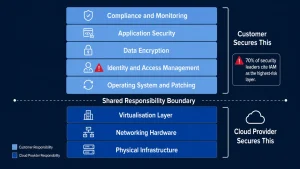
protection duties between the cloud provider and the
customer. Most breaches occur in the customer-controlled
layers especially identity and access management which
70 percent of security leaders identify as their
highest risk area.
The Biggest Cloud Security Threats You Need to Know About
Now that you understand what cloud security is and who is responsible for what, you need to understand the threats. These are the attack methods that are actually causing the most damage to cloud environments in 2026.
1. Misconfiguration: The Number One Cloud Security Risk
Misconfiguration is the single most common cause of cloud security incidents. Analysts project that 99 percent of cloud breaches result from misconfigurations largely driven by human error. A misconfigured storage bucket left public, an IAM policy granting admin rights to a read-only account, or a default network rule allowing inbound traffic from all sources can each expose your entire environment to anyone with a simple automated scanner.
None of these require a sophisticated attacker. They require one scan. And with 43 misconfigurations per account on average across public cloud deployments, the odds are not in favour of unmanaged environments.
2. Identity and Credential Theft
Stolen credentials remain the most common initial access vector for cloud attacks, responsible for 22 percent of all confirmed breaches. Attackers steal usernames and passwords through phishing attacks, purchase them from dark web marketplaces, or find them hardcoded in public code repositories on GitHub. Once they have valid credentials they bypass most perimeter security controls entirely and operate as a legitimate user.
Non-human identities have also become a primary target. Service accounts, API keys, and automated pipeline tokens now outnumber human identities by 45 to 1 in cloud environments. Many of these non-human identities hold excessive permissions and receive far less monitoring than human user accounts.
3. Ransomware in the Cloud
Ransomware attacks hit 78 percent of companies over the past year with projected growth of 40 percent by the end of 2026. Attackers now specifically target cloud backups, knowing that encrypting backup data forces organisations to pay ransoms even when they have recovery procedures in place. A successful ransomware attack in a cloud environment can cost organisations millions in ransom payments, recovery costs, and regulatory fines before any reputational damage is counted.
4. AI-Powered Phishing and Social Engineering
AI-driven phishing attacks are projected to exceed 42 percent of all global intrusions by the end of 2026. Hackers now use AI to generate highly personalised phishing emails that impersonate executives, colleagues, vendors, and service providers with unprecedented accuracy. These attacks bypass traditional email filters and fool even security-aware employees because the content is contextually accurate and grammatically perfect.
5. Supply Chain Attacks
Supply chain attacks target your cloud environment through third-party integrations, SaaS vendors, and open-source components. A breach in one vendor or integration can compromise your entire multi-cloud environment even if your own configuration is perfect. Attackers specifically seek out smaller suppliers with weaker security postures knowing they serve as pathways into larger, better-protected targets.
6. API Vulnerabilities
APIs serve as the backbone of communication across multi-cloud environments, but broken authentication, excessive permissions, missing rate limiting, and insufficient access controls make them prime targets. Defenders frequently struggle to monitor API traffic consistently across providers, creating blind spots that attackers actively probe and exploit.
Key Cloud Security Technologies That Protect Your Data
Understanding what cloud security is in practical terms requires knowing the specific technologies that do the protecting. Here are the most important tools and approaches operating in cloud environments right now.
Encryption: Your First Line of Defence
Encryption converts your data into an unreadable format that only authorised parties with the correct key can access. Strong cloud security encrypts data in three states. At rest, your stored data is encrypted on disk so that physical access to a storage device yields nothing readable. In transit, data moving between systems uses TLS encryption to prevent interception. And increasingly, in use, data remains encrypted even while being processed thanks to technologies like confidential computing.
Every major cloud provider offers encryption at rest by default for most storage services, and encryption in transit for most data transfer channels. Organisations need to verify these defaults are active for every service they use and manage their own encryption keys wherever possible rather than relying solely on provider-managed keys.
Trusted Execution Environments (TEE): Protecting Data in Use
A Trusted Execution Environment (TEE) is a hardware-secured isolated region inside a processor that keeps sensitive data encrypted even while it is being processed. This solves a problem that encryption alone cannot: protecting data from anyone with privileged access to the host system, including cloud providers, operating system administrators, and even compromised hypervisors.
TEE technology is the foundation of confidential computing, which is becoming a critical layer in cloud security architectures for healthcare, financial services, AI model training, and any workload involving highly sensitive data. Major TEE implementations include Intel SGX, Intel TDX, and AMD SEV-SNP, all of which are available through cloud providers including AWS, Azure, and Google Cloud.
TEEs protect data that conventional security controls cannot reach. When a cloud provider, a system administrator, or a compromised piece of software tries to access data inside a TEE it sees nothing but encrypted output. The data is only ever decrypted inside the hardware-enforced enclave where the authorised workload is running.
TEEs also include an attestation mechanism that allows a workload running inside an enclave to cryptographically prove to any external party that it is genuinely running in a trusted and unmodified environment. This attestation capability makes TEEs particularly valuable for multi-party data sharing scenarios where different organisations need to collaborate on sensitive data without any party gaining access to the other’s raw inputs.
Zero Trust Architecture
Zero trust is the security philosophy that no user, device, or application receives automatic trust simply by being inside the network or holding valid credentials. Every access request is continuously verified, every permission is evaluated against the least-privilege principle, and every session is monitored for anomalous behaviour.
Google’s BeyondCorp implementation is the most famous real-world zero trust deployment and it replaced VPN-based remote access with a system where access decisions are based on verified user identity and device health rather than network location. Zero trust architecture has become the dominant security model for cloud environments precisely because the cloud has no meaningful perimeter to defend.
Cloud Security Posture Management (CSPM)
CSPM tools continuously scan your cloud environments for misconfigurations, policy violations, and compliance failures. They map every resource across all your cloud accounts, check each one against security best practices and compliance frameworks, and alert you when something drifts from a secure configuration. CSPM tools are no longer optional for any organisation running meaningful cloud workloads.
Identity and Access Management (IAM)
IAM controls who can access which cloud resources and under what conditions. A strong IAM implementation enforces the principle of least privilege, granting users and services only the permissions they genuinely need for their specific tasks. It enforces multi-factor authentication for all human users, rotates credentials and API keys regularly, monitors for unusual access patterns, and flags or blocks anomalous activity automatically.
Cloud Detection and Response (CDR)
CDR platforms continuously monitor your cloud environment for signs of active threats and respond automatically when they find them. They correlate events across logs, network traffic, identity activity, and application behaviour to identify attack patterns that individual point solutions miss. In a world where breaches take 276 days on average to detect without dedicated monitoring, CDR platforms are among the highest-value security investments available.
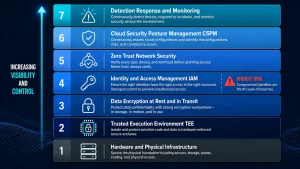
technology layers working together. The Trusted Execution
Environment (TEE) sits close to the hardware layer,
protecting data even when the operating system and
hypervisor above it are compromised.
Cloud Security Best Practices Every Organisation Must Follow
Knowing what cloud security is and which technologies exist is only valuable when you translate it into action. These are the specific practices that security experts and industry reports consistently identify as the highest-impact steps you can take to protect your cloud environment.
Enable Multi-Factor Authentication on Every Account
Multi-factor authentication (MFA) is the single highest-impact low-cost action available to any cloud user. MFA requires a second form of verification beyond a password, such as a code from an authenticator app or a biometric scan. Even if an attacker steals or guesses a password they cannot access the account without the second factor. Enable MFA for every user account with cloud access and make no exceptions for administrators or executives who are specifically targeted by attackers because of their elevated permissions.
Apply the Principle of Least Privilege
Every user, service account, and application should hold only the permissions they genuinely need and nothing more. Audit your IAM policies regularly and remove any permissions that are not actively used. Use cloud provider tools like AWS IAM Access Analyzer or Google Cloud Policy Intelligence to identify and scope down overly permissive policies. Excessive permissions are one of the fastest pathways from initial access to full account compromise.
Encrypt All Data at Rest and in Transit
Verify that every storage bucket, database, and volume uses encryption at rest and that all data transfers between services use TLS 1.2 or higher. Where possible, manage your own encryption keys using a dedicated key management service rather than relying solely on cloud provider-managed keys. Key management control gives you the ability to revoke access immediately if keys are compromised without depending on the provider to act on your behalf.
Monitor Continuously and Set Alerts Proactively
Threats that you do not detect cannot be contained. Enable logging for all cloud services and centralise those logs in a SIEM or CDR platform that can correlate events across your entire environment. Set up automated alerts for suspicious activity including unusual login times and locations, privilege escalation attempts, large data transfers, new resources created in unexpected regions, and changes to security configurations. Review your monitoring coverage quarterly and close gaps proactively.
Audit and Remediate Misconfigurations Continuously
Misconfigurations are the root cause of the majority of cloud breaches. Deploy a CSPM tool that scans every cloud resource continuously and alerts you immediately when something deviates from a secure baseline. Treat every critical misconfiguration alert as a high-priority incident rather than a routine maintenance item. The average account contains 43 misconfigurations and most attackers use automated tools to discover them within hours of deployment.
Use Confidential Computing for Your Most Sensitive Workloads
For workloads involving highly sensitive data, deploy TEE-based confidential computing to protect data even from your cloud provider and from compromised infrastructure layers. This is especially important for healthcare data, financial models, AI training data, and any multi-party collaboration where different organisations share sensitive inputs. AWS Azure and Google Cloud all offer TEE-backed confidential computing instances that you can configure with no changes to your application code in many cases.
Secure Your APIs and Secrets
Never hardcode API keys, passwords, or tokens into your application code or commit them to version control. Use a dedicated secrets management tool like HashiCorp Vault or your cloud provider’s native secrets manager to store and rotate credentials automatically. Regularly scan your code repositories for exposed secrets using automated tools that check both new commits and historical code. One exposed API key in a public repository is enough to compromise an entire cloud environment.
For a detailed implementation guide covering these practices read the
cloud security best practices guide updated for 2026
which covers specific configuration guidance for AWS, Azure, and Google Cloud environments.
Frequently Asked Questions About Cloud Security
What is cloud security in simple terms?
Cloud security is every measure taken to protect the data, applications, and systems stored in the cloud from threats, theft, and unauthorised access. It includes the technologies, policies, and practices that keep your information safe when it is stored or processed on cloud platforms like AWS, Google Cloud, or Microsoft Azure rather than on your own physical servers.
Why is cloud security important for small businesses?
Small businesses are increasingly targeted by attackers precisely because they hold valuable data but invest less in security than large enterprises. Customer payment information, employee records, email communications, and financial data all represent high-value targets. A single successful breach can result in regulatory fines, legal liability, reputational damage, and operational disruption that many small businesses cannot recover from. Cloud security is not optional for any business that stores customer data.
What is a Trusted Execution Environment (TEE) in cloud security?
A Trusted Execution Environment (TEE) is a secure hardware-isolated region inside a processor that protects sensitive data and code even while it is being processed. In cloud security, TEEs are used for confidential computing which keeps data encrypted not just at rest and in transit but also in use. This means that even if a cloud provider’s system administrator, hypervisor, or operating system is compromised, the data inside the TEE remains inaccessible. Intel SGX, Intel TDX, and AMD SEV-SNP are the major commercial TEE implementations available through cloud providers today.
What is zero trust and how does it apply to cloud security?
Zero trust is a security model that requires continuous verification of every user, device, and application regardless of where they are connecting from. In cloud security, zero trust replaces the old perimeter-based approach where anyone inside the network was automatically trusted. Instead, every access request is evaluated against identity verification, device health, behavioural context, and the principle of least privilege. Zero trust architecture has become the dominant model for cloud security because cloud environments have no meaningful physical perimeter to protect.
What are the most common cloud security threats in 2026?
The most common cloud security threats in 2026 are misconfiguration, stolen credentials, ransomware, AI-powered phishing, supply chain attacks, and API vulnerabilities. Misconfiguration alone is projected to cause 99 percent of cloud breaches and often results from human error in configuring storage permissions, access controls, and network rules rather than from sophisticated technical attacks. Stolen credentials remain the most common initial access vector, responsible for 22 percent of all confirmed breaches.
Is cloud storage safer than storing data on my own computers?
Cloud storage from major providers is generally more physically secure than most organisations could achieve on their own. Major cloud providers invest billions per year in physical security, redundancy, and infrastructure-level protection. However, the cloud shifts responsibility for configuration, access management, and compliance to the customer. A well-configured cloud environment with proper access controls and encryption is significantly safer than most on-premises setups. A poorly configured one with default settings and no monitoring can be more vulnerable.
CONCLUSION
Cloud Security Is Not Optional in 2026
You now have a complete answer to what cloud security is and why it demands your immediate attention. Cloud computing is not a trend or a technology choice anymore. It is the infrastructure of modern life. Every business, every professional, and every individual who uses the internet interacts with cloud systems daily, whether they realise it or not.
The threat landscape has never been more serious or more sophisticated. Breaches are up 154 percent year over year. Attackers use AI to craft personalised attacks at machine speed. Misconfigurations expose billions of cloud assets every single day. And the technologies available to defenders, from zero trust architecture to TEE-backed confidential computing, have never been more powerful when deployed correctly.
The good news is that most cloud security failures are preventable. Enabling MFA, enforcing least privilege, encrypting all data, monitoring continuously, and auditing configurations regularly closes the vast majority of the attack surface that bad actors actually exploit. You do not need to be a security expert to take these steps. You need to treat cloud security as a priority rather than an afterthought.
Start with one action today. Audit your MFA settings across every cloud account you control. Then move to reviewing your IAM permissions. Then enable a CSPM tool. Every layer you add makes a meaningful difference to your security posture and reduces the risk that you become part of next year’s breach statistics.
For the most current data on the threat landscape driving these recommendations read the
Check Point Software cloud security trends report
and the independent
Datadog 2025 State of Cloud Security study
which both provide organisation-level benchmarks that help you understand how your current security posture compares to industry peers.