In this article28 sections
- 01.What Is ChatGPT? A Plain-Language Explanation for Beginners
- 02.How to Create Your ChatGPT Account: Step by Step
- ↳Free vs Plus: Which Plan Do Beginners Need
- 03.Understanding the ChatGPT Interface
- 04.How to Write a Good Prompt: The Most Important Skill in ChatGPT for Beginners
- ↳The Formula for a Strong Prompt
- 05.What Can You Use ChatGPT for Every Day? Practical Use Cases for Beginners
- ↳1. Writing Help
- ↳2. Learning and Explanation
- ↳3. Research and Summarisation
- ↳4. Brainstorming and Idea Generation
- ↳5. Coding Help
- ↳6. Planning and Organisation
- 06.25 Beginner-Friendly ChatGPT Prompts to Try Right Now
- 07.Important ChatGPT Limitations Every Beginner Must Know
- ↳1. It Can Hallucinate
- ↳2. Its Knowledge Has a Cutoff
- ↳3. It Does Not Know You
- ↳4. It Reflects Your Prompt Quality
- 08.ChatGPT Tips for Beginners That Most People Never Discover
- 09.Frequently Asked Questions About ChatGPT for Beginners
- ↳Is ChatGPT free to use?
- ↳Do I need to know coding or technical skills to use ChatGPT?
- ↳Is ChatGPT safe to use?
- ↳How is ChatGPT different from a Google search?
- ↳Can ChatGPT make mistakes?
- ↳What is the best way to get started with ChatGPT as a complete beginner?
- 10.ChatGPT for Beginners Is Easier Than You Think
ChatGPT for Beginners: The Complete Step-by-Step Guide to Getting Started in 2026
This ChatGPT for beginners guide gives you everything you need to go from zero to confident in one sitting. ChatGPT is the most widely used AI tool in the world, with over 900 million weekly active users and more than 2 billion queries processed every single day as of early 2026. Despite that scale, most people only scratch the surface of what it can actually do for them.
Whether you want to write better emails, learn new subjects faster, brainstorm ideas, summarise long documents, or simply understand what all the AI excitement is about, this guide walks you through every step clearly and without jargon. You will learn what ChatGPT is, how to create your account, how to write prompts that get great results, what you can use it for every day, and the common beginner mistakes to avoid from day one.
You do not need any technical knowledge. You just need to start.
What Is ChatGPT? A Plain-Language Explanation for Beginners
ChatGPT is an AI-powered chat tool made by a company called OpenAI. You type something into it, such as a question, a request, or a task description, and it responds in clear, conversational, human-like language. It can write emails, explain complex topics in simple terms, help you brainstorm, summarise documents, translate languages, write and debug code, create outlines, and much more.
Think of it as the most patient, knowledgeable assistant you have ever had. It never gets tired of questions. It adjusts its explanations if you ask it to go simpler or more detailed. It remembers everything you said earlier in the same conversation so you can build on previous answers without repeating yourself.
OpenAI released ChatGPT in November 2022 and it became the fastest-growing consumer application in history, reaching 100 million users in just two months. As of 2026 it runs on GPT-5.3 Instant as its everyday free default model, with GPT-5.2 Thinking available on paid plans for deeper reasoning and more complex professional tasks.
You can access ChatGPT directly at chatgpt.com on any browser, on iPhone through the iOS app, and on Android through the Google Play app. It works on every device without any installation required.
How to Create Your ChatGPT Account: Step by Step
Creating a ChatGPT account is free and takes less than three minutes. Here is exactly what to do.
- Go to chatgpt.com in any browser on your phone or computer
- Click Sign Up in the top right corner of the page
- Choose how you want to sign up. You can use your existing Google account, your Apple ID, or your Microsoft account for the fastest option. Alternatively enter your email address and create a password
- If you used email, check your inbox for a verification email from OpenAI and click the confirmation link
- Complete the short setup by entering your name and date of birth when prompted
- You are in. The chat interface opens immediately and you can start typing your first message right away
You can also try ChatGPT without creating an account at all by clicking Stay Logged Out on the homepage. You lose access to your conversation history and some features but you can test it immediately with no signup required.
Free vs Plus: Which Plan Do Beginners Need
The free plan is a genuine starting point, not a watered-down demo. It gives you access to GPT-5.3 Instant, web search, image analysis, and the ability to generate images. Most beginners will find the free plan more than sufficient for months of regular use.
ChatGPT Plus costs $20 per month and unlocks GPT-5.2 Thinking for more complex reasoning tasks, higher usage limits, access to Deep Research, the ability to create custom GPTs, priority access during peak hours, and advanced voice mode. Upgrade only when you feel you are hitting the limits of the free plan, which for most casual users takes a while to happen.
Understanding the ChatGPT Interface
The ChatGPT interface is intentionally simple. There are no complicated menus or overwhelming dashboards. Here is what you see when you log in and what each part does.
The left sidebar shows your conversation history. Every chat you have is saved here automatically so you can come back to any previous conversation at any time. You can rename conversations to find them easily later, and you can delete any conversation you no longer need.
The main chat area is where your conversation happens. Your messages appear on the right side and ChatGPT’s responses appear on the left. The conversation scrolls upward as it grows, and you can scroll back to review everything said earlier.
The message box at the bottom of the screen is where you type your prompts. You can also click the paperclip icon to upload files, images, or documents for ChatGPT to read and analyse. Click the microphone icon to speak your prompt out loud instead of typing. Press Enter or click the Send button to submit your message.
The model selector sits above the message box and lets you switch between available models. On the free plan you see GPT-5.3 Instant. On Plus you also see GPT-5.2 Thinking. Leave it on the default unless you have a specific reason to switch.
How to Write a Good Prompt: The Most Important Skill in ChatGPT for Beginners
A prompt is simply what you type into ChatGPT. The quality of what you get back depends almost entirely on the quality of what you put in. This is the single most important skill for any beginner to develop and it improves quickly with practice.
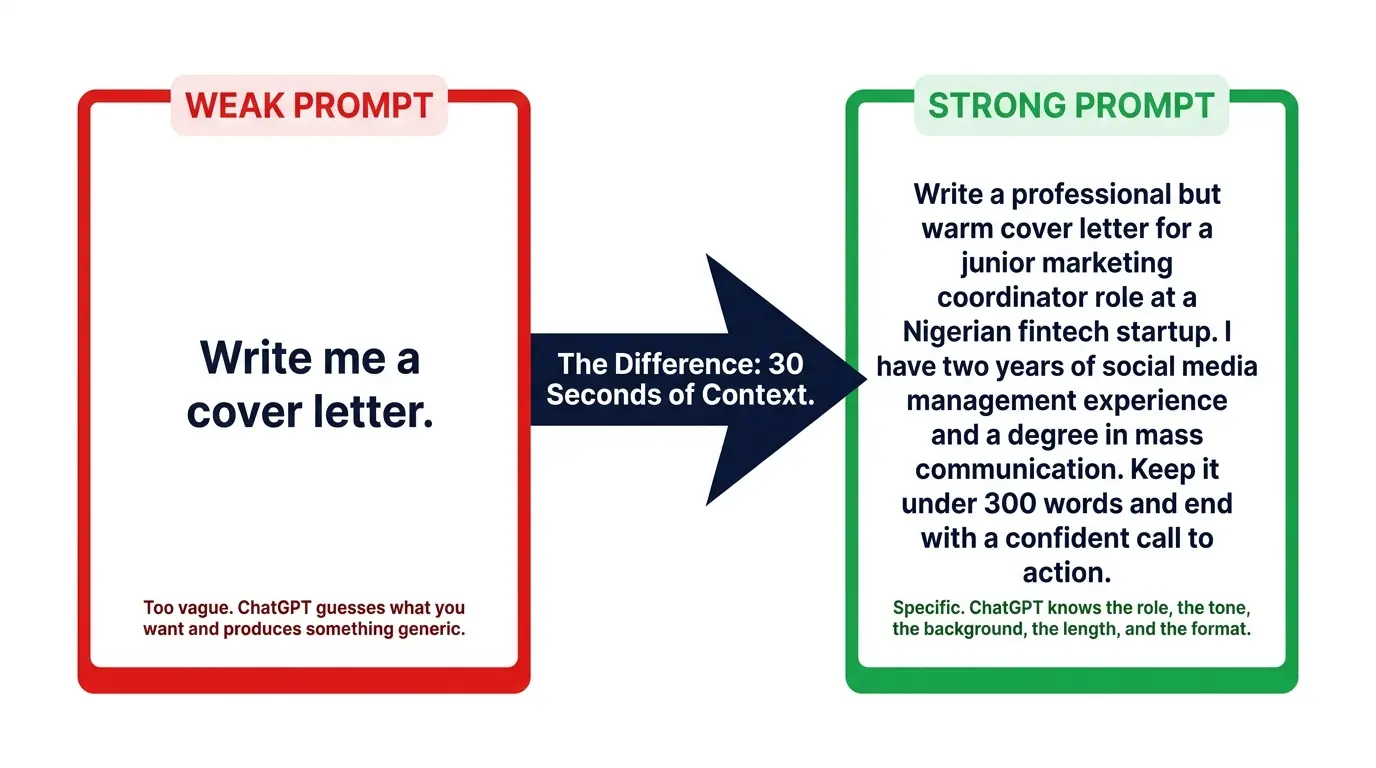
Most beginners write prompts that are too vague. A vague prompt produces a generic answer. A specific, detailed prompt produces a precise, useful answer. The difference is dramatic.
The Formula for a Strong Prompt
Every strong prompt answers four questions: who, what, how, and for whom. You do not need to answer all four every time, but including more context always produces better results.
- Role — Tell ChatGPT what role to play. “Act as an experienced marketing copywriter” or “You are a friendly science teacher explaining to a ten-year-old”
- Task — State exactly what you want. “Write a 200-word product description” or “Summarise this article in three bullet points”
- Context — Provide relevant background. “My audience is small business owners with no technical background” or “I am applying for a junior marketing role”
- Format — Specify how you want the output delivered. “Use numbered steps” or “Keep it under 150 words” or “Write in a friendly, casual tone”
A weak prompt looks like this: “Write me a cover letter.”
A strong prompt looks like this: “Write a professional but warm cover letter for a junior marketing coordinator role at a Nigerian fintech startup. I have two years of social media management experience and a degree in mass communication. Keep it under 300 words and end with a confident call to action.”
The second prompt takes 30 extra seconds to write and produces a result that is five times more useful. According to Oxford Home Study Centre’s ChatGPT prompting guide, specific guidance helps ChatGPT deliver exactly what you need rather than a rough approximation that requires multiple rounds of correction.
What Can You Use ChatGPT for Every Day? Practical Use Cases for Beginners
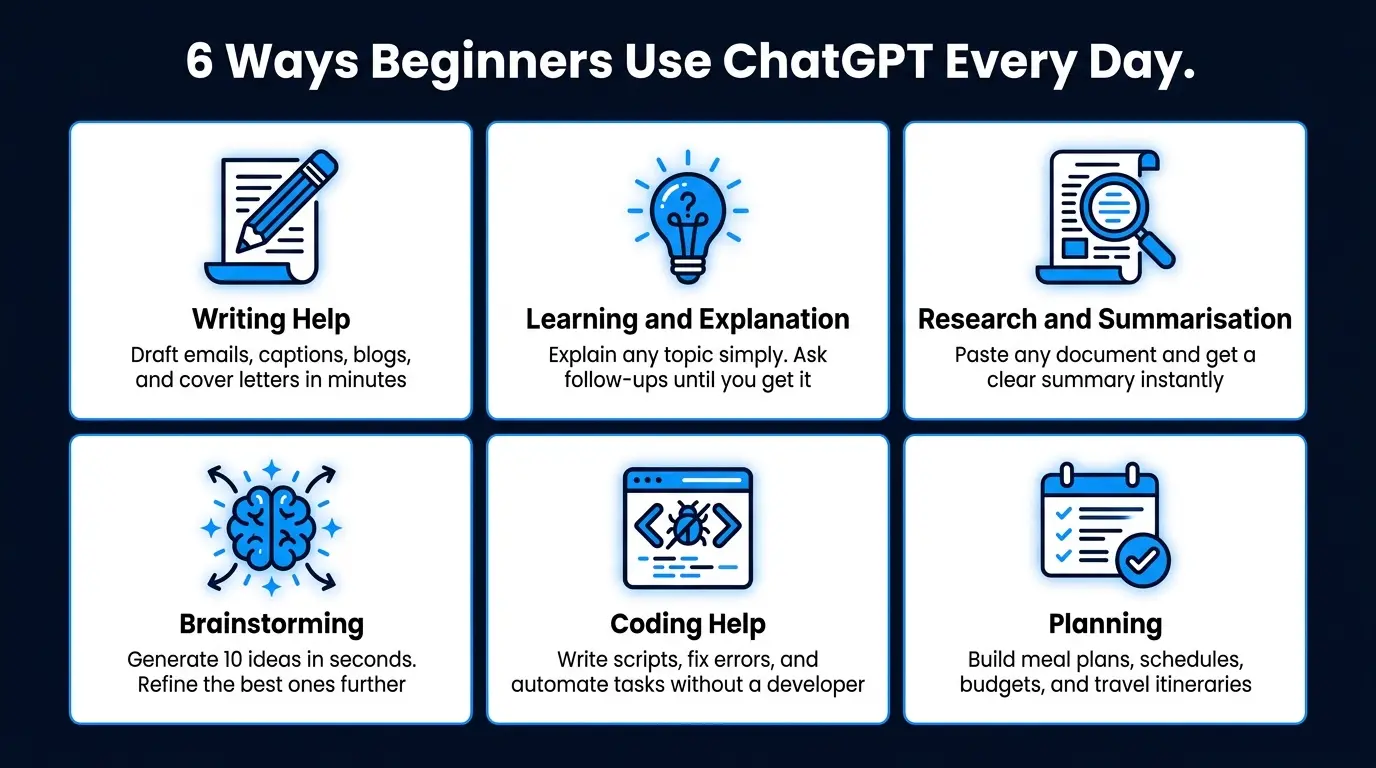
Most beginners are surprised by how many everyday tasks ChatGPT handles well once they know it is available. Here are the most practical and immediately useful applications for anyone just getting started.
1. Writing Help
Writing help is the most popular use of ChatGPT worldwide. You can ask it to draft emails, write social media captions, create blog post outlines, write product descriptions, proofread your existing text, rewrite a paragraph in a different tone, or translate content into another language. Tasks that used to take an hour often take five minutes with ChatGPT producing a solid first draft that you refine.
2. Learning and Explanation
ChatGPT is one of the most patient and effective learning tools ever created. Ask it to explain any concept in simple terms, and it will. Ask it to go simpler, and it will. Ask for an analogy, a real-world example, or a comparison to something you already understand, and it adapts immediately. You can use it to study for exams, understand your tax return, learn how a new software tool works, or get a plain-language explanation of any news story.
3. Research and Summarisation
Paste a long document, a research paper, or an article into the chat and ask ChatGPT to summarise it in three bullet points. Ask it to extract the key arguments. Ask it what the most important statistic mentioned is. It reads and processes text at a speed no human can match and returns a structured, readable summary in seconds. This use case alone saves professionals hours every week.
4. Brainstorming and Idea Generation
Tell ChatGPT what you are trying to create and ask for ten ideas. Then tell it which direction you like and ask for ten more in that style. Use it to overcome creative blocks, generate content calendars, name products, develop business ideas, plan events, or think through problems from multiple angles. It is the brainstorming partner who never runs out of energy and never judges your starting point.
5. Coding Help
Even if you have never written a line of code, ChatGPT can write simple scripts for you, explain what a piece of code does, fix errors in existing code, and walk you through building basic tools step by step. Developers use it to accelerate their work. Non-developers use it to automate small tasks without hiring a programmer.
6. Planning and Organisation
Ask ChatGPT to create a weekly meal plan, build a study schedule, design a project timeline, write a travel itinerary, or draft a budget spreadsheet structure. Give it your constraints, your preferences, and your goal, and it produces a structured plan you can use immediately.
25 Beginner-Friendly ChatGPT Prompts to Try Right Now
The fastest way to understand what ChatGPT can do is to try it. Copy any of these prompts, paste them into ChatGPT, and see what comes back. Each one demonstrates a different capability.
- “Explain how compound interest works as if I am 15 years old”
- “Write a professional email to my manager asking for a one-week extension on a project deadline. Keep it polite and brief”
- “Give me 10 blog post ideas for a Nigerian tech blog targeting young professionals”
- “Create a 7-day beginner workout plan I can do at home with no equipment”
- “Summarise the main arguments for and against electric vehicles in 5 bullet points”
- “Write a WhatsApp message to a client following up on a proposal I sent three days ago. Keep it friendly and professional”
- “Give me a simple explanation of what machine learning is and how it differs from traditional programming”
- “Help me write a short bio for my LinkedIn profile. I am a graphic designer with 4 years of experience specialising in brand identity”
- “Create a weekly content calendar for a fashion Instagram account targeting women aged 25 to 35 in Lagos”
- “What are 5 questions I should ask before accepting a job offer”
- “Rewrite this paragraph to sound more professional: [paste your paragraph here]”
- “Plan a 3-day budget trip to Abuja for two people. Include accommodation, food, and activities”
- “Give me 10 names for a Nigerian food delivery startup targeting busy professionals”
- “Explain what a VPN is and whether I need one”
- “Write a caption for a motivational Instagram post about consistency and success”
- “Help me prepare for a job interview for a customer service role. Give me 5 common questions and strong answers”
- “Translate this message into French: [paste your message here]”
- “Create a simple monthly budget template for someone earning 300,000 naira per month”
- “Give me a 30-day reading challenge for someone who wants to read more non-fiction”
- “Write a short product description for a handmade scented candle brand targeting premium buyers”
- “What are 5 books every entrepreneur should read and why”
- “Help me write a complaint letter to my internet service provider about repeated downtime”
- “Explain what ChatGPT can and cannot do honestly”
- “Give me a step-by-step plan for learning graphic design from scratch in 6 months”
- “Write a professional thank-you email after a job interview”
Important ChatGPT Limitations Every Beginner Must Know
ChatGPT is powerful but it has real limitations you need to understand before relying on it. Knowing these limitations keeps you from making costly mistakes and helps you use the tool more effectively.
1. It Can Hallucinate
ChatGPT sometimes generates confident, plausible-sounding information that is completely false. This is called hallucination and it happens with statistics, citations, names, dates, and any specific factual claim. The tone is always confident, which makes the errors difficult to detect without checking. Never use ChatGPT as your only source for facts, medical advice, legal information, or financial decisions. Always verify important claims through a reliable independent source.
2. Its Knowledge Has a Cutoff
The model’s training data has a knowledge cutoff date, which means it does not know about events that occurred after that date unless you enable web search or provide the information yourself. For current news, recent statistics, or anything that changes frequently, use ChatGPT with web search turned on or supplement its answers with your own up-to-date sources.
3. It Does Not Know You
ChatGPT does not remember you between separate conversations. Every new conversation starts completely fresh. If you want it to understand your background, preferences, or context, you need to provide that information at the start of each new chat. This changes somewhat with the Memory feature available on paid plans, which allows ChatGPT to remember selected information across conversations.
4. It Reflects Your Prompt Quality
Vague prompts produce vague answers. Generic prompts produce generic answers. If you give ChatGPT little context, it fills in the gaps with assumptions that may not match what you actually wanted. The quality of your output is directly proportional to the specificity of your input. This is why learning to write clear prompts matters so much, especially as a beginner.
ChatGPT Tips for Beginners That Most People Never Discover
These tips move you from casual user to confident power user faster than anything else.
Ask ChatGPT to explain its own reasoning. After it gives you an answer, type “explain how you arrived at that” or “walk me through your thinking step by step.” This helps you verify the logic and learn from the process at the same time.
Use the regenerate button. If a response does not quite hit the mark, click the regenerate icon below the response. ChatGPT will produce a different answer to the same prompt. Do this two or three times to see which approach works best for your purpose.
Tell it what you did not like. If a response is too long, too formal, too vague, or misses the point, say so directly in your next message. Type “That was too formal, make it more casual” or “The previous response was too long, give me the same answer in 100 words.” ChatGPT adjusts immediately and specifically.
Build context progressively. Use a single conversation for a single project or task rather than starting new chats for every question. ChatGPT remembers everything said in the same conversation and gives increasingly tailored answers as context builds up.
Save your best prompts. Keep a note in Google Docs, Notion, or a simple notes app of every prompt that produces great results. Over time you build a personal prompt library that saves hours every week because you are not reinventing effective prompts from scratch each time.
For a deeper dive into advanced prompting strategies specifically designed for beginners, the guide at Dumb It Down AI’s complete ChatGPT beginner guide covers the most common prompt mistakes and how to fix each one with clear before-and-after examples.
Frequently Asked Questions About ChatGPT for Beginners
Is ChatGPT free to use?
Yes, ChatGPT has a genuinely useful free plan. It gives you access to GPT-5.3 Instant, web search, image analysis, and image generation. Most beginners find the free plan more than sufficient for everyday use. ChatGPT Plus costs $20 per month and unlocks more powerful models, higher usage limits, and advanced features like Deep Research and custom GPTs.
Do I need to know coding or technical skills to use ChatGPT?
No technical skills are required at all. ChatGPT works entirely through plain language conversation. If you can type a question or a request in everyday English, you can use ChatGPT effectively. The only skill worth developing is writing clearer, more specific prompts, and that improves naturally through practice within your first few days of use.
Is ChatGPT safe to use?
ChatGPT is safe for everyday use with some sensible precautions. Do not paste sensitive personal information such as your passwords, financial account details, national identification numbers, or private medical records into the chat. Be aware that conversations may be used to improve OpenAI’s models unless you opt out in your account settings. For business use involving confidential company data, review OpenAI’s enterprise data privacy terms or consider ChatGPT Enterprise which offers stronger data protection guarantees.
How is ChatGPT different from a Google search?
Google search finds and links you to existing web pages. ChatGPT synthesises information and gives you a direct, conversational answer. Google is better for finding specific sources, checking current news, and verifying facts. ChatGPT is better for getting explanations, drafting content, thinking through problems, and working with information you already have. In 2026, ChatGPT also has optional web search built in so it can do both, though you should still verify specific facts independently.
Can ChatGPT make mistakes?
Yes. ChatGPT makes mistakes regularly, especially on specific facts, statistics, names, and dates. It delivers incorrect information with the same confident tone as correct information, which makes errors hard to spot. Always verify factual claims from ChatGPT using a reliable independent source before relying on them for important decisions, professional documents, or published content. Use it as a first draft tool, not as a final authority.
What is the best way to get started with ChatGPT as a complete beginner?
Create a free account, open the chat, and start with a task you already need to do today. Ask it to write an email you have been putting off. Ask it to explain something you have been confused about. Ask it to help you plan something you need to organise. Learning ChatGPT by applying it to real tasks you already have is faster and more effective than any tutorial. The feedback loop between your prompt and its response teaches you more in twenty minutes of practice than an hour of reading about it.
ChatGPT for Beginners Is Easier Than You Think
By now you have everything you need to use ChatGPT as a beginner with confidence. You know what it is, how to sign up, how the interface works, how to write prompts that get great results, what to use it for every day, and what limitations to watch out for.
The single most important thing you can do right now is open ChatGPT and start a real conversation. Pick one task from the list of 25 prompts above, paste it in, and see what comes back. Then follow up. Ask it to adjust the response. Try a different angle. The tool teaches itself through use and you will understand more from twenty minutes of actual conversation than from any amount of preparation.
ChatGPT has 900 million weekly users in 2026 and processes over 2 billion queries every day. The people getting the most value from it are not the ones who understood AI first. They are the ones who started using it, made mistakes, refined their approach, and built daily habits around it. You can do the same starting today.
For a comprehensive step-by-step walkthrough of ChatGPT’s latest features including Voice Mode, Projects, and Deep Research read the full updated guide at Netcom Learning’s How to Use ChatGPT guide for 2026 and for the most current information on ChatGPT models, pricing, and account options visit OpenAI’s official ChatGPT page which is updated whenever new features and plans are released.

Prince Anichi
Founder and Lead Technology Editor at Ortechy. Covering digital economy shifts, tech ecosystems across Africa, cybersecurity intelligence, and emerging software platforms.