In this article28 sections
- 01.How ChatGPT Memory Evolved to Reach Its 2026 Form
- ↳The Three Versions of ChatGPT Memory
- ↳Dreaming V3: The June 2026 Architecture
- 02.What ChatGPT Memory Actually Stores in 2026
- ↳The Two Active Memory Layers
- ↳What Types of Information ChatGPT Learns to Remember
- 03.What ChatGPT Memory Gets Wrong and Where It Still Fails
- ↳The Accuracy Gap Still Exists
- ↳Specific Scenarios Where Memory Breaks Down
- 04.What ChatGPT Memory Does Not Remember
- ↳Hard Limits on What the System Retains
- ↳What Happens in Custom GPTs and Projects
- 05.How to Control and Manage ChatGPT Memory
- ↳Reviewing What ChatGPT Knows About You
- ↳Your Options for Controlling Memory
- 06.Privacy Implications of the 2026 Memory System
- ↳What OpenAI Does With Memory Data
- ↳Enterprise Privacy Defaults Are Different
- 07.How ChatGPT Memory Compares to Custom Instructions
- ↳Memory vs Custom Instructions: The Key Differences
- 08.Frequently Asked Questions
- ↳Does ChatGPT memory work on the free plan?
- ↳Can I see everything ChatGPT remembers about me?
- ↳Does ChatGPT memory sync across devices?
- ↳Will ChatGPT remember things I said years ago?
- ↳What is the difference between ChatGPT memory and Projects?
- ↳How do I stop ChatGPT from remembering my conversations?
- 09.Understanding How ChatGPT Memory Works
ChatGPT Memory in 2026: What It Remembers and What It Does Not
ChatGPT memory has changed more in the past 12 months than in the two years before that combined. On 4 June 2026, OpenAI launched Dreaming V3, a completely rebuilt memory architecture that scans your entire conversation history in the background and updates what ChatGPT knows about you automatically. Factual recall climbed from 41.5 percent under the original 2024 system to 82.8 percent with the new 2026 architecture, according to OpenAI’s own internal evaluations. That is a near-doubling of how reliably ChatGPT retains and uses the things you have told it.
However, the new system also raises questions that a lot of users have not thought through yet. What exactly does ChatGPT store? Who controls it? What does it get wrong? And what does it flat-out ignore regardless of how many times you mention it? Understanding how ChatGPT memory actually works in 2026 matters more than ever because the system now runs continuously in the background without waiting for you to say anything.
This guide covers the full picture: how the architecture evolved, what ChatGPT genuinely remembers today, where it still fails, how to review and control what it knows about you, and what the privacy implications are for everyday users.
How ChatGPT Memory Evolved to Reach Its 2026 Form
The Three Versions of ChatGPT Memory
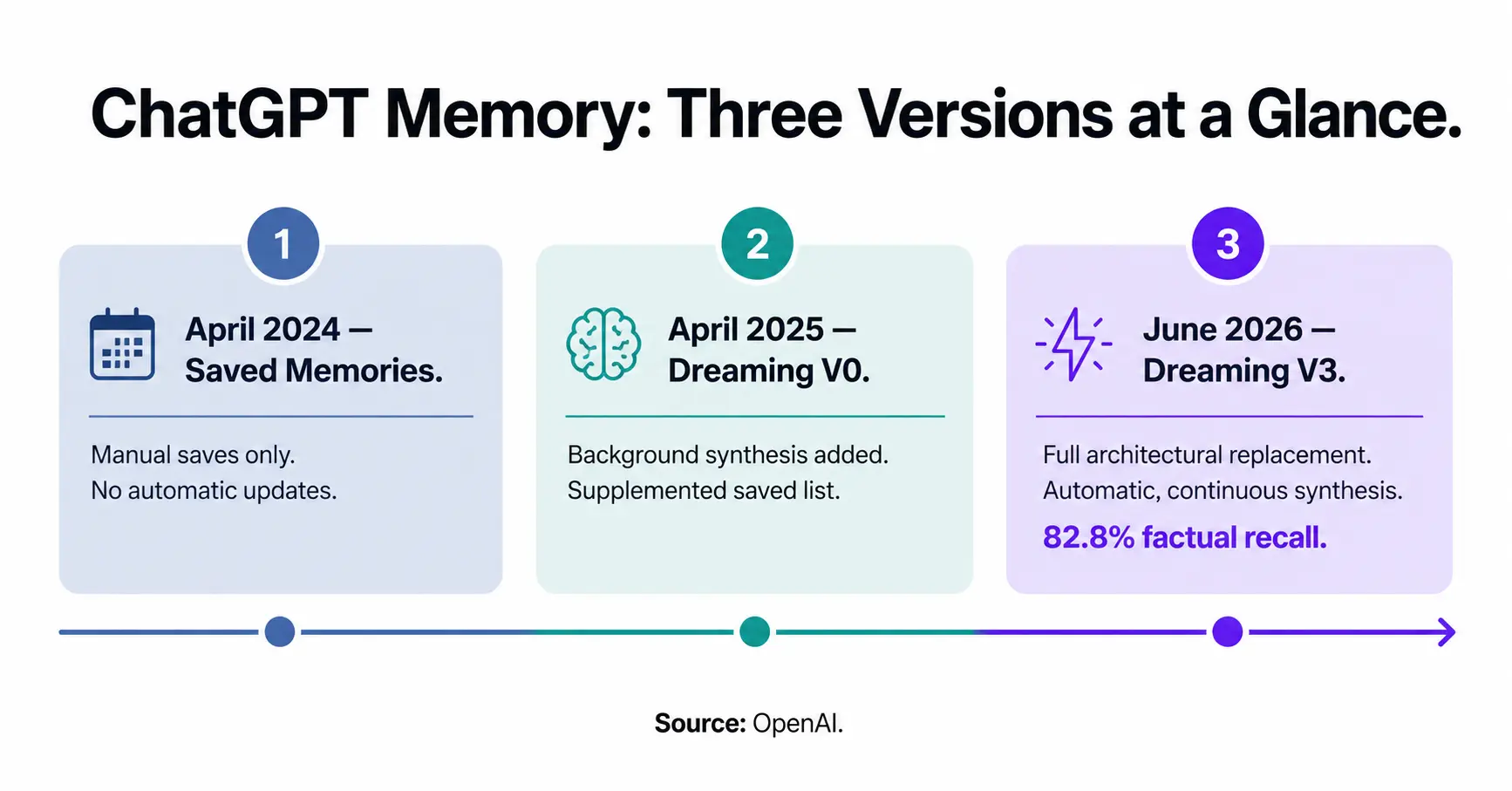
To understand the current system, it helps to know where it started. ChatGPT memory has gone through three distinct versions since its first public launch.
Version one launched in April 2024 as what OpenAI called saved memories. This was a simple, explicit system. ChatGPT saved information only when you or the model decided during a conversation to remember something. It retained nothing from a conversation unless a save instruction was triggered. The system was reliable but narrow, and everything it stored eventually went stale because it had no way to update itself.
Version two arrived in April 2025, when OpenAI introduced the first generation of a feature it called dreaming. This added a background layer that could reference your broader conversation history beyond the saved memories list. It improved personalisation meaningfully, but OpenAI acknowledged publicly that this first version of dreaming was never capable of standing alone as a memory system. It supplemented the saved memories list rather than replacing it, as confirmed by OpenAI’s official announcement of the Dreaming V3 architecture.
Dreaming V3: The June 2026 Architecture
Dreaming V3, launched on 4 June 2026, is a full architectural replacement. It no longer relies on the saved memories list as its foundation. Instead, a background synthesis process reads across years of your past conversations and continuously updates what the system understands about you without any action on your part.
The rollout began with Plus and Pro subscribers in the United States. Free, Go, and international users are expected to follow in the weeks after launch. OpenAI also reduced the compute cost of the new system by approximately five times, which is what made it feasible to extend to the free tier at all, according to EdTech Innovation Hub’s coverage of the Dreaming V3 rollout.
What ChatGPT Memory Actually Stores in 2026
The Two Active Memory Layers
Even under Dreaming V3, ChatGPT memory still operates in two distinct layers. Understanding the difference between them is important because they behave differently and you control them separately.
The first layer is saved memories. This is a viewable, editable list of facts ChatGPT has chosen to retain about you. You can read every entry, add new ones manually, edit existing ones, or delete individual items at any time through Settings, then Personalization, then Memory. This layer is transparent. What you see is exactly what ChatGPT has written down about you from this source.
The second layer is the chat history reference. This is the dreaming process itself, which synthesises patterns and context from your past conversations without turning them into a fixed list. This layer is not directly viewable as a line-by-line record. OpenAI does provide a memory summary page where you can review what the system has synthesised, but this is a readable summary rather than a complete audit trail of everything it has inferred.
What Types of Information ChatGPT Learns to Remember
In practice, the memory system picks up and retains several categories of information across conversations:
- Personal preferences: communication style, writing tone, response length, preferred formats
- Ongoing projects: topics you return to repeatedly, constraints you have stated, goals you are working toward
- Location and time context: where you are based, your timezone, upcoming or past events you have mentioned
- Professional context: your job, industry, the tools and software you use regularly
- Recurring interests: subjects that come up frequently across multiple sessions
Additionally, OpenAI’s canonical example for the time-awareness capability is telling. If ChatGPT stored “You are going to Singapore in July,” Dreaming V3 will automatically update that entry to “You went to Singapore in July 2026” after the trip has ended. No user action is required. The system recognises that time has passed and the context has changed.
What ChatGPT Memory Gets Wrong and Where It Still Fails
The Accuracy Gap Still Exists
OpenAI’s internal evaluation numbers are directional rather than independently verified. With that caveat stated, the progress they show is real. Factual recall under the original 2024 system sat at 41.5 percent task success. The 2025 system raised that to 67.9 percent. Dreaming V3 reached 82.8 percent in OpenAI’s own testing.
That means roughly one in five factual recall attempts still produces an incorrect or incomplete result under the best system available today. For preference adherence, the figure is 71.3 percent. For time-sensitive context updates, it reached 75.1 percent, up from just 9.4 percent in 2024. These are substantial improvements, but they are not perfection, as detailed by TechTimes’ analysis of the Dreaming V3 architecture changes.
Specific Scenarios Where Memory Breaks Down
Understanding where the system still struggles helps you work around the gaps. Memory performance tends to be weakest in these situations:
- Contradictory information across sessions: if you told ChatGPT two different things about your preferences at different times, the synthesis may blend them incorrectly or retain the older version
- Nuanced constraints: broad preferences like “keep responses concise” carry forward better than specific technical constraints like “never use recursion in Python examples”
- Stale professional context: if you changed jobs, moved cities, or started a new project, ChatGPT may retain the old context until enough new conversations override it
- Infrequent topics: details mentioned once or twice in passing are less likely to be synthesised than recurring themes
Therefore, for any context that is genuinely critical to how you use ChatGPT, adding it manually as a saved memory is still the more reliable approach. The dreaming layer is powerful for continuous personalisation, but the explicit saved list remains the authoritative source for your most important constraints.
What ChatGPT Memory Does Not Remember
Hard Limits on What the System Retains
Several categories of information sit outside what ChatGPT memory touches, by design or by practical limitation.
Temporary Chats bypass memory entirely. Any conversation you start using the Temporary Chat option does not feed into the memory system and does not draw on it. Nothing from a Temporary Chat session is saved or referenced later. This is the cleanest way to interact with ChatGPT when you do not want a session to influence future responses.
Enterprise and Education plan users have memory turned off by default. Organisation administrators must explicitly opt in before the feature activates for any account under those plans. This reflects a sensible privacy-first default for environments where conversations may contain commercially sensitive or regulated information.
Additionally, memory does not carry over between different OpenAI accounts. If you use both a personal ChatGPT account and a work account, each maintains a completely separate memory state. Content from one account never influences the other.
What Happens in Custom GPTs and Projects
Custom GPTs (customised versions of ChatGPT built for specific tasks or audiences) use a different memory framework. By default, a Custom GPT does not share the main ChatGPT memory system. Each Custom GPT can have its own memory configuration, but they do not automatically inherit what the main ChatGPT has learned about you.
Projects, a feature that lets you group related conversations, have their own context persistence separate from the main memory system. However, the dreaming synthesis process does reference project conversations when building its broader understanding, so recurring patterns from a Project can influence personalisation in main ChatGPT chats over time.
How to Control and Manage ChatGPT Memory
Reviewing What ChatGPT Knows About You
You can access your memory settings through Settings, then Personalization, then Memory. This page shows two things: the saved memories list, which you can read in full, and the memory summary, which is a readable synthesis of what Dreaming V3 has inferred from your conversation history.
Now, the saved memories list is a complete record. Every item on it is visible and editable. The memory summary is different. It is a curated overview rather than a line-by-line log. This means you cannot see every individual inference the dreaming process has made, only a summarised representation. TechTimes’ reporting on the Dreaming V3 launch specifically noted this as a reduction in the audit trail compared to the previous system.
Your Options for Controlling Memory
OpenAI provides several practical controls, and each works independently:
- Turn off saved memories only: ChatGPT stops writing explicit saved facts but continues referencing chat history through the dreaming process.
- Turn off chat history reference only: ChatGPT stops using the background synthesis layer but retains and uses the saved memories list.
- Turn off both layers: ChatGPT operates with no persistent memory. Each conversation starts fresh, similar to the experience before April 2024.
- Delete specific saved memories: Remove individual entries from the saved list without affecting anything else.
- Clear all memories: Reset the entire system to blank, including both saved memories and the dreaming synthesis state.
- Use Temporary Chat: Bypass memory entirely for a single session without changing your global settings.
Additionally, OpenAI now lets you specify which topics ChatGPT should raise and when, giving you more control over how the memory system surfaces context proactively during conversations.
Privacy Implications of the 2026 Memory System
What OpenAI Does With Memory Data
Memory data sits within your OpenAI account and is used to personalise your ChatGPT experience. OpenAI’s privacy controls let you review and delete memory content at any time, and the company states that turning off memory prevents ChatGPT from referencing past conversations by default.
However, the background nature of Dreaming V3 raises a practical point worth understanding. The system processes your entire conversation history to build its synthesis, which means conversations you had months or years ago can influence current memory state. If you want a clean slate, clearing all memories resets the synthesised state. It does not delete the underlying conversation history itself, which is governed by separate data retention settings under Settings, then Data Controls.
Enterprise Privacy Defaults Are Different
For organisations using ChatGPT Enterprise or ChatGPT Edu, memory is off by default and requires administrator activation. This is the appropriate default for environments where conversations may touch legal, medical, financial, or confidential business information. Individual users under these plans cannot turn memory on themselves unless the administrator has enabled it at the organisation level, according to OpenAI’s official memory controls documentation.
How ChatGPT Memory Compares to Custom Instructions
Memory vs Custom Instructions: The Key Differences
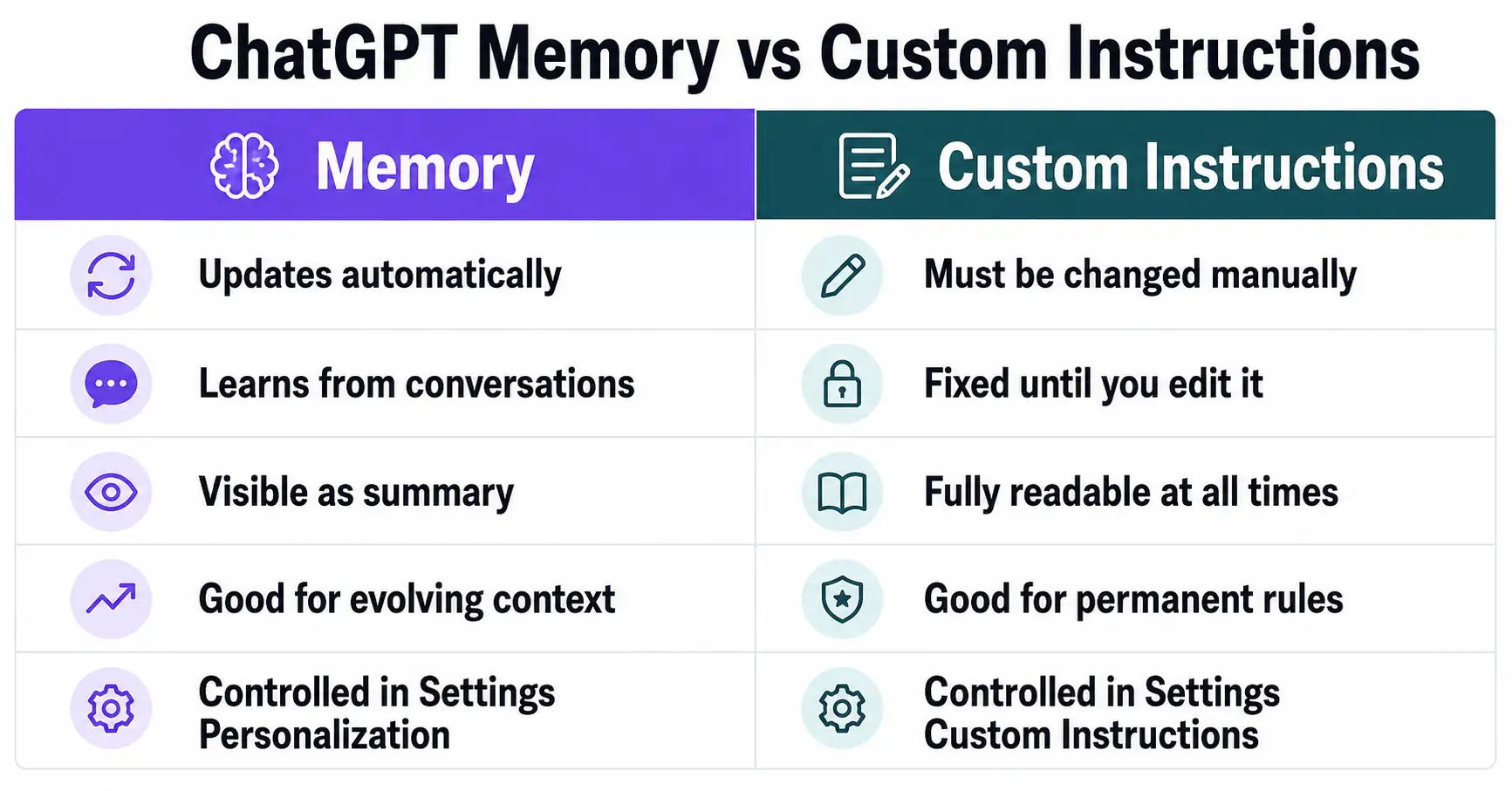
Custom Instructions is a separate feature that lets you define a standing set of instructions for how ChatGPT should always behave. It is not the same as memory. Understanding the difference saves confusion.
Memory is dynamic. It learns and updates automatically from your conversations over time. Custom Instructions are static. They stay exactly as you write them until you manually change them. Think of Custom Instructions as a fixed rulebook and memory as a continuously updated profile.
In practice, use Custom Instructions for preferences that never change, like your preferred response format or a standing instruction to always cite sources. Use memory for context that evolves, like ongoing projects, personal circumstances, or preferences that develop naturally over months of use.
Frequently Asked Questions
Does ChatGPT memory work on the free plan?
Yes, but with differences in depth. Dreaming V3 began rolling out to free users after the initial Plus and Pro launch in the US. The compute reduction that made Dreaming V3 possible is specifically what allows OpenAI to extend the feature to the free tier. Free users get a version of the memory system, but Plus and Pro accounts have access to greater memory depth.
Can I see everything ChatGPT remembers about me?
You can see the full saved memories list through Settings, then Personalization, then Memory. The dreaming synthesis layer is visible as a readable summary on the memory summary page, but it is not a complete audit trail. Some inferences the background process makes are not individually viewable as line items.
Does ChatGPT memory sync across devices?
Yes. Saved memories sync across the iOS, Android, macOS, Windows, and web versions of ChatGPT, as long as you are signed into the same OpenAI account. The dreaming synthesis layer also operates at the account level, so it applies consistently across all devices.
Will ChatGPT remember things I said years ago?
Under Dreaming V3, the background synthesis process can reference your full conversation history, not just recent chats. This means context from conversations going back to when you first started using ChatGPT can influence current memory state. If outdated information persists, you can correct it by adding a manual saved memory or clearing specific entries.
What is the difference between ChatGPT memory and Projects?
Projects group related conversations and maintain their own persistent context. Memory applies across all your ChatGPT use, not just within a single Project. The dreaming process can reference Project conversations when building its broader synthesis, but Projects and the main memory system operate through different mechanisms and are configured separately.
How do I stop ChatGPT from remembering my conversations?
Go to Settings, then Personalization, then Memory, and toggle off both saved memories and the chat history reference. For a single session without changing global settings, use Temporary Chat. For a complete reset, use the option to clear all memories, which wipes the synthesised state while leaving your conversation history governed by the separate data retention settings.
Understanding How ChatGPT Memory Works
ChatGPT memory in 2026 is genuinely more capable than most users realise. The jump from 41.5 percent factual recall in 2024 to 82.8 percent under Dreaming V3 is not a marketing figure. It reflects a real architectural change that makes ChatGPT considerably more useful for people who use it regularly across complex or ongoing work. The time-awareness upgrade alone, where the system updates stale context without prompting, removes one of the most persistent frustrations with the earlier versions.
However, the system is not perfect and it is not fully transparent. Roughly one in five recall attempts still produces an incomplete or incorrect result. The dreaming synthesis layer is not fully auditable from a user’s perspective. And the default-off status for Enterprise and Education plans is a reminder that not everyone wants a continuously learning AI profile of themselves built from their work conversations.
Understanding what ChatGPT memory does and does not do puts you in a much better position to use it deliberately rather than being surprised by it. Review your saved memories periodically. Use the memory summary page to check what the synthesis has inferred. Correct stale context manually when you know it has changed. And use Temporary Chat whenever a session covers something you do not want feeding back into your long-term profile.
For the authoritative and always-updated reference on how this feature works, the OpenAI memory controls documentation is the right starting point. The feature is still rolling out globally, so some behaviours described here may arrive for your account in the weeks ahead if you have not seen them yet.

Prince Anichi
Founder and Lead Technology Editor at Ortechy. Covering digital economy shifts, tech ecosystems across Africa, cybersecurity intelligence, and emerging software platforms.