In this article27 sections
- 01.What Is a No-Code AI Chatbot and How Does It Work
- 02.The 5 Best No-Code AI Chatbot Platforms in 2026
- ↳1. Chatbase — Best for Beginners and Website Chatbots
- ↳2. Voiceflow — Best for Complex Conversation Flows
- ↳3. Tidio — Best for E-Commerce and Small Business
- ↳4. ManyChat — Best for WhatsApp, Instagram, and Facebook
- ↳5. Landbot — Best for Lead Generation and Marketing
- 03.How to Build an AI Chatbot Without Coding: Step-by-Step Using Chatbase
- ↳Step 1: Create Your Free Account
- ↳Step 2: Create a New Chatbot
- ↳Step 3: Upload Your Training Data
- ↳Step 4: Configure Your Chatbot’s Personality and Instructions
- ↳Step 5: Test Your Chatbot Thoroughly
- ↳Step 6: Customise the Appearance
- ↳Step 7: Deploy Your Chatbot
- ↳Step 8: Monitor and Improve After Launch
- 04.What to Train Your Chatbot On: Getting the Knowledge Base Right
- 05.The Most Common No-Code Chatbot Mistakes to Avoid
- 06.No-Code Chatbot Use Cases That Deliver Real Business Results
- 07.Frequently Asked Questions About Building AI Chatbots Without Coding
- ↳Can I really build an AI chatbot without any coding skills?
- ↳How much does it cost to build a no-code AI chatbot?
- ↳What is the best no-code chatbot platform for beginners?
- ↳How long does it take to build a no-code AI chatbot?
- ↳Can a no-code chatbot handle complex questions?
- ↳Which is better: a flow-based chatbot or an AI-trained chatbot?
- 08.Your AI Chatbot Is One Afternoon Away
How to Build an AI Chatbot Without Coding: The Complete Step-by-Step Guide for 2026
Learning how to build an AI chatbot without coding is one of the most practical skills any business owner, marketer, or entrepreneur can develop in 2026. AI chatbots now resolve up to 80 percent of common customer inquiries automatically, cut support ticket volumes in half, and deliver instant responses around the clock without human involvement. Thanks to a new generation of no-code chatbot platforms, you can build and launch one in under ten minutes without writing a single line of code.
The chatbot market is growing at a 23.3 percent compound annual growth rate and is projected to reach $27.29 billion by 2030. Every business that wants to compete for customer attention in the next five years needs one. This guide walks you through the entire process from choosing the right platform to training your chatbot on your own data and deploying it across your website, WhatsApp, and social media channels.
You do not need a developer. You do not need a budget of thousands of dollars. You just need to follow these steps.
What Is a No-Code AI Chatbot and How Does It Work
A no-code AI chatbot is an intelligent conversational assistant you build using visual tools, drag-and-drop interfaces, and plain language instructions instead of programming languages. You connect it to your website content, your documents, your FAQs, or your product catalogue, and it learns to answer questions about your business accurately using that data.
Traditional chatbots required developers to write conversation logic in code. A customer asked a question and the bot checked a decision tree to find the matching scripted answer. If the customer phrased the question slightly differently, the bot failed and handed off to a human. Modern AI chatbots work completely differently. They use large language models to understand the intent behind any question regardless of how it is phrased, retrieve the relevant information from your data, and compose a natural, conversational answer in real time.
No-code platforms handle all the AI infrastructure behind the scenes. You never see the model weights, the retrieval system, or the deployment architecture. You see a simple visual interface where you upload your content, configure your chatbot’s personality and tone, set the topics it should and should not discuss, and click publish. The platform manages everything else.
Businesses using no-code chatbots report measurable results quickly. Response times drop from minutes or hours to seconds. Support teams handle fewer repetitive tickets. Lead capture rates improve because the chatbot engages visitors immediately rather than waiting for a human to respond. And unlike human agents, the chatbot works the same way at 2am on a Sunday as it does at 11am on a Monday.
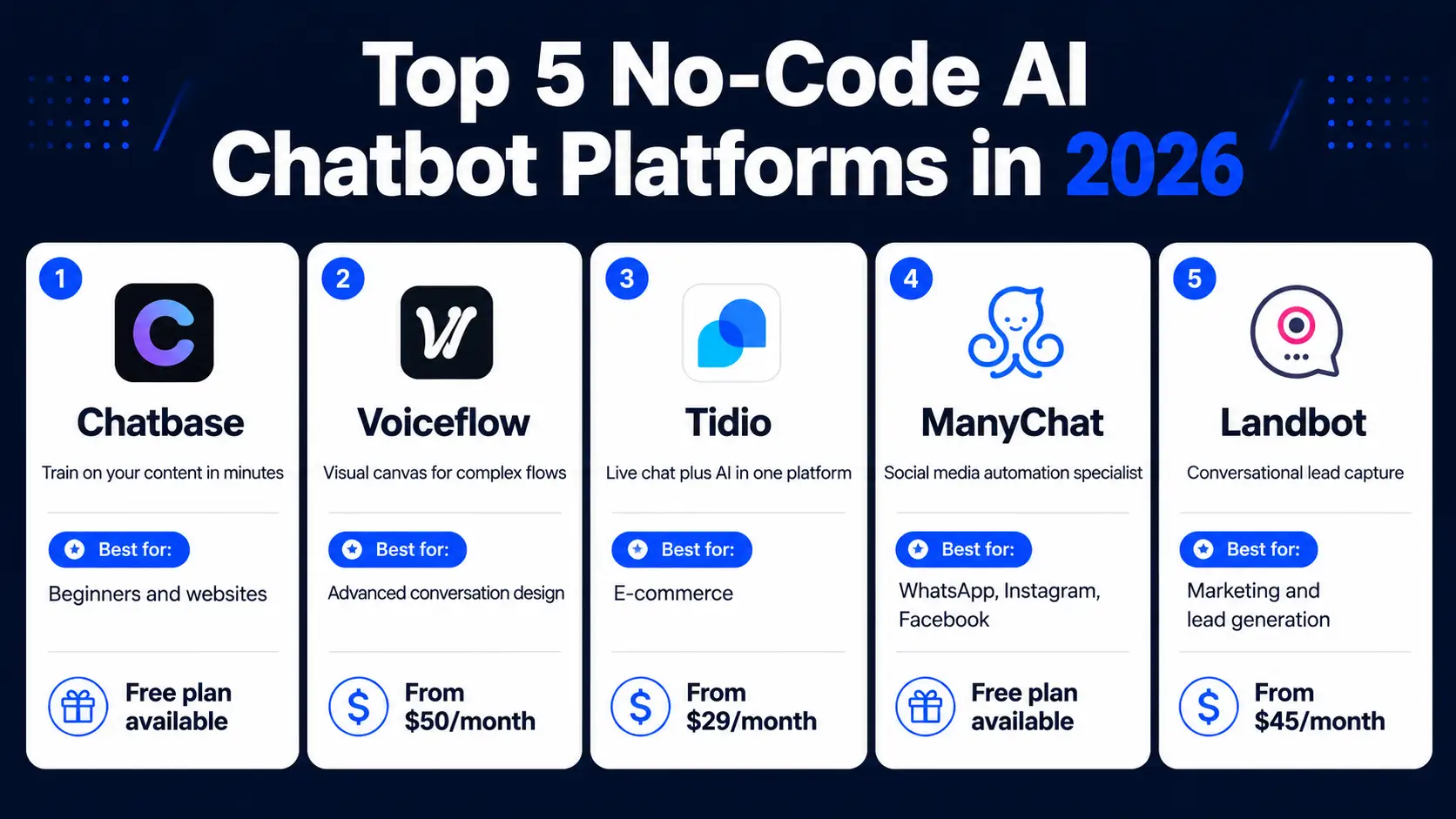
The 5 Best No-Code AI Chatbot Platforms in 2026
Not all no-code chatbot builders are the same. The right platform depends on your use case, your budget, and which channels you need the chatbot to work on. Here are the five strongest options available in 2026, each suited to different types of users.
1. Chatbase — Best for Beginners and Website Chatbots
Chatbase is consistently ranked as one of the best no-code AI chatbot builders for businesses that want fast results with minimal setup. You create your chatbot by uploading documents, pasting your website URL, or importing from a Google Drive file. Chatbase crawls and processes your content, trains a chatbot on it, and gives you an embeddable widget you can add to your website with a small script tag. The setup genuinely takes under ten minutes for most users.
Chatbase connects to popular tools including Slack, WhatsApp, and Zapier. It supports multiple languages and provides conversation analytics showing which questions your chatbot handles well and where users drop off. Pricing starts free for basic use with paid plans from $19 per month for higher message volumes and additional chatbot instances. Visit Chatbase to start your free account.
2. Voiceflow — Best for Complex Conversation Flows
Voiceflow is the platform of choice for building chatbots with sophisticated conversation logic. Its visual canvas lets you design multi-step conversation flows, add conditional logic, define fallback responses, and connect to external APIs, all through a drag-and-drop interface that requires no coding experience. Voiceflow is particularly strong for building customer support bots, sales qualification flows, and internal knowledge base assistants.
The platform supports deployment across web chat, voice interfaces, WhatsApp, and SMS. Teams can collaborate on chatbot design in real time, making it a strong choice for agencies and businesses with multiple stakeholders involved in the chatbot’s design. Pricing starts free for individual users with team plans from $50 per month. Explore it at Voiceflow’s official site.
3. Tidio — Best for E-Commerce and Small Business
Tidio combines live chat, AI chatbot, and email marketing in a single platform, making it particularly strong for e-commerce businesses that want to handle both automated and human-assisted customer conversations in one place. Its Lyro AI responds to customer questions using your help centre content, handles order tracking queries, and escalates to a human agent seamlessly when needed. Tidio integrates natively with Shopify, WooCommerce, WordPress, and BigCommerce.
Setup is fast. Install the Tidio plugin on your website, connect your help centre content, configure your chatbot’s tone, and go live. Pricing starts free with paid plans from $29 per month depending on the number of conversations and AI features required. More details are available at Tidio’s website.
4. ManyChat — Best for WhatsApp, Instagram, and Facebook
ManyChat specialises in chatbots for social media and messaging platforms. If your primary goal is automating conversations on WhatsApp, Instagram Direct Messages, or Facebook Messenger, ManyChat is the strongest no-code option available. Its visual flow builder lets you design conversation sequences for lead capture, appointment booking, product recommendations, and customer support across all three platforms without any technical knowledge.
ManyChat’s AI capabilities have expanded significantly in 2026, with natural language understanding that allows it to handle free-form questions rather than just scripted button-based flows. Pricing starts free for basic use with Pro plans from $15 per month. Visit ManyChat to explore its platform features.
5. Landbot — Best for Lead Generation and Marketing
Landbot turns chatbots into interactive landing page experiences, making it particularly effective for lead capture, marketing campaigns, and product recommendation flows. Its visual builder creates conversational forms that replace traditional static forms with a guided, engaging dialogue that typically improves completion rates significantly. Landbot deploys on websites, WhatsApp, and as standalone chat landing pages.
The platform integrates with HubSpot, Salesforce, Mailchimp, Calendly, and Zapier, making it easy to feed captured leads directly into your existing marketing and sales workflows. Pricing starts from $45 per month for business use. Explore it at Landbot’s official platform.
How to Build an AI Chatbot Without Coding: Step-by-Step Using Chatbase
This step-by-step walkthrough uses Chatbase because it represents the fastest path from zero to a live, working chatbot for most beginners. The principles apply to every platform on this list, with minor differences in interface layout.
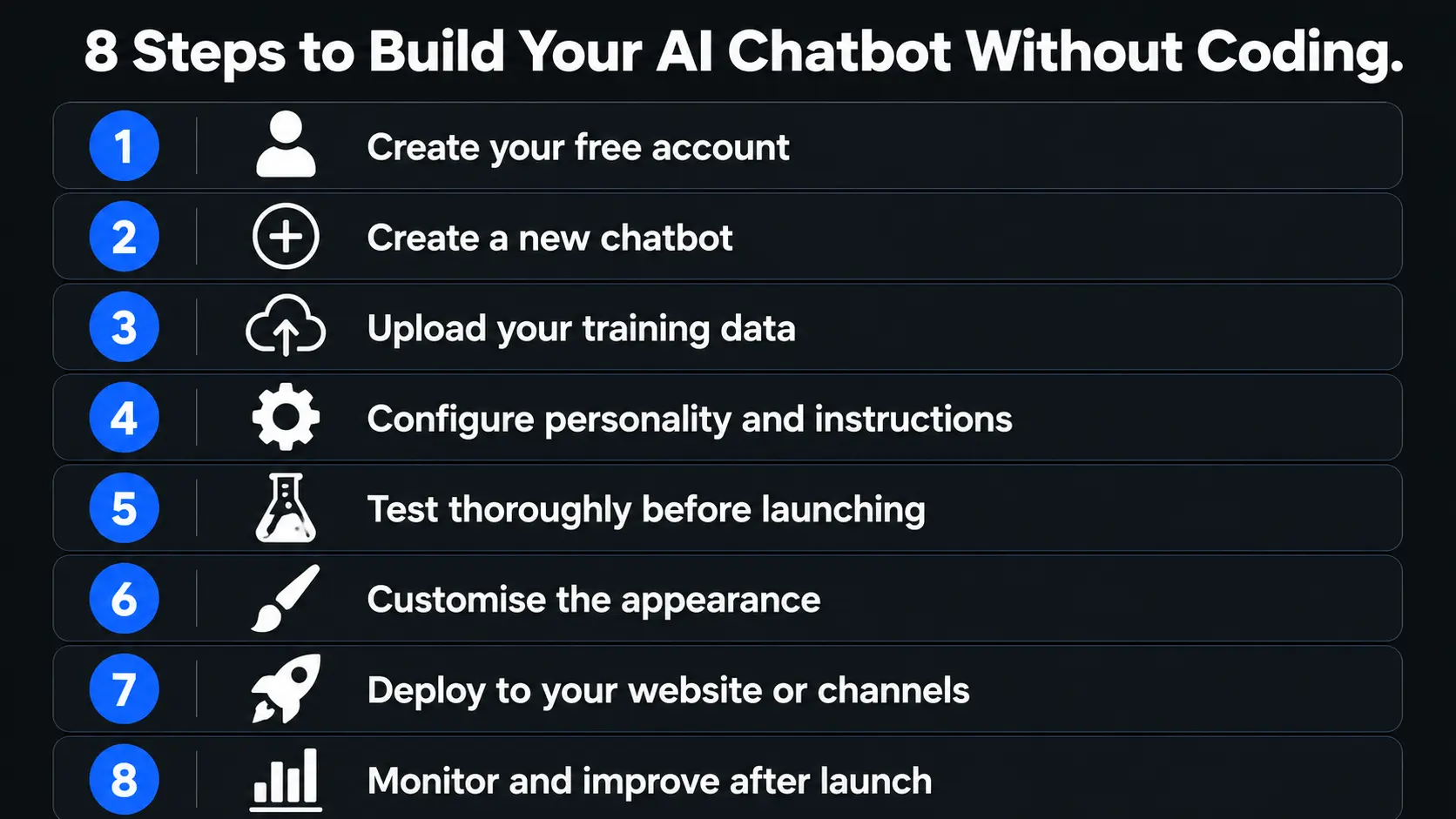
Step 1: Create Your Free Account
Go to chatbase.co and click Get Started Free. Sign up with your Google account or your email address. No credit card is required for the free plan. The dashboard opens immediately after signup.
Step 2: Create a New Chatbot
Click New Chatbot on your dashboard. You will see the data source options that you can use to train your chatbot. These include uploading documents in PDF, DOCX, or TXT format, pasting the URL of your website for automatic crawling, connecting to a Google Drive folder, entering plain text directly into the editor, and adding a sitemap URL for large websites with many pages. Choose the option that best matches where your business information lives.
Step 3: Upload Your Training Data
Your training data is the knowledge base your chatbot draws on when answering questions. For a customer support chatbot, upload your FAQ document, your product catalogue, your return policy, your shipping information, and any other content your customers regularly ask about. For an internal knowledge base chatbot, upload your company procedures, your HR documents, and your onboarding materials.
Quality matters more than quantity here. A chatbot trained on a clear, well-organised document answers questions more accurately than one trained on a large, poorly structured information dump. Review your documents before uploading and remove any outdated or contradictory information that would confuse the chatbot’s responses.
If you choose the website URL option, Chatbase crawls your site automatically and processes the text content it finds. This is the fastest option for businesses whose most important information already lives on their website.
Step 4: Configure Your Chatbot’s Personality and Instructions
Click Settings then AI in your Chatbase dashboard. Here you define the system prompt that shapes how your chatbot behaves. Write instructions in plain language such as:
“You are a helpful customer support assistant for [Your Business Name]. Answer questions only about our products, services, and policies. Keep responses friendly, concise, and professional. If a customer asks something outside your knowledge, apologise and offer to connect them with a human team member.”
Set the chatbot’s name to match your brand. Choose the base language model your chatbot uses from the dropdown. GPT-4o is the default and handles most business use cases well. Adjust the response length setting to keep answers appropriately concise for your customers.
Step 5: Test Your Chatbot Thoroughly
Testing before you deploy is the step most beginners skip and then regret. Use the built-in preview window to ask your chatbot every question your customers are likely to ask. Test the questions you know are in your training data and the edge cases that are not. Check whether it handles ambiguous questions gracefully. Confirm that it declines to answer questions outside its defined scope rather than making up responses.
Ask it deliberately tricky questions. Ask it to compare your products to competitors. Ask it something completely unrelated to your business. The goal is to find gaps in your training data or instructions before real customers encounter them. When you find a gap, either add the relevant information to your training data or refine your system prompt instructions to address it.
Step 6: Customise the Appearance
Click Settings then Chat Interface to customise how the chatbot widget looks on your website. Set the chat bubble colour to match your brand. Upload your company logo. Write a welcoming opening message that greets visitors and tells them what the chatbot can help with. Configure the suggested opening questions that appear when the chat window opens, choosing questions that represent the most common things your customers want to know.
Step 7: Deploy Your Chatbot
Click Connect in your Chatbase dashboard to see your deployment options. For website embedding, copy the provided script tag and paste it into the HTML of every page where you want the chatbot to appear. On WordPress, you can add it through a Custom HTML widget or a plugin that supports custom scripts. On Shopify, paste it into your theme’s code editor. On most other website builders, there is a custom code or HTML section where you can add it.
Chatbase also provides a shareable link you can send directly to users and offers native integrations with Slack and WhatsApp for those channels. If you use Zapier, you can connect your chatbot to hundreds of additional tools including your CRM, email marketing platform, and help desk.
Step 8: Monitor and Improve After Launch
Launching your chatbot is not the end of the process. Open your Chatbase analytics dashboard after the first week and review the conversation logs. Look for questions that generated unhelpful or inaccurate responses. Add the missing information to your training data and retrain. Look for questions that users asked repeatedly where the chatbot performed well, these confirm which topics your training data covers effectively.
Set a recurring reminder to review your chatbot monthly. Update the training data whenever your products, pricing, policies, or services change. A chatbot trained on outdated information causes more confusion than having no chatbot at all.
What to Train Your Chatbot On: Getting the Knowledge Base Right
The single biggest factor in your chatbot’s quality is the quality of the data you train it on. Most beginners focus too much on the platform choice and too little on the content they feed into it. The platform is the tool. The training data is the intelligence.
For a customer support chatbot, the ideal training data includes a comprehensive FAQ document covering every question your support team answers repeatedly, full product descriptions with specifications, pricing, and availability, your complete returns, shipping, and warranty policies, any troubleshooting guides or setup instructions for your products, and links or references to relevant help centre articles.
For a sales qualification chatbot, train it on your service descriptions, your pricing tiers and what each includes, the typical objections your sales team handles and the responses that work, your process for onboarding new clients, and examples of the businesses or customers you work best with.
For an internal knowledge base chatbot, train it on your employee handbook, your SOPs for common processes, your onboarding documentation for new hires, your project management workflows, and your company policies.
One important principle applies to all of these: structure your training documents clearly. Use headings, bullet points, and plain language. Remove jargon. Break complex topics into short, focused sections. A chatbot trained on well-structured, clear content delivers noticeably better answers than one trained on dense, poorly organised text.
The Most Common No-Code Chatbot Mistakes to Avoid
Building a chatbot without coding is easy. Building a chatbot that works well requires avoiding a small set of consistently costly mistakes.
The most common mistake is deploying before testing thoroughly. A chatbot that gives wrong information about your return policy or your pricing damages customer trust faster than having no chatbot at all. Always run a full test cycle covering both expected questions and edge cases before putting any chatbot in front of real customers.
The second most common mistake is training the chatbot on too little data. If you give it only a short FAQ with ten questions and answers, it will fail on any question that does not closely match those ten entries. Comprehensive training data produces a chatbot that can handle the full range of things your customers actually ask.
Forgetting to set up human handoff is a third major mistake. No chatbot handles every situation well. Configure a clear fallback for when the chatbot cannot help, whether that is a message directing the user to email you, a live chat escalation, or a calendar booking link for a call. Customers who hit a dead end with a chatbot and have no alternative path become frustrated quickly.
Finally, never train your chatbot on competitor comparisons, legal claims, medical or financial advice, or any content where an inaccurate answer could expose your business to liability. Restrict your chatbot clearly to the topics it has verified, accurate information about.
No-Code Chatbot Use Cases That Deliver Real Business Results
The right use case determines whether your chatbot becomes a valuable business tool or an expensive feature nobody uses. Here are the scenarios where no-code chatbots consistently deliver measurable results.
Customer support automation is the most widely deployed use case and the one with the clearest ROI. A chatbot that handles the top 20 questions your support team receives most often can resolve the majority of incoming queries automatically, reducing support ticket volumes and giving your human team more time for complex issues.
Lead capture and qualification on websites is the second highest-value use case. A chatbot that greets every visitor, asks about their needs, and captures their contact information with a question sequence converts website visitors into leads significantly more effectively than a static contact form that sits at the bottom of a page most visitors never reach.
Appointment booking automation through a chatbot connected to Calendly or Google Calendar removes friction from the booking process and eliminates the back-and-forth email exchange that delays conversions. The chatbot handles availability questions, captures the visitor’s requirements, and books the meeting in a single conversation flow.
E-commerce product recommendation chatbots ask visitors what they are looking for and guide them to the right products based on their answers, reducing the bounce rate on product pages and improving average order value through personalised suggestions.
Frequently Asked Questions About Building AI Chatbots Without Coding
Can I really build an AI chatbot without any coding skills?
Yes, completely. Every platform covered in this guide is designed specifically for users with zero programming knowledge. Chatbase, Tidio, ManyChat, Landbot, and Voiceflow all use visual interfaces, upload-based training, and plain language configuration. The entire process from account creation to a live chatbot on your website can genuinely take under ten minutes for a basic setup.
How much does it cost to build a no-code AI chatbot?
Most platforms offer a free plan that lets you build and test a chatbot at no cost. Chatbase’s free plan supports basic chatbot creation and deployment. ManyChat’s free tier covers Instagram, WhatsApp, and Facebook Messenger for up to 1,000 contacts. Paid plans across the main platforms start from around $15 to $50 per month depending on the features and message volumes you need. For most small businesses, a plan in the $20 to $30 per month range provides everything needed for a fully functional customer support or lead generation chatbot.
What is the best no-code chatbot platform for beginners?
Chatbase is the most beginner-friendly option for website chatbots because its entire setup is built around uploading your existing content and going live. ManyChat is the best starting point for social media chatbots on Instagram, WhatsApp, and Facebook. Tidio is the strongest option for e-commerce businesses that want both live chat and AI in one place. As detailed in SiteGPT’s 2026 comparison of no-code chatbot builders, the best platform depends primarily on which channels your customers use most and what your chatbot needs to do.
How long does it take to build a no-code AI chatbot?
A basic chatbot can go live in under ten minutes. A well-tested, fully configured chatbot with comprehensive training data, custom personality instructions, brand-matched appearance, and integrations with your CRM and email tools typically takes two to four hours of focused work. The testing phase is where most of that time goes. The build itself is fast on every major platform.
Can a no-code chatbot handle complex questions?
Modern no-code chatbots using GPT-4o and similar large language models handle surprisingly complex questions well as long as the training data covers the topic. The quality of your answer is tied directly to the quality and completeness of your training data. Questions that fall completely outside your training content will receive a graceful “I do not have that information” response rather than a made-up answer, provided you configure the system prompt correctly to restrict the chatbot to its knowledge base.
Which is better: a flow-based chatbot or an AI-trained chatbot?
AI-trained chatbots handle natural, open-ended questions better. Flow-based chatbots deliver more predictable, structured experiences for guided processes like lead qualification or appointment booking. Many platforms now combine both approaches, using AI for free-form question answering and visual flows for guided processes. For most businesses starting out, an AI-trained chatbot on Chatbase or Tidio provides more immediate value than a complex flow built in Voiceflow.
Your AI Chatbot Is One Afternoon Away
Now you know exactly how to build an AI chatbot without coding. You have the platform options, the step-by-step build process, the training data guidance, the common mistakes to avoid, and the use cases that deliver real business results. Everything you need is in this guide and on the free tiers of the platforms covered.
The only thing left is to start. Open Chatbase, create your free account, upload your FAQ document or paste your website URL, and follow the steps in this guide. Your first chatbot will not be perfect. It will have gaps in its training data that you will discover in testing. It will have answers you want to refine. That is normal and expected. The goal for your first build is not perfection. It is a working chatbot you can improve continuously based on real conversations with real users.
The businesses that move on this now will have months of conversation data, refined training sets, and optimised chatbot flows by the time their competitors start paying attention. Start today and you will be ahead before the race begins.
For a regularly updated comparison of the leading no-code chatbot platforms with detailed pricing and feature breakdowns read the comprehensive guide at Denser AI’s no-code chatbot platform comparison, which covers the full build process and platform selection criteria in technical detail.

Prince Anichi
Founder and Lead Technology Editor at Ortechy. Covering digital economy shifts, tech ecosystems across Africa, cybersecurity intelligence, and emerging software platforms.