In this article15 sections
- 01.What Xiaomi’s AirDrop Support via Quick Share Actually Does
- 02.Which Xiaomi Devices Support AirDrop via Quick Share
- 03.How the Quick Share and AirDrop Integration Works Technically
- 04.The Full Timeline: How This Feature Came to Xiaomi
- 05.Why This Update Matters for Xiaomi Users Specifically
- 06.Quick Share AirDrop vs Apple’s Native AirDrop: The Differences You Need to Know
- 07.The QR Code Alternative for Unsupported Android Devices
- 08.What Comes Next in the Quick Share and AirDrop Expansion
- 09.Frequently Asked Questions About Xiaomi AirDrop and Quick Share
- ↳Can Xiaomi phones now use AirDrop with iPhones?
- ↳Which Xiaomi devices support AirDrop via Quick Share?
- ↳Do you need to download any app to use Xiaomi AirDrop?
- ↳How fast is Quick Share file transfer with AirDrop compared to native AirDrop?
- ↳Why does the iPhone need to be set to Everyone for AirDrop to work with Xiaomi?
- 10.Xiaomi Joins the End of the Android and iPhone File Sharing Divide
Xiaomi Brings AirDrop Support to Android With Quick Share Integration
Xiaomi officially announced AirDrop support for its Android phones on June 1, 2026, through the Quick Share integration that Google has been rolling out across the Android ecosystem. The announcement came through Xiaomi’s official HyperOS account on X, with the message: “AirDrop is now available on Quick Share. Fast, seamless sharing of photos and files to Apple devices.” For millions of Xiaomi users who have spent years watching iPhone users share files instantly while Android remained locked out of that experience, the update is genuinely significant.
Xiaomi joins Samsung, Google, OPPO, OnePlus, Vivo, and HONOR in supporting the Quick Share and AirDrop integration that Google first launched exclusively on the Pixel 10 family in November 2025. The rollout marks one of the most meaningful interoperability improvements between Android and iOS in years and addresses one of the most consistent everyday frustrations that Android users cite when comparing their experience to iPhone.
This article covers exactly what the Xiaomi AirDrop integration does, which devices support it, how it works technically, how it compares to Apple’s original AirDrop, and what comes next in Google’s broader compatibility expansion.
What Xiaomi’s AirDrop Support via Quick Share Actually Does
Quick Share with AirDrop support allows Xiaomi phones to send and receive files directly with nearby iPhones, iPads, and Macs without needing any third-party app, cable, or cloud service. The experience mirrors what iPhone users have always had with each other: open Quick Share on your Xiaomi device, select the file you want to share, and nearby Apple devices running AirDrop appear as recipients in the sharing sheet.
This solves one of the most persistent everyday problems for mixed households and friend groups. Anyone who has tried to send a photo from an Android phone to an iPhone without resorting to messaging apps, email, or Bluetooth file managers understands the friction involved. Quick Share with AirDrop integration eliminates that friction entirely for users on supported devices.
The feature works in both directions. Xiaomi phone users can send files to iPhones, iPads, and Macs. Apple device users can send files to supported Xiaomi phones. The only current limitation is on the Apple side: the iPhone’s AirDrop visibility must be set to “Everyone for 10 minutes” rather than “Contacts Only” for the transfer to work. Google is working with Apple to add Contacts Only support, but that option is not available yet.
As 9to5Google confirmed in its coverage of the Xiaomi announcement, this update is part of a broader Android-wide rollout that Google has been orchestrating across multiple manufacturers throughout 2025 and 2026. Xiaomi’s addition follows Samsung and Google’s own Pixel devices and brings the feature to one of the world’s most widely used Android brands.
Which Xiaomi Devices Support AirDrop via Quick Share
The Xiaomi 17T Pro is the first confirmed Xiaomi device to receive AirDrop support through Quick Share. The device appeared on the official Google compatibility list published on June 2, 2026, which MacRumors and other outlets confirmed. However, Xiaomi’s own announcement suggested the rollout extends beyond a single model.
Xiaomi has not yet published a complete device list, and as AbsoluteGeeks noted in its report on the announcement, the company has not clarified whether the feature extends to all current Xiaomi models or is limited to those running the latest HyperOS 3 software. What is clear is that devices need to be running recent Google Play Services updates to enable the integration on the Android side. For Xiaomi’s flagship Chinese devices, those Play Services updates typically arrive quickly.
The official Google compatibility list published on June 2, 2026 confirmed AirDrop support via Quick Share for the following devices beyond Xiaomi:
- Samsung: Galaxy S26, S26+, S26 Ultra, Galaxy S25 series, Galaxy S24 series, Galaxy Z Flip 7, Galaxy Z Fold 7, Galaxy Z Flip 6, Galaxy Z Fold 6, Galaxy Z TriFold
- Google: Pixel 10, Pixel 10 Pro, Pixel 10 Pro XL, Pixel 10 Pro Fold, Pixel 10a, Pixel 9 series, Pixel 8a
- OPPO: Find X9, Find X9 Pro, Find X9 Ultra, Find X9s, Find N6
- Vivo: X300, X300 Pro, X300 Ultra
- HONOR: Magic V6
- OnePlus: OnePlus 15
- Xiaomi: Xiaomi 17T Pro
Google also confirmed that more devices are coming, including the Motorola Razr Fold 2026 and the OPPO Find X8 series. The full list continues to grow as manufacturers push the necessary software updates.
How the Quick Share and AirDrop Integration Works Technically
The Quick Share and AirDrop integration uses a combination of Bluetooth for device discovery and Wi-Fi Direct for the actual file transfer. This is the same underlying approach that both Quick Share and AirDrop have always used individually, and combining them means the speed and reliability characteristics are comparable to native AirDrop transfers between Apple devices.
Under ideal conditions the system can achieve transfer speeds of hundreds of megabytes per second, which makes it practical for sharing large video files, high-resolution photo libraries, and documents without the wait time that slower sharing methods require. The Bluetooth component handles the initial discovery and handshake between devices, while Wi-Fi Direct takes over for the actual data transfer once both devices have confirmed the connection.
On the Xiaomi side, the integration is delivered through a Google Play Services update rather than a HyperOS system update, which means it can reach devices without requiring a full operating system upgrade. Users who keep their Google Play Services current will receive the capability as part of a routine background update.
On the Apple side, the only action required is ensuring AirDrop is set to visible. Open the Control Centre on your iPhone, long-press the AirDrop icon, and select Everyone for 10 Minutes. The Xiaomi device will then appear as a recipient in Quick Share just as another iPhone would appear in AirDrop. No app installation, no account creation, and no pairing process is required on either side.
The Full Timeline: How This Feature Came to Xiaomi
The Quick Share and AirDrop integration has a clear and documented expansion timeline that explains how Xiaomi arrived at this point.
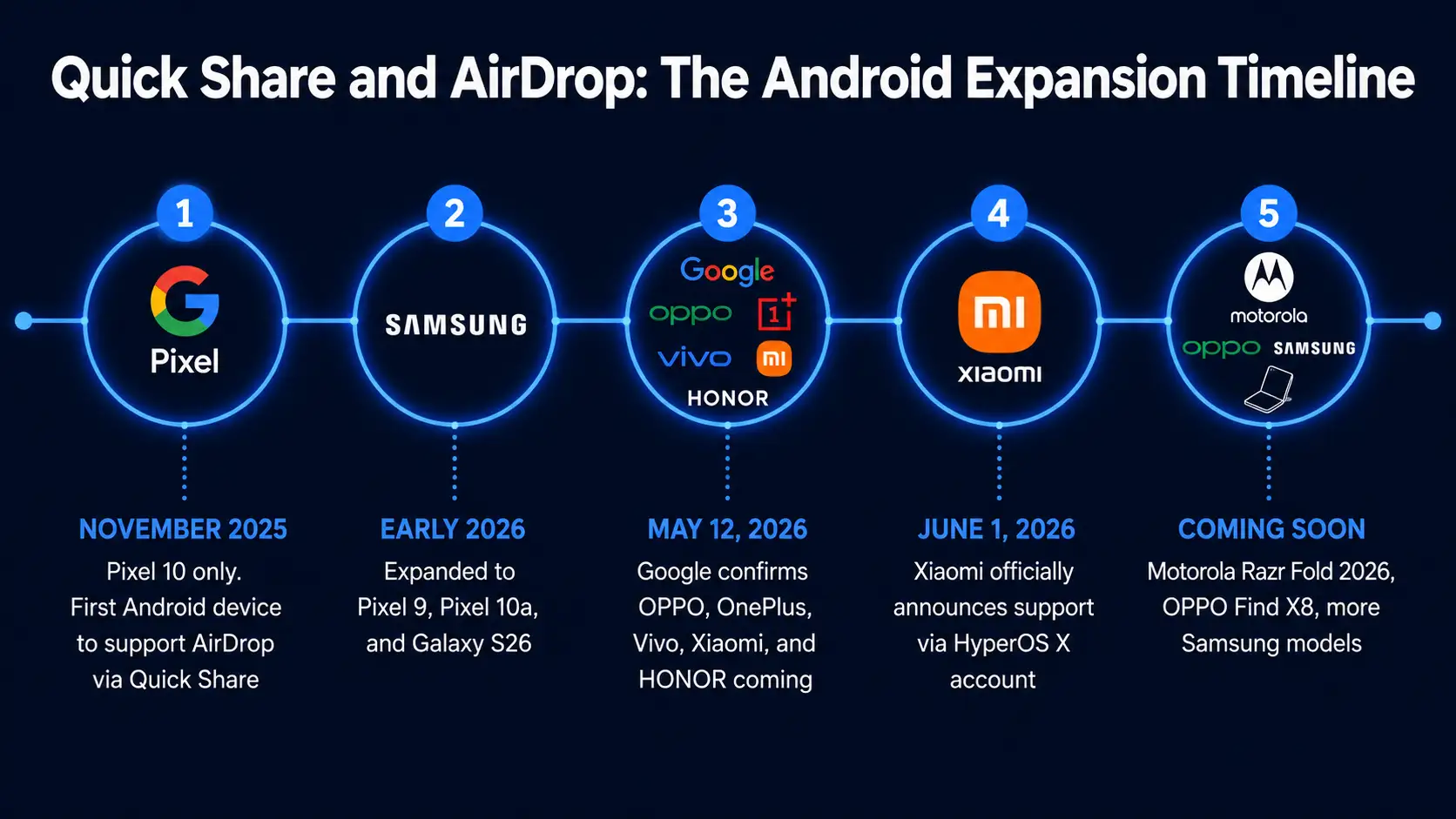
Google launched Quick Share with AirDrop compatibility exclusively on the Pixel 10 family in November 2025. This was the first time any Android device could natively share files with an iPhone through AirDrop without a third-party workaround. The announcement was positioned as one of Android 16’s most important interoperability improvements.
In early 2026, the feature expanded to Pixel 9 devices, the Pixel 10a, and the Samsung Galaxy S26 series. Samsung’s integration came through the One UI 8.5 update, which brought AirDrop compatibility to a much larger installed base of Galaxy devices.
On May 12, 2026, Google made its biggest announcement in the rollout, confirming that AirDrop support via Quick Share would expand to Android devices from OPPO, OnePlus, Vivo, Xiaomi, and HONOR. This confirmation from Google established the roadmap that Xiaomi’s June 1 announcement fulfilled.
June 1, 2026 saw Xiaomi announce official support through the HyperOS X account, with the Xiaomi 17T Pro named as the first confirmed compatible device. The following day, June 2, Google published the updated official compatibility list confirming the Xiaomi 17T Pro alongside expanded Samsung and other manufacturer support, as reported by MacRumors in its coverage of the expanded compatibility announcement.
Why This Update Matters for Xiaomi Users Specifically
Xiaomi has one of the largest global Android user bases of any manufacturer outside Samsung. The company consistently ranks among the top three smartphone manufacturers worldwide by shipment volume, with particular strength across Europe, Asia, and Latin America. In markets where both Android and iPhone have significant presence, the inability to share files seamlessly across ecosystems has been a genuine daily friction point for a large number of Xiaomi users.
The update is especially meaningful in mixed households and professional environments where teams use a combination of Android and Apple devices. Sharing files between a Xiaomi phone and a MacBook, or between a Xiaomi phone and a colleague’s iPhone, now works as smoothly as any same-ecosystem transfer. This removes one of the few remaining practical advantages that Apple’s closed ecosystem provides in everyday device-to-device interaction.
For Xiaomi specifically, the integration also reinforces the HyperOS 3 platform as a modern, well-integrated Android experience rather than a closed alternative. Xiaomi has invested heavily in making HyperOS competitive with both standard Android and Samsung’s One UI, and Quick Share with AirDrop support adds a flagship-tier interoperability feature that was previously unavailable on the platform.
As AppleMagazine observed in its coverage, Quick Share with AirDrop support is becoming one of Android’s most practical bridges to the iPhone, and Xiaomi’s inclusion in the expanding group of supported manufacturers represents another meaningful step in the gradual blurring of lines between Android and iOS sharing tools.
Quick Share AirDrop vs Apple’s Native AirDrop: The Differences You Need to Know
Quick Share with AirDrop integration is not identical to native AirDrop, and understanding the differences helps you set realistic expectations for the experience.
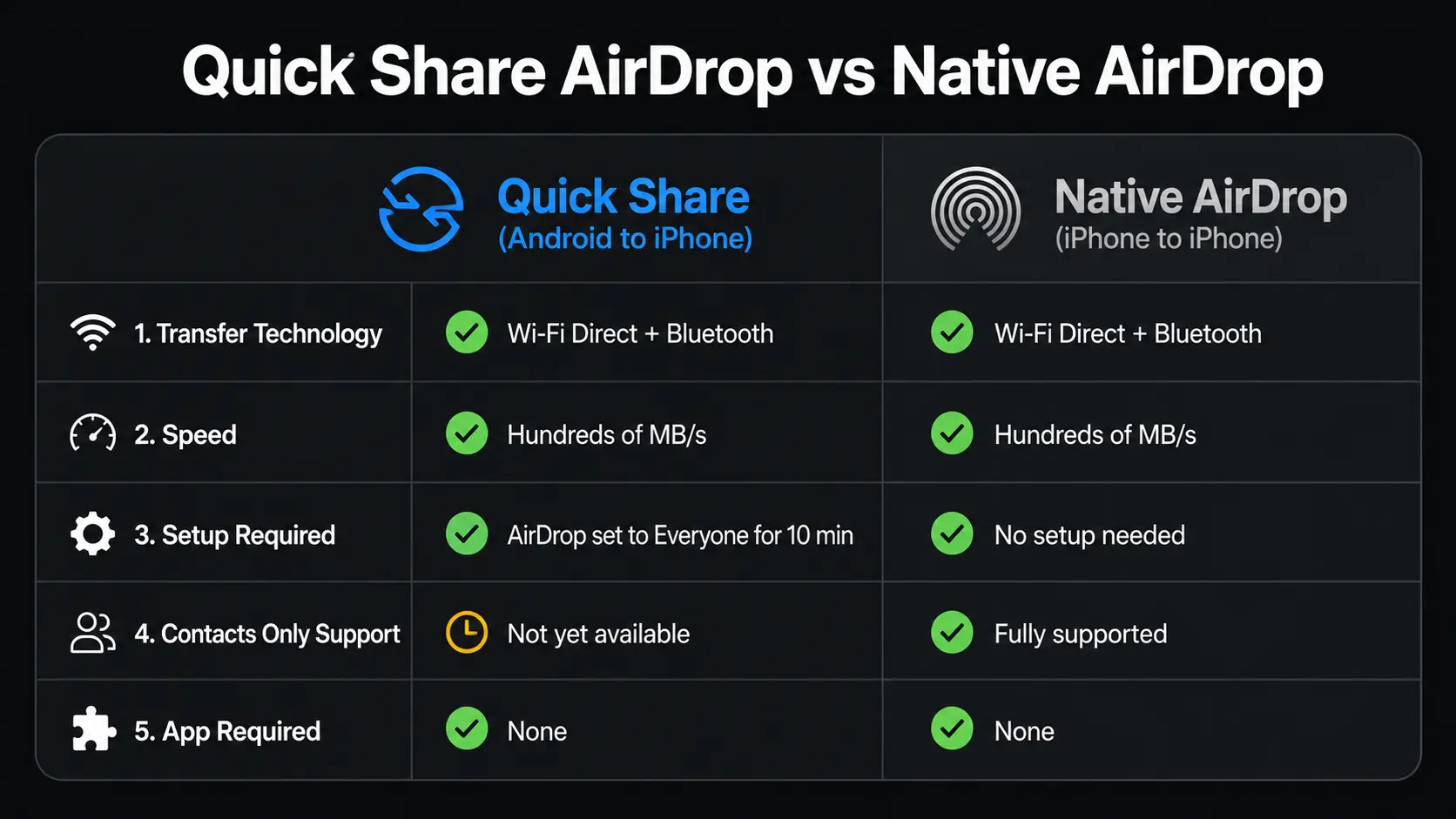
The most important current limitation is the AirDrop visibility requirement on the iPhone side. Native AirDrop between two iPhones works with either the Everyone or Contacts Only visibility setting. Quick Share transfers from an Android device to an iPhone currently require the iPhone to be set to Everyone for 10 Minutes. If the iPhone is set to Contacts Only or Receiving Off, the Xiaomi device will not be able to see it as a target. Google has confirmed it is working with Apple to enable the Contacts Only setting for Android transfers, but that capability is not yet live.
Transfer speeds are comparable in most real-world scenarios. Both systems use Bluetooth for discovery and Wi-Fi Direct for transfer, and both achieve multi-hundred megabyte per second speeds under good conditions. Range limitations are similar too, with performance degrading at longer distances as the Wi-Fi Direct component weakens.
The user interface experience differs slightly between the two systems. Native AirDrop on iPhone presents a clean, system-level sharing sheet that is consistent across every app. Quick Share on Android is similarly integrated at the system level on supported devices, appearing in the standard share sheet without requiring any additional steps. For non-supported Android devices, Google has built an alternative QR code method that enables a cloud-based sharing workaround, though this is significantly slower and less elegant than the direct device-to-device transfer.
The QR Code Alternative for Unsupported Android Devices
Recognising that not every Android device will receive native Quick Share and AirDrop compatibility, Google has built an alternative QR code method for unsupported phones. This approach allows any Android device to share files with nearby iPhones or Macs without requiring the device to be on the official compatibility list.
The QR code method works by generating a scannable code from the Android device containing a temporary link to the file being shared, hosted briefly in cloud storage. The iPhone user scans the QR code and the file downloads through a browser-based transfer rather than a direct device-to-device Wi-Fi connection. The approach is slower and less seamless than the native Quick Share integration, but it provides a functional fallback for devices and users who cannot access the direct method.
Google positions this QR code alternative as a bridge solution while the native Quick Share and AirDrop integration continues its expansion across the Android device ecosystem. As more manufacturers enable native support through software updates, the QR code method becomes a progressively smaller part of the overall sharing picture.
What Comes Next in the Quick Share and AirDrop Expansion
Google has confirmed that the Quick Share and AirDrop rollout is ongoing and that additional devices will gain support throughout the rest of 2026. The next wave of confirmed additions includes the Motorola Razr Fold 2026, the OPPO Find X8 series, and additional Samsung Galaxy models not yet on the current list.
Google is also working with Apple to expand the AirDrop visibility settings supported in cross-platform transfers. The ability to use Contacts Only visibility from the iPhone side when receiving from an Android device would significantly improve the security and usability of the feature, removing the requirement to open your iPhone’s AirDrop to everyone in order to receive a file from a Xiaomi or Android device.
The Thurrott team, which first covered Google’s May 12 announcement of the expanded manufacturer rollout, noted in its report that Google also collaborated with Apple to simplify the iOS-to-Android transfer process, suggesting the relationship between the two companies on this specific interoperability feature is active and ongoing rather than a one-time agreement.
For Xiaomi specifically, the expectation from the community is that the initial Xiaomi 17T Pro support will expand to additional HyperOS 3 devices as Google Play Services updates reach a wider range of models. Xiaomi has not published a complete future compatibility list, but the pattern established by Samsung and Google suggests that the newest and most widely used flagship models receive the update first, followed by recent mid-range devices in subsequent update waves.
Frequently Asked Questions About Xiaomi AirDrop and Quick Share
Can Xiaomi phones now use AirDrop with iPhones?
Yes. Xiaomi phones running HyperOS 3 with current Google Play Services can now use Quick Share to send and receive files with nearby iPhones, iPads, and Macs using the same AirDrop protocol. The Xiaomi 17T Pro is the first confirmed compatible device. The iPhone must have AirDrop set to Everyone for 10 Minutes to receive files from an Android device.
Which Xiaomi devices support AirDrop via Quick Share?
The Xiaomi 17T Pro is the first officially confirmed Xiaomi device on Google’s Quick Share and AirDrop compatibility list. Xiaomi has not yet published a complete list of supported models. Additional devices running HyperOS 3 are expected to gain support through Google Play Services updates throughout the remainder of 2026.
Do you need to download any app to use Xiaomi AirDrop?
No app download is required on either side. The integration is delivered through a Google Play Services update on the Xiaomi device and works through the standard Quick Share interface already built into the operating system. On the iPhone side, no app installation is needed. AirDrop must simply be set to visible in the Control Centre.
How fast is Quick Share file transfer with AirDrop compared to native AirDrop?
Transfer speeds are comparable to native AirDrop in most real-world scenarios. Both systems use Bluetooth for device discovery and Wi-Fi Direct for file transfer, achieving speeds of hundreds of megabytes per second under ideal conditions. The speed advantage over Bluetooth-only transfers or messaging app sharing is substantial for large files such as videos and high-resolution photo collections.
Why does the iPhone need to be set to Everyone for AirDrop to work with Xiaomi?
The current implementation of cross-platform Quick Share and AirDrop only supports the Everyone visibility setting on the iPhone side. The Contacts Only setting restricts AirDrop to recognised iPhone contacts, and because an Android device does not appear in an iPhone’s contact list as an Apple ID, it cannot be seen when Contacts Only is active. Google and Apple are working together to enable Contacts Only support for Android-to-iPhone transfers, but this capability has not yet been released.
Xiaomi Joins the End of the Android and iPhone File Sharing Divide
Xiaomi’s Quick Share and AirDrop integration is a practical, meaningful, and long-overdue development for one of the world’s most popular Android brands. The ability to share files directly between a Xiaomi phone and an iPhone eliminates one of the most consistently cited everyday limitations of using Android in a world where iPhones are everywhere.
Google’s coordinated rollout across Samsung, Pixel, OPPO, OnePlus, Vivo, HONOR, and now Xiaomi shows a serious commitment to making cross-platform file sharing a standard part of the Android experience rather than a premium feature limited to one manufacturer. The addition of Apple’s cooperation in simplifying the iOS-to-Android transfer flow further suggests that both companies are genuinely invested in reducing the friction between their ecosystems at the file-sharing layer.
For Xiaomi users, the practical advice is simple. Check that your device is on the compatibility list, ensure your Google Play Services are up to date, and the next time you need to send a photo or file to an iPhone user standing next to you, open Quick Share instead of reaching for a messaging app. The experience is fast, direct, and exactly as simple as it should have been years ago.
For the full updated list of all Android devices that support Quick Share with AirDrop and the latest details on the ongoing rollout, Notebookcheck’s coverage of the Xiaomi Quick Share and AirDrop update provides a well-maintained reference point as the compatibility list continues to expand.

Prince Anichi
Founder and Lead Technology Editor at Ortechy. Covering digital economy shifts, tech ecosystems across Africa, cybersecurity intelligence, and emerging software platforms.